


Participating Frequently
October 6, 2020
Answered

Can a user entered URL in form text field be a hyperlink?

  • October 6, 2020
  • 1 reply
  • 5062 views

Firstly - sorry if this has already been asked and answered, but I can't find a successful solution anywhere.


I have created an interactive form in Acrobat Pro DC, with one of the editable fields being where a user adds a URL link. I want this link to be "clickable" and to go to that URL - but I at the moment the text doesn't act as a link.


The initial blank form will distributed be used by different users, and therefore the URL will be different in each case.


I found a potential fix, that made use of a button and javascript, but I couldn't get it to work - probably as my knowledge in this area is VERY limited and I was probably doing something wrong.


Can anyone help with a step by step solution for the less well initiated, please? Thanks.
This topic has been closed for replies.
Correct answer try67

Thanks for that - I have tried it and it is getting closer to what I want.


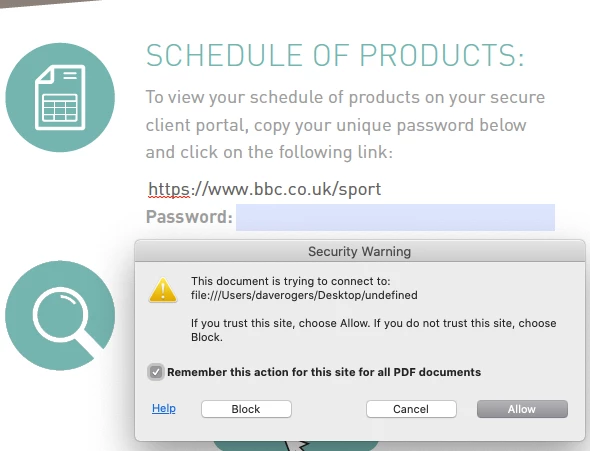
I have added it as an action to the field itself, then password protected it and added a test URL (BBC sport) - however when I click on the field I get the following message. When I click "allow", there is no further action


Don't worry about the password indicated here - this is a unique password my client would add when they add the unique URL and isn't active at this point.


Can you advise, please?


Sorry, there's an error in the code above. It needs to be:

app.launchURL(this.getField("Name of text field").valueAsString);

Of course, you'll need to adjust the code to have the actual field name in double-quotes.

If it's still not working please share the file for further help with this.

1 reply

try67
Community Expert
October 6, 2020

The best solution is to do it using a separate button field, yes, or to set the text field as having Rich Text Formatting, which will allow the user to manually add hyperlinks to it. What was the issue when you tried to do the former?

Dave_areAuthor
Participating Frequently
October 6, 2020

Thanks for the response - I added a separate button near the field, but there was no action when I clicked it. It may have been that the javascript I had was not correct or that I haven't implemented it correctly. As I said, I am very underskilled in this area, so that is quite possible! Ideally, I would like the process to be automatic - with no further input from the user other than to add the URL in the field.

try67
Community Expert
October 14, 2020

Hi try67

Did you see the screen grabs I sent of the security settings - are they ok?

Is this something that isn't possible to do and do I need to give up on it?

Thanks again for your time spent on this - you showed me how to get passed the initial issue I had, which will be helpful in the future. Dave.


I did, and as I said multipe times before, it will work if you use a button field, not if you keep on using a text field to launch the URL.