


Participant
January 14, 2020
Question

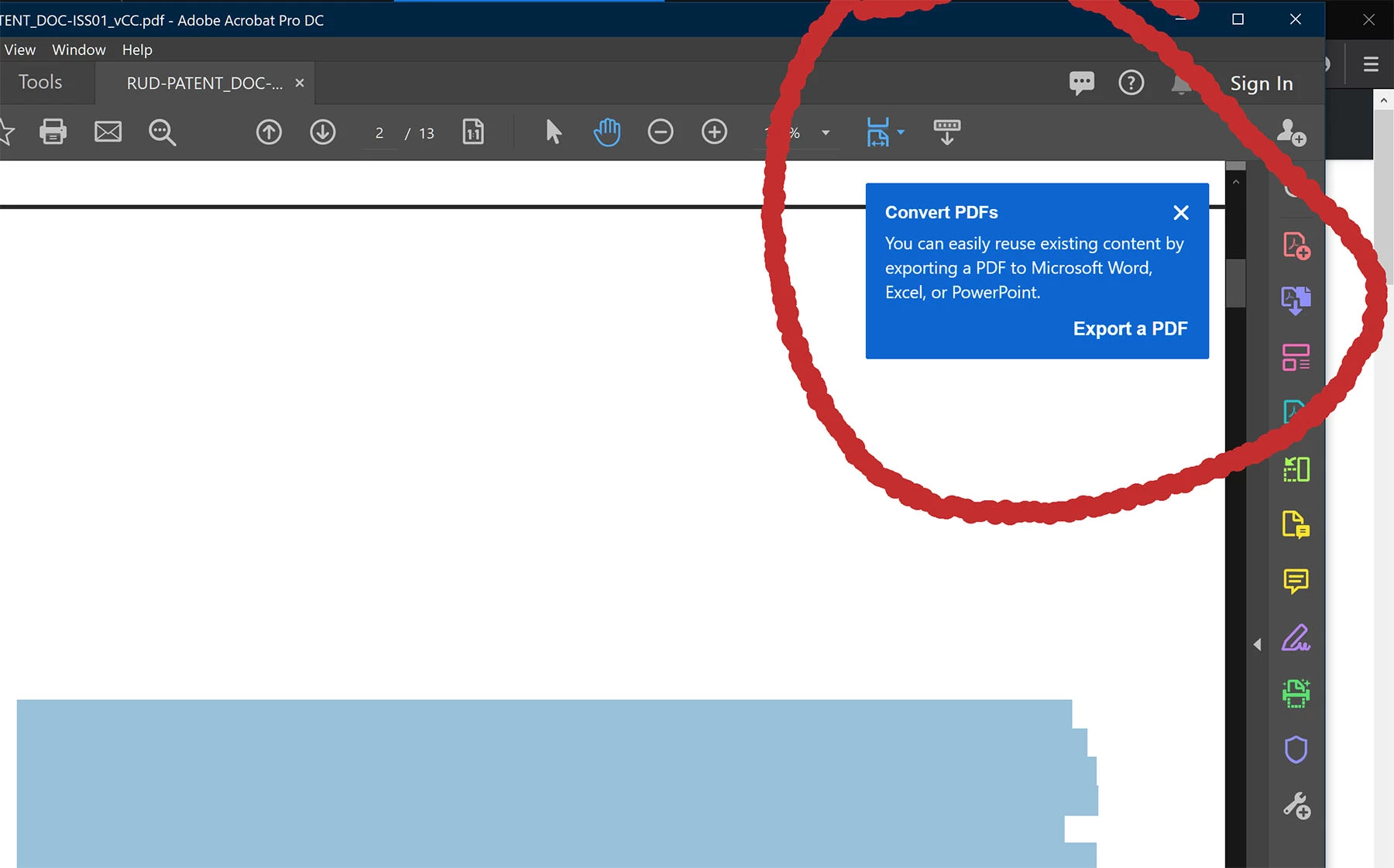
Can I stop blue popup "tips" appearing?

  • January 14, 2020
  • 14 replies
  • 41990 views

Hi


Recently, blue popup "tips" have started to appear in Acrobat. Unless dismissed, they hang around, and do not time out. This is hugely annoying thing for a program to do.


Is there anything I can do to stop them forever?


A
14 replies

D4v3
Inspiring
July 26, 2024

I can't believe there is still no way to stop these intrusive, distracting pointless blue pop ups.

Participating Frequently
February 19, 2024

Adobe, please, resolve this issue!


Participant
March 8, 2023

Problem Solved:
Our company solved the annoying Blue Bubble Tip problem by switching to Bluebeam Revu. As Adobe licenses expire, we migrate those employees to Bluebeam Revu. Solely because of this one aggravating "feature" we are heading elsewhere. Good job Adobe.

Participating Frequently
March 28, 2023

Thank you; will check it out. Imagine- paying money to be patronised by a company that treats its clients with contempt!

Participant
December 15, 2022

I found this after being annoyed by the constant popups. I've used adobe acrobat professionally for 10-20 years and personally for longer.


If Adobe doesn't stop being anti-consumer, it's users who are not just home users but also enterprise users will complain enough to their IT team that they'll consider competitive products. Already, I've seen one alternative product mentioned and some users have that software installed where I work. In my company we've discussed moving to a single product solution company wide and Adobe has been the common solution but it's not guaranteed especially if they don't listen to their user base. This would represent 500+ users. Acrobat is one piece of the software package but it may be a matter of time as people wake up to the lack of support and anti-consumer decisions being made. A company of my size has a marketing department with all of the software included with that. While this may seem like a small drop in the overall bucket, I can imagine many other businesses will follow suit when public opinion becomes more commonplace with a negative tone.


As for, gregg4gia : you're responding to a frustrated user who is sick and tired of dumb decisions being made with UI by Adobe. This is a support community not an argument community. Let's try to keep on track. If someone is venting/ranting but on topic, just ignore it. There's no reason to draw away from the argument and muddy the waters with unhelpful commentary. If it offends you enough you can always report the comment.


Participant
November 11, 2022

I have created a Notion page with details on how to diable the Context Tips in the registry. As of 11.11.22 @ 7:23 AM this seems to be working. I know it's not the best workaround, but anything to remove this bubbles is helpful for me.


Click Here to check out that notion page.


If you have more information on this matter pleae comment on the Notion page itself.

Participating Frequently
March 28, 2023

I'm using a Mac though

Sandy Campbell
Known Participant
October 17, 2022

I gather that as of 2022-10-17 there is no solution other than that we now know the annoying blue popups are called "Contextual Tips." This is so Microsoftian that my head is about to explode.

Participating Frequently
May 27, 2022

How is this marked as solved? I've tried every suggestion in this thread and they still don't work. A full two years later.

Participating Frequently
May 28, 2022

This is still a problem... and none of the accepted suggestions work.


Legend
May 30, 2022

I guess it will never be solved, as it appears to me that Adobe's gonna let Acrobat die. Why? Simple answer: no updates since 1.5 years. The last one is from December of 2020. And it's not like users find no bugs and report. This problem here is called an annoyance and there are at least 5 other threads with the same topic, all being marked as solved. Seems that this very annoyance comes in levels of severity. Yours is the highest, other user have had it solved by the suggestions. For me this also went halfway. Means, messages from Adobe keep popping up randomly, as if these messages have a level of importance and some level even overrides that "Show me..." setting. I find these software concepts of today weird. The overall performance becomes worse and worse (Photoshop 22 takes about 30 seconds to start from SSD on an i5 PC), new versions instead of fixing bugs in the old ones, constantly changing the UI to confuse the users,  bloating software with unnecessary features like "Sharing". 

My worst problem with Acrobat: the DDE doesn't work 3 out of 10 times I export a PDF.

Participant
June 17, 2021

The "correct answer" is not correct. It does nothing to stop these awful popups. None of the other suggestions work either and I will not be tinkering with my registry over this nonsense. For the love of all that is decent in the world, let me turn these unhelpfull, intrusive and obnoxios popups off.

pixpusher
Inspiring
January 9, 2023

The same thing happened in Dreamweaver and I just uninstalled it. I might need to do the same for Acrobat because this is so frustrating and it seems like Adobe never listens to customer feedback.

Does anyone know of an alternative PDF reader?


Participating Frequently
January 9, 2023
Bluebeam.
Participant
March 3, 2021

adobe     amatuer designers     stop DEFAULTING POPUPS IN THE INTERFACE


NO ONE WANTS YOUR TIPS     GET A REAL DESIGN JOB


adobe sucks


[abuse removed by moderator]

gregg4gia
Known Participant
March 3, 2021

Wow, sc00bz. I can't imagine how meaningful the Adobe developers will find your post.


If anything can make them reconsider their decisions and do what we've all been asking for in this thread, it's statements like yours that will do the trick.


Thanks for your insights, and have a good day.

Participant
March 17, 2021

Your welcome SIMP!


anytime


scoobz

Participant
February 4, 2021

Uncheck the box in Prefences/Accessibility/"Enable assistive technology support"


gregg4gia
Known Participant
February 4, 2021

Thanks for the suggestion, kmpowell. I did that eight months ago when I reinstalled macOS and Adobe Acrobat Professional.  
  
Sadly, it did nothing to solve the problem.

Participant
February 9, 2021

Same! I had to send myself a PDF through the Share feature to stop it from appearing everytime I opened up a PDF.