Hi, @Howard_F, I have to admit I VERY seldom do image editing in Acrobat. I prefer to do any editing by going back to the application where I created the original document, editing that, and then re-PDF it. But I did want to see what you were seeing, so I went through the process.
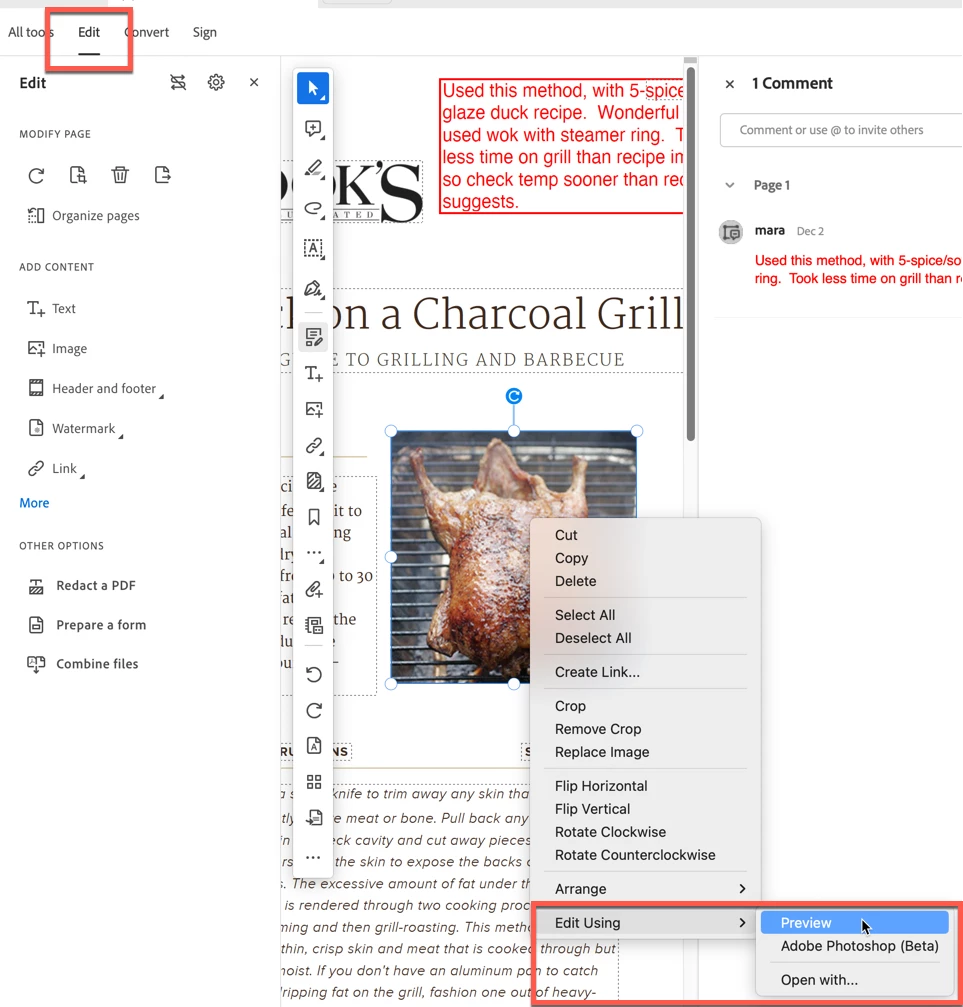
What I found was that Acrobat is not very "graceful" about this process. In my image below, I am pointing out several things just to make sure that we're talking about the same things: You need to go into the Edit mode (upper left), and as you stated, you'll see the application that is set to do the editing there, under Preview. However, the first time I did this, PS was not shown under Preview; nothing was. Then, after I did the first edit and then went back to check something, PS was listed under Preview.
So, my first (and only) question is, did you go ahead and perform an edit on the image? Once I did that, then PS appeared as it does here in this screenshot.



 AdChoices