


CADManDrew
New Participant
November 3, 2022
Question

Can't Edit Callout Boxes

  • November 3, 2022
  • 1 reply
  • 3847 views

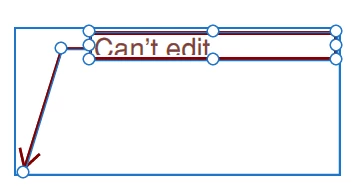
When I place a callout with the arrow, it is displayed as a grouped entity. I can not edit, resize, move the arrow or do anything that I once was able to do.

This topic has been closed for replies.

1 reply

ls_rbls
Community Expert
November 4, 2022

Hi,


That is normal when you select the "Add text callout" as opossed to when you use other comments or annotations geometrical shapes, sticky notes or a text box.


So as you've observed, the text callout (with an arrow) is a annotation type composed of various shapes and elements that allows the editing of the text that will be typed in in the floating textbox as well as the arrow which allows the enlarging or decreasing of the size of the arrow, and it will do so independently from each other.


In addition, by grabbing any of the outer edges of the rectangular frame with the Selection Tool (the black arrow), it allows the user to manipulate all the elements that are inside of that shape bigger or smaller in unison (or as a single entitiy as you've described).


However, I've noticed myself that this feature becomes burdensome and glitchy to work with if the Page Zoom is anything under 100% zoom.


If you increase the zoom for that page, you'll be able to click inside the text box with ease, work with the arrow or even right-click on any area inside of the rectangle to invoke the "Porperties" context menu (which is what you're looking for - if I understood your question correctly-).


That said, when you're able to open up that context menu, and select "Properties", the "Callout Properties" dialogue window will open up; see in the "Appearance" tab (first tab from left to right) if the tick box "Locked" is not checked.


New Participant
February 15, 2024

I agree with CADManDrew.  In Acrobat 2017 I could draw a text callout box, then move the arrow tip, change the overall size of the box, move the box around, etc.  I can't do anything now.  I try to grab the usual handles, and the cursor turns into the double-bar-arrow to move one side of the text box, or the angled-arrow to change both the height and width of the box at the same time, or the 4-arrow cursor to move the box and arrow around, but nothing happens when I click and drag.  Nothing.  And of course the cursor doesn't show up when I do a print-screen to show you the different arrows.... 

New Participant
February 19, 2024

This tool has become useless. I've wasted a whole lot of time scratching my head as to why I cant move or adjust anything with text callouts of any kind. What happend to acrobat? Used to love now I cant work in it at all. I should be able to modify endlessly regardless of zoom. I have zoomed out to 100 and same result. Cant alter to orignal placement. 

Please advise.