


Can't Figure Out How to Change Font in Form Fields
Hello,
I may be a blooming fool here, but here goes...
A friend gave me a copy of an editable contact list. Perfect! There are fillable fields for name, address, etc.
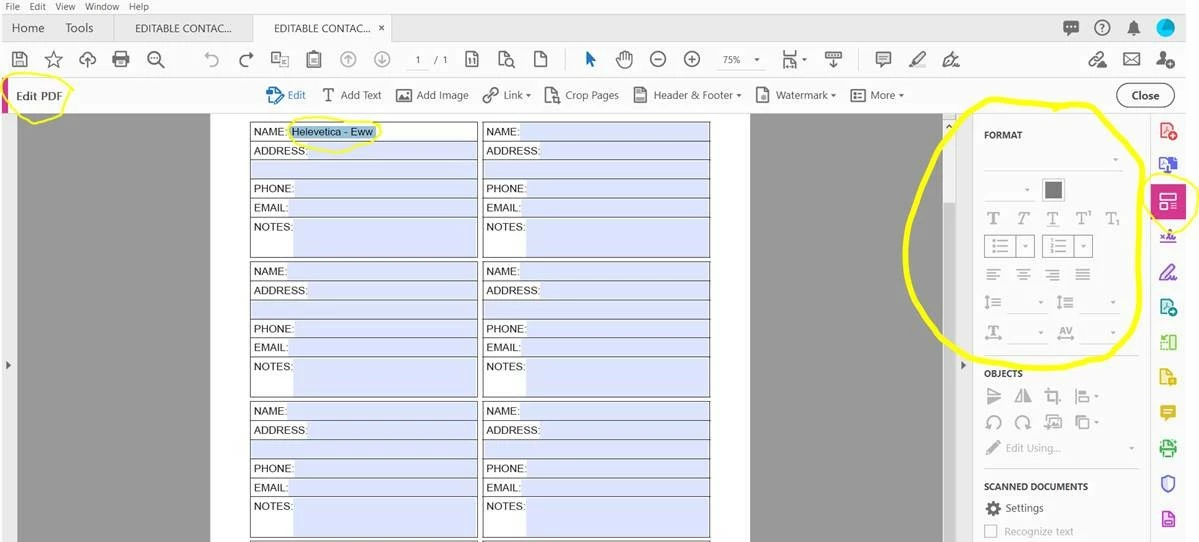
I can't stand Helevetica font. So, I wrote the name, highlighted, right-clicked, and there's really no option to change font type - just options for bold, italic, etc. I tried clicking "Edit PDF" as well. When I click "Edit PDF" and fill out the field, the text formatting option remains grayed out, even if I highlight the text.
I tried editing through "Prepare Form." I wrote text in the field, then right-clicked on the field to view properties. I can change the font type from there, but it doesn't change the text I've already written. I have to go back and change the font type in the form field before my text appears with the correct font.
How can I change the font type/size of text within a form field? Is it impossible to apply changes in font to text already written in the field, or am I a dunce?
How can I apply the font type/size changes to the entire document, and not just one field?
Is there anyway the contact information can be edited through the Edit PDF function?
 AdChoices