


Participant
October 14, 2019
Answered

Can't get Acrobat DC Pro to Install on Mac Catalina; hangs at 9.2%

  • October 14, 2019
  • 8 replies
  • 42272 views

I installed Mac Catalina and it won't load my trusty Acrobat Pro.  So I upgraded to this new Acrobat DC Pro, and it was supposed to install.  Yet every time I try to install it, it hangs at 9.2%.  I can never get it past this point.  See image.
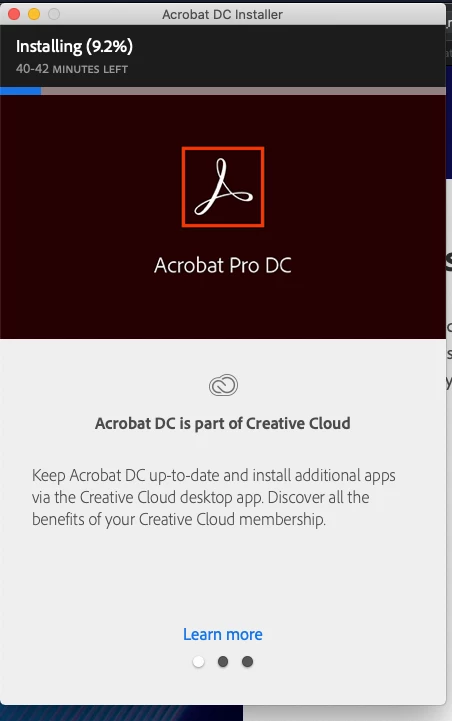
This is very annoying.  There is lots of help for older version of Mac Os, but nothing for Catalina for this particular problem.  I have briefs to file this week and they have to be in Acrobat.  I need to get this installed on my Macbook.  I need someone to tell me the secret handshake or magic incantation to make this damned thing work.

This topic has been closed for replies.
Correct answer Bevi Chagnon - PubCom.com

@margueritek wrote: Adobe is just months behind the ball.


A large part of the problem is Apple, not Adobe. Major OS changes are supposed to be released in advance to all software partners and developers, way in advance of the OS's release so that programs can be adjusted.


Apple traditionally waits until the last minute to notify its partners like Adobe.


Apple's Catalina OS was released less than a week ago and I'm surprised Adobe got out an Acrobat fix in such a short time period.


Here's some background info in other posts this week:


Best Practice: Don't let any operating system do an auto-update.

Turn off this feature.

You certainly don't want an OS to be updated while you're working on a critical, deadline-focused project.


8 replies

Participant
February 1, 2020

After almost 4 months still the same problem.... That doesn't sound like an Apple problem!!

January 22, 2020

What is the fix for Perpetual Licenses? Or maybe that's the punchline.

Legend
January 22, 2020

Old software won't have any new feature added (working in Catalina being the new feature).

Acrobat DC - not perpetual

Acrobat 2017 - free update

Acrobat 2015 - paid upgrade or convert to subscription

Acrobat XI, X, 9 etc. - end of life. Buy new or convert to subscription.

January 23, 2020

DC works fine in Catalina. I have multiple users who upgraded to 10.15. The issue is the DC installer hanging in 10.15.

Participant
December 11, 2019

I had this problem too.  Seems lame that Adobe can't get its software in order.

Participant
October 14, 2019

So, I received an email with some substantive help that does not appear here.  I was asked to submit log files.  So I responded back to the email and got an undeliverable mail message.  So I went to customer care, to the chat function, and wasted an hour just trying to get an email address to send the ZXP log file to them.  I am just amazed.  I have a log file, and I would love to get it to Adobe, but before I could do that, at the 1 hour mark the chat function simply switched off.  Everything was lost.  I never got an email address.


So, Adobe, if you want these files, email me, give me a valid email address to send them to, and I will send them to you.  Until then, I guess they'll stay on my computer.  I will now go test their work around.

99jon
Genius
October 16, 2019

You should be able to automatically upload the log file by clicking “Continue” Create and send log files for Creative Cloud

Bevi Chagnon - PubCom.com
Legend
October 14, 2019

@margueritek wrote: Adobe is just months behind the ball.


A large part of the problem is Apple, not Adobe. Major OS changes are supposed to be released in advance to all software partners and developers, way in advance of the OS's release so that programs can be adjusted.


Apple traditionally waits until the last minute to notify its partners like Adobe.


Apple's Catalina OS was released less than a week ago and I'm surprised Adobe got out an Acrobat fix in such a short time period.


Here's some background info in other posts this week:


Best Practice: Don't let any operating system do an auto-update.

Turn off this feature.

You certainly don't want an OS to be updated while you're working on a critical, deadline-focused project.


|    Bevi Chagnon   |  Designer, Trainer, & Technologist for Accessible Documents ||    PubCom |    Classes & Books for Accessible InDesign, PDFs & MS Office |
Participant
November 20, 2019

@Bevi_Chagnon___PubCom wrote:

A large part of the problem is Apple, not Adobe. Major OS changes are supposed to be released in advance to all software partners and developers, way in advance of the OS's release so that programs can be adjusted.

Apple traditionally waits until the last minute to notify its partners like Adobe.

Apple's Catalina OS was released less than a week ago and I'm surprised Adobe got out an Acrobat fix in such a short time period.


This is incorrect.  Apple released macOS Catalina in beta form to developers on June 3, 2019, a full four months before it was released to the public on October 7, 2019.  I would not characterize that as "last minute", and should have been plenty of time for Adobe to test their installers and their apps against the new version.  My guess is that Adobe started testing their apps, but just failed to test their installers before the public release, when customers started running into this problem.

Dov Isaacs
Legend
November 20, 2019

@Bevi_Chagnon___PubCom wrote:

A large part of the problem is Apple, not Adobe. Major OS changes are supposed to be released in advance to all software partners and developers, way in advance of the OS's release so that programs can be adjusted.

Apple traditionally waits until the last minute to notify its partners like Adobe.

Apple's Catalina OS was released less than a week ago and I'm surprised Adobe got out an Acrobat fix in such a short time period.


@HigbDCCIU responded:

This is incorrect.  Apple released macOS Catalina in beta form to developers on June 3, 2019, a full four months before it was released to the public on October 7, 2019.  I would not characterize that as "last minute", and should have been plenty of time for Adobe to test their installers and their apps against the new version.  My guess is that Adobe started testing their apps, but just failed to test their installers before the public release, when customers started running into this problem.


Although Apple had so-called “beta releases” of MacOS 10.15 last June, the fact is that the June release was nowhere near what the final MacOS 10.15 ended up being. There were very many additional significant changes before MacOS 10.15 was actually released to the customer. There were even changes between what was released and what was sent to developers such as Adobe a week to a few days earlier. As such, there were “mismatches” that needed to be reconciled by both Apple and application developers after MacOS 10.15 was officially released.


           - Dov

- Dov Isaacs, former Adobe Principal Scientist (April 30, 1990 - May 30, 2021)
Bevi Chagnon - PubCom.com
Legend
October 14, 2019

Today, Adobe released an Acrobat update that's Catalina compliant.

Download Acrobat DC | Enterprise term or VIP license

|    Bevi Chagnon   |  Designer, Trainer, & Technologist for Accessible Documents ||    PubCom |    Classes & Books for Accessible InDesign, PDFs & MS Office |
Participant
October 20, 2019

Thank you!  This worked for me :)))

JR Boulay
Community Expert
Community Expert
October 14, 2019

Welcome to the world of MacOS beta testers. 😉


Adobe recommends waiting before installing and using this new OS.

Acrobate du PDF, InDesigner et Photoshopographe
Inspiring
October 14, 2019
Cataline is being pushed through the automatic OS update system. Adobe is just months behind the ball.
Legend
October 14, 2019

Catalina is for early adopters who don’t mind the pain. Always wait a few months. Suggest you go back if you can.