

This topic has been closed for replies.
Correct answer JR Boulay

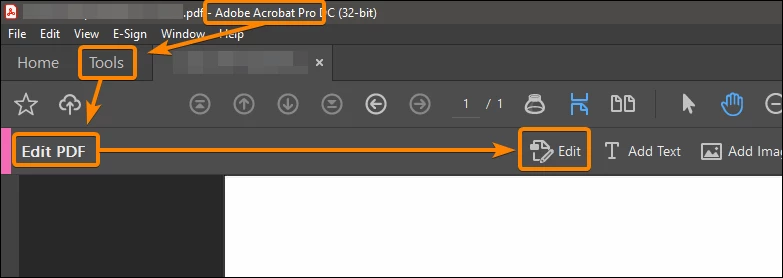
Click and drag using the "Edit" tool to select the lines, then press the "Delete" key.
 

4 replies

Participant
April 22, 2024

In edit, instead of trying to use the "Select Text" (the normal arrow looking thing), use the "Highlight Selected Text" (Highlight).

Participant
May 24, 2024

Thank you, that worked perfectly for me.

Participant
January 4, 2022

In edit mode, move or delete the text box then exposing and isolating the lane. Click on line and delete it

Joe

John F. ("Joe") Perry, Esq
The Law Firm of John F Perry, LLC
[edited]
Licensed in South Carolina and Pennsylvania (retired)

[image]


Participant
February 6, 2024

Hi.  This is what worked for me after nearly losing what is left of my hair....  Had a doc with form boxes on it, and I could not get rid of some underlines.  They were underneath the form boxes in case the pdf needed to be manually printed and you can write on the line, etc. Moving the boxes out of way did not help.

They would not go away.  Clicked on them in Form or Edit mode, nothing.  Finally, I created a copy of the pdf, opened both.  Then on the one, I deleted all the text in the field.  This left the remnant and "inmovable" underlines, and then I could select them in Edit mode and delete.  Then I pasted back the text from the copy to the PDF, and made any adjustements thereafter.  It was painful to figure out, but that is what eventually worked for me.  Hope this helps someone else out there.


D

JR Boulay
Community Expert
JR BoulayCommunity ExpertCorrect answer
Community Expert
January 4, 2022

Click and drag using the "Edit" tool to select the lines, then press the "Delete" key.


Acrobate du PDF, InDesigner et Photoshopographe
Participant
April 21, 2024

How does that work if a lot of stuff is on top, not allowing you to select the line?  Eventually you have to move 10 boxes just to get to the one line, and then move the 10 boxes back.  Is there a way to simply select the one line?  I tried zooming in but if anything else is remotely close to the area, it will never select the line.

Bernd Alheit
Community Expert
Community Expert
January 4, 2022

Try the redaction tool.
