


New Participant
January 9, 2018
Answered

can't print pdf files double sided

  • January 9, 2018
  • 1 reply
  • 776 views

I cannot print pdf files double sided.  I just finished with printer tech support and installed printer drivers and re-installed printer.  The print dialogue box does not give me the option of checking 'print both sides of page'.  Printer tech support said it was an adobe issue since I can print double sided using other apps.  I am using a Brother MFC-L5900DW printer.
This topic has been closed for replies.
Correct answer Adorobat

Hi Mal,

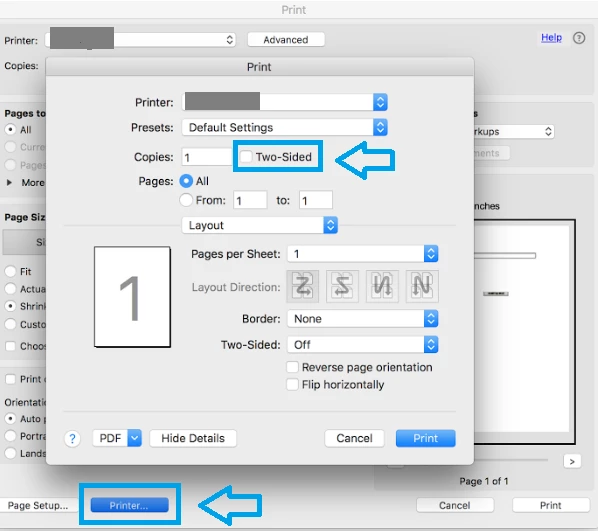
Could you please check if "two-sided" option is visible under printer's interface?

Launch Acrobat > click File > Print > click Printer (in the bottom-left corner). Below is the screenshot:

Also, let us know the application you are using to print the pdfs- Adobe Acrobat/ Acrobat Reader?

Thanks,

Shivam

1 reply

Adorobat
Community Manager
AdorobatCommunity ManagerCorrect answer
Community Manager
February 12, 2018

Hi Mal,

Could you please check if "two-sided" option is visible under printer's interface?

Launch Acrobat > click File > Print > click Printer (in the bottom-left corner). Below is the screenshot:

Also, let us know the application you are using to print the pdfs- Adobe Acrobat/ Acrobat Reader?

Thanks,

Shivam