


Participating Frequently
January 9, 2023
Question

Cannot change comment author

  • January 9, 2023
  • 2 replies
  • 4402 views

Hi, I have an issue with changing author name to comments. I have sent out a PDF document for review and received alot comments from a handfull of people. Each of them have returened with a separate pdf-file with thier comments. In two out of five PDFs I have been able to change the Author preference from their MS default name their actual names. But in three of the PDFs I cannot manage to change the name. I get the pop-up to open and fill in the Authour name, but the change does not follow through.


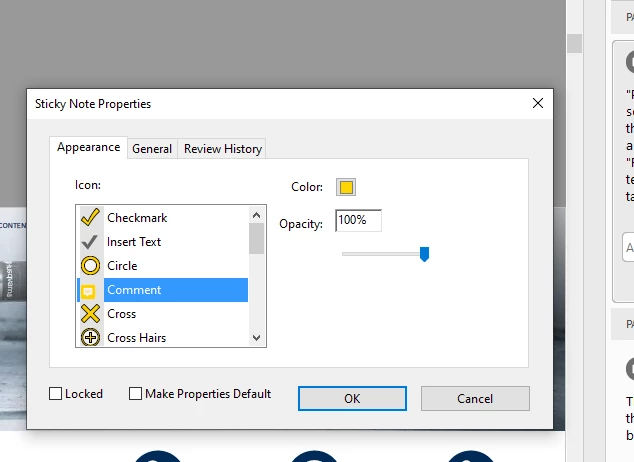
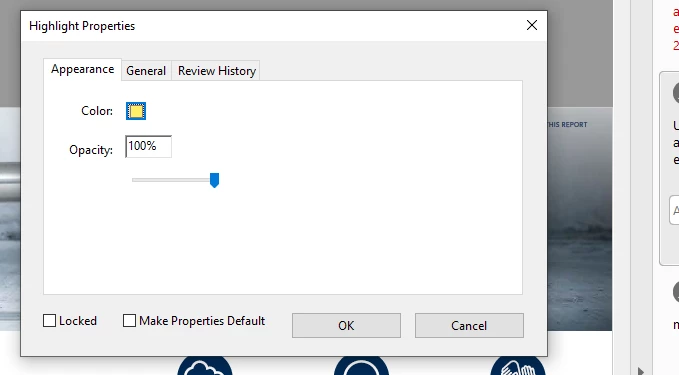
One thing I have noticed is a slight difference on the looks of the comment properties pop-up window on the ones that I can change author on compared to the ones where I cannot change the author name.


This  is how it looks on the ones where I CAN change the comment Author name:

And below is how it looks on the PDFs where I CANNOT change comment Author:
 

Any clues?

Kind regards

/Calle

This topic has been closed for replies.

2 replies

try67
Community Expert
Community Expert
January 9, 2023

The Author property is under the General tab, not under Appearance. Also, I'm not really seeing any major differences between the two screenshots, apart from those caused by the fact that these are different kinds of comments (the first is a Sticky Note, the second is a Highlight), so it's not really clear what you're referring to...

Participating Frequently
January 9, 2023

Hi,

Yes I know Author property is set under the General tab. But there both documents look the same. See below:

General tab in document where I CAN edit Author:


General tab in document where I CANNOT change Author:


The point I wanted to make about the Appearance tab is that in the document where I CAN change Author, there is a drop down menue where i can edit also the type of comment whereas in the document where I CANNOT change Author there is no information about the type of the comment except the color and opacity. It almos seems as the document where I CAN change the Author preference is more "intelligent" and have more Meta-data options.


KR

/Calle

try67
Community Expert
Community Expert
January 9, 2023

Again, these differences in the Appearance tab are caused by the different type of comment. A sticky-note has an icon, while a highlight does not. This has nothing to do with your issue.

So what exactly happens when you type a value in the Author field on the second computer? Does an error message appear? Does it let you type into it at all? Does it allow you to press OK, but the field is empty later on? You need to provide more details...

AkanchhaS8194121
Legend
January 9, 2023

Hi @Calle27858178js7u 


Thanks a lot for sharing the detailed information along with the screenshots.

Some of the documents give you limited options in commenting preferences, and not being able to change the Author's name is because of Document's security. Which doesn't allow you to make any changes to it.

Or the other reason is the file is still being shared. So it would help if you unshared it first before making such changes.


Open the file that doesn't allow you to change commenting preferences> Ctrl+D right, click Document Properties> Security> Document Restriction summary check what all options are allowed. 


If it still doesn't;t help. Then can you share a sample file with us?


Thanks,

Akanchha 

Participating Frequently
January 9, 2023

Hi Akanchaa. Thanks for swift reply.
How do I find out if the file is being shared? And if so, how to unshare it?

As for the Sucurity settings I am not relly clear on what settings to look for/change. This is how it lookes on one of the PDFs where I cannot change comment Author:

KR

/Calle