


New Participant
November 11, 2024
Question

Cannot Embed Fonts

  • November 11, 2024
  • 1 reply
  • 486 views

I'm trying to process a batch of documents for Amazon KEP and they require all the fonts within the PDF to be embedded. However, a few of them won't embed when I try to use the process outlined here: https://www.adobe.com/uk/acrobat/resources/embed-fonts-in-pdf.html


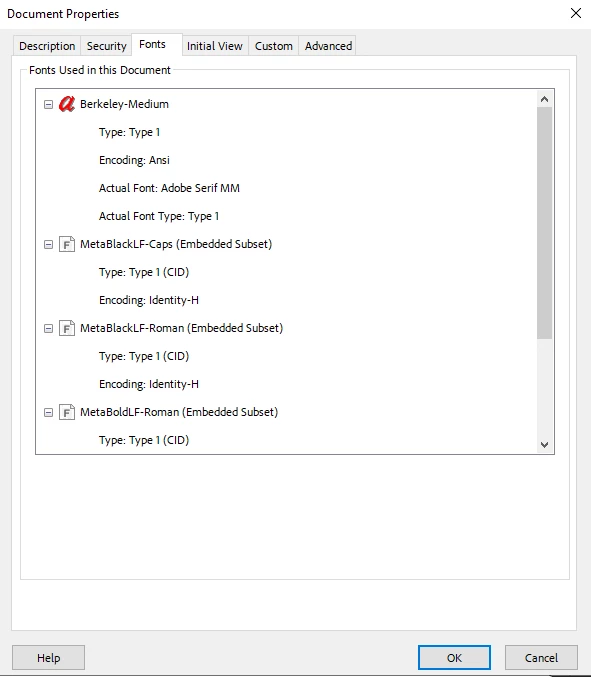
It seems that the issue is specifically with Berkeley-Medium, which is actually replaced with Adobe Serif MM. Does anybody have a workaround or how I can possibly replace all instances of the font with a different one? I've included screenshots of the document properties.
This topic has been closed for replies.

1 reply

S_S
Community Manager
Community Manager
November 12, 2024

Hi @Fancy_Sunrise4012,


Hope you are doing well. Thanks for writing in!


One suggestion here would be to uncheck the checkbox "Rely on system fonts only; do not use document fonts" to ensure that the fonts used within the document are embedded without any issues. [screenshot attached for reference]


Also, when you get into Properties-> Edit-> Fonts, ensure that the checkbox "Embed OpenType Fonts" is also checked.


Hope this helps.


-Souvik

New Participant
November 12, 2024

Thanks for the suggestion Souvik. Unfortuneately this did not resolve the embed issue.

S_S
Community Manager
Community Manager
November 13, 2024

Thanks, @Fancy_Sunrise4012, for the response.


Would you mind manually trying to embed the font?

You can check for more info on how to do it here: PDF fonts, Adobe Acrobat


The above helpful article explains in-depth how to manually embed a font or substitute a font within a PDF using Acrobat/Distiller.


-Souvik