


New Participant
August 17, 2020
Answered

Cannot find text field properties

  • August 17, 2020
  • 1 reply
  • 4126 views

I have tried googling and reading posts here, but after an hour, I don't know what else to do. Everything I've read says that I should be able to edit the properties of a text field, but I have no options showing that ability. I just want to make a section of text editable for when it is downloaded by the recipient. Any help is appreciated!
This topic has been closed for replies.
Correct answer Nesa Nurani

Ah, okay, To create a form text field, what would I need to click instead of the "Add Text Box" button?


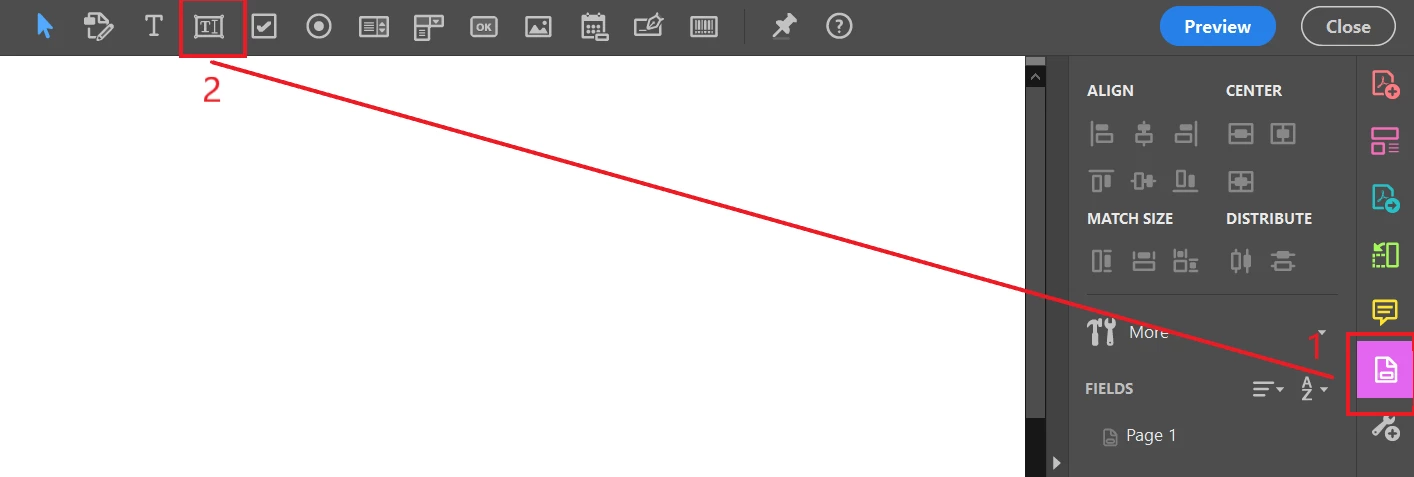
First select "prepare form" tool ( if it's not on your toolbar select "more tools" and find it there)

then select "add text field" as in photo.

1 reply

Brainiac
August 17, 2020

This suggests either

1. It isn't actually a form field, just a bit of text or

2. You are trying to do this with the free Acrobat Reader rather than paid-for Acrobat.

Possibly both.

Nesa Nurani
Community Expert
August 17, 2020

Choose this tool

then you should see all text fields, if it is text field press right mouse button on it and choose properties.

Nesa Nurani
Community Expert
August 17, 2020


Thats not a form text field. it's just text, use Edit PDF tool,then you should be able to edit it.