


Known Participant
October 1, 2024
Question

Cannot turn off AI Assistant

  • October 1, 2024
  • 1 reply
  • 1617 views

Cannot turn off AI Assistant. The instructions I found say to do it in Preferences > Generative AI. However, I don't have this option in Preferences. Yes, I gave the latest version of Acrobat Reader.
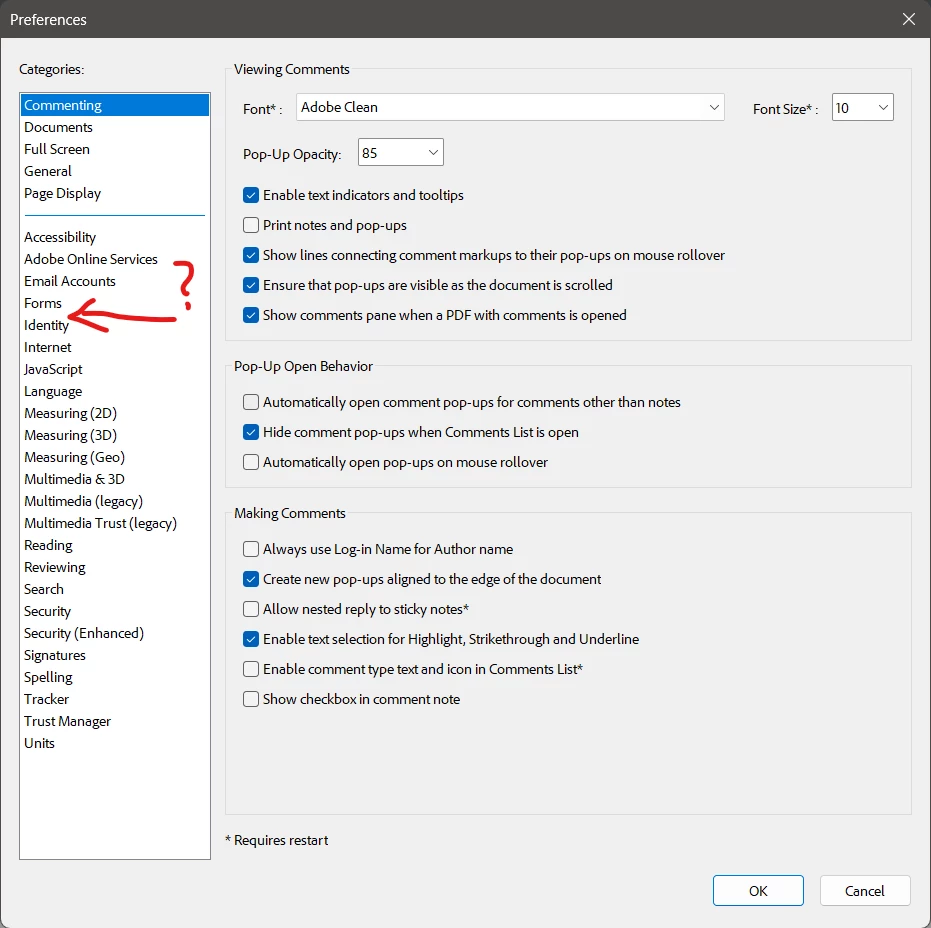
So, the question remains: how can I turn off AI Assistant?

This topic has been closed for replies.

1 reply

S_S
Community Manager
Community Manager
October 1, 2024

Hi @timofej,


Hope you are doing well. Sorry for your experience with Acrobat!


Are you using an IT provided or Enterprise account? I wasn't able to trace the subscription on the email address registered on the community.

One thing that I would like to know if whether you are logged in to the application. If not, please sign in and check if you are able to see the preferences.


Also, if you are on an Enterprise license, I would suggest checking on with your IT team whether they have disabled the option from the backend. 


Look forward to hearing from you.


-Souvik

timofejAuthor
Known Participant
October 1, 2024

Thank you for the fast reply, Souvik!


I've installed the software myself after downloading it from you website. So, this is neither IT provided nor Enterprise version. I've signed in to the application but the Preferences options have not changed.

S_S
Community Manager
Community Manager
October 1, 2024

I don't get a prompt to agree to the terms. Probably, I have already done at some occation. What I see is following:

Still no option to turn off Generative AI.


@timofej 


Would you mind trying out the steps below: 

Please run the Acrobat cleaner tool https://www.adobe.com/devnet-docs/acrobatetk/tools/Labs/cleaner.html, reboot the computer once, and install the application using the direct link https://helpx.adobe.com/acrobat/kb/acrobat-dc-downloads.html and see if that works for you.


-Souvik