



LynneMarieLLC
Participant
December 29, 2021
Answered

Canva images become black blobs when I open my PDF in Adobe Acrobat

  • December 29, 2021
  • 2 replies
  • 23671 views

Hello,

I am using Canva.com to create some projects. I used a lot of their provided images in my project. The images look great when I view them in Canva. When I was done with my project I downloaded it as a print quality PDF. The images in this PDF look great if I view the PDF in a browser such as Chrome or Edge. But, if I look at the PDF in Adobe Acrobat all of the images become black blobs. They lose all of the intricate detail. Has anyone else experienced this and if so please help. Thank you.
This topic has been closed for replies.
Correct answer Bevi Chagnon - PubCom.com

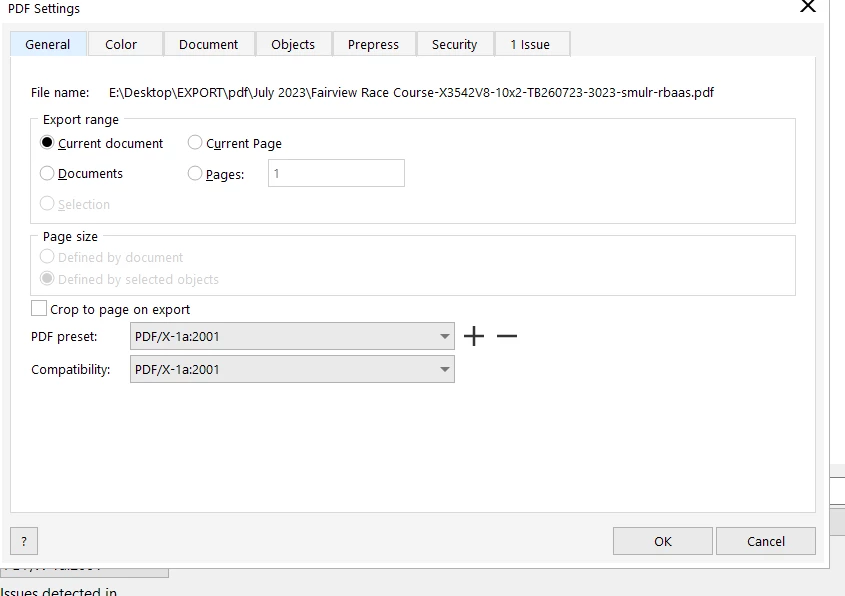
Hi @gary_sc , i created it using CorelDRAW Graphics Suite 2022 with below preset


@gary_sc, is correct. It's up to the manufacturer (in this case, Corel) to code their software to meet the PDF specification.

Adobe hasn't controled the specification since 2008, so it also doesn't have any control how well Corel, Microsoft, Canva or any other company programs their export utility that makes PDFs.


Three suggestions:

  • Review your graphics files.
    • What color space? PDF/X wants CMYK, not RGB.
    • What is their final (effective) resolution? Print graphics should be a minimum of 300 dpi/ppi. In InDesign, you can select the graphic in the Links panel and see the "Effective Resolution" in the info panel at the bottom. I don't recall where to find it in Corel (i'm an old Corel User!) nor in Canva (I don't use cookie cutter software).
  • Review the settings under the other tabs in your screen capture. I no longer have CorelDraw installed on my systems so I can't tell you what's there.
  • Contact Corel's user forums and see if the gurus there have a clue.


PS: I also don't work for Adobe and am just a volunteer here.

But I am a US delegate to the ISO committees that write the PDF standards that everyone uses. And that's also a volunteer position.


2 replies

Participant
September 3, 2023

Nice to reat this post , i would like to inform you, these days lot isue are in all graphic app , specially Remini , canva pro etc. You should visit offical sites to solve your ishue.

gary_sc
Community Expert
Community Expert
December 29, 2021

Hi Lynne,


I would first go to Canva and ask them for help, they created the PDF.


Just a bit of info here. Some time back Adobe gave the rights to the PDF format to the ISO organization so that it could be made into an international standard. That's why Microsoft, Apple, and MANY other companies can create a PDF. However, the bad side of this is that not all of them generate a PDF with all of the proper settings. In fact, this is a known issue that very few companies generate an all-around proper PDF. From the Apple side of things I know that filling out a simple form in Apple's Preview app can create a monster.


So please, go to Canva.


BTW, I do not work for Adobe, I, like many others in these forums simply try to help where we can. As soon as I see someone with an issue you describe, I know it's 99 times out of a 100 for it to not be in Adobe's range of issues. Sorry.

Participant
July 20, 2023

@gary_sc  Hi Gary

I have a similar problem. I upload PDF file for print. The preview is fine however when it prints it comes out black.

gary_sc
Community Expert
Community Expert
July 20, 2023

Hi, @simonpetermuller, do you know who created the PDF and how it was created?