



patrick34238
Known Participant
April 5, 2024
Question

change color box too small because of bug

  • April 5, 2024
  • 3 replies
  • 1312 views

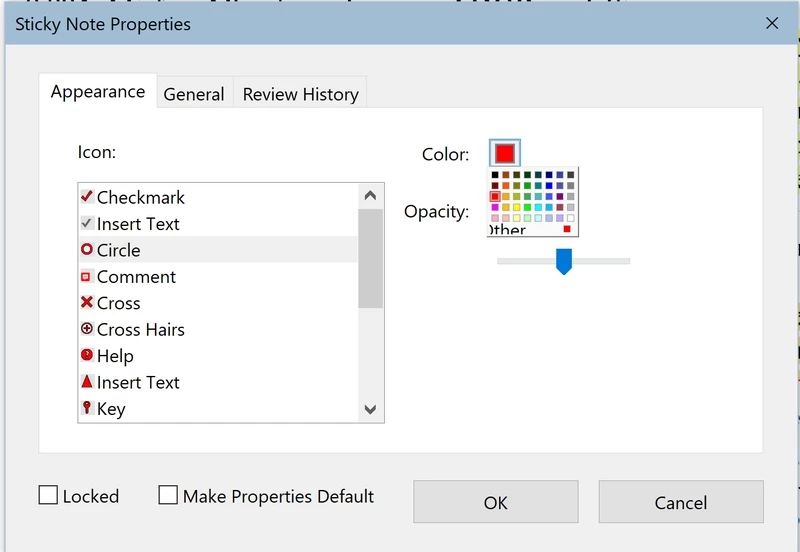
Since a recent update (at the end of last January or at the beginning of February), the color box shown to change the color of a highlight or a sticky note has become much too small on my screen.

I use a high resolution screen (3840 x 2160 pixels) and this problem looks like an object which doesn't resize itself for such a screen any more.

The attached screenshot shows that the "sticky note properties" window is correctly sized on my screen, but not the color box which appears when clicking on "color"


3 replies

Participant
October 6, 2025

I have this same problem and found only this post when I searched for help, so I contacted Adobe support through their chat option. My small redaction color box does allow me to scroll a bit, not through all the colors, and only up and down. I can't scroll through the colors to the right within the box. When I scroll down, I can see the word 'more col' (more colors), and I was informed by the Adobe help that if I click on the word more the box will expand. It works! 


Windows 11 Pro

Adobe 25.001.20756 (64-bit)

patrick34238
Known Participant
October 12, 2025

yes, you're right: clicking on more gives you an enlarged panel of colors, but it's not the same one.

Untitled 10.jpg is the original color box (enlarged)

Untitled 11.jpg shows the color box after clicking on "More". So if you use, like me, color-coded sticky notes, it's not a solution to clicking on "More".

Participant
April 9, 2024

All of a sudden I'm having the same issue. It must have to do with screen resolution because it looks different depending on the monitor (see attachments).


C'mon Adobe! 

patrick34238
Known Participant
October 13, 2024

i have the same problem with a GIS (geographic information system) program, SAGA. After the answer from SAGA's developers, it is related with a Windows API. So neither Adobe or SAGA can do anyting about it.


try67
Community Expert
Community Expert
April 5, 2024

What's the exact version number of the application (You can find it out by going to Help - About Adobe Acrobat)? What's your OS version?

patrick34238
Known Participant
April 5, 2024

Thanks for your interest in my problem. I use:

acrobat pro version 2024.001.20643 64 bit "old" interface
windows 10 Pro v. 22H2 OS Build 19045.4170

Both are up to date

Best regards