


Known Participant
August 9, 2021
Answered

Change default path for signature files

  • August 9, 2021
  • 1 reply
  • 4041 views

In Acrobat Reader DC how can I change the default path for digital signature files? Acrobat likes to put them in C:\Users\<user>\AppData\Roaming ..., but I prefer to keep them on a different drive (if I can help it, I don't keep anything other than Windows and program files on my C drive - easier to back things up that way).


Since a lot of people sign documents on my computer I have to set up new signature profiles on a regular basis, so I'd like to change the default path, but I can't find a setting for that.


TIA
This topic has been closed for replies.
Correct answer Amal.

Hi YossiD


Hope you are doing well and sorry for the toruble. As described you want to change the default path for signature files.


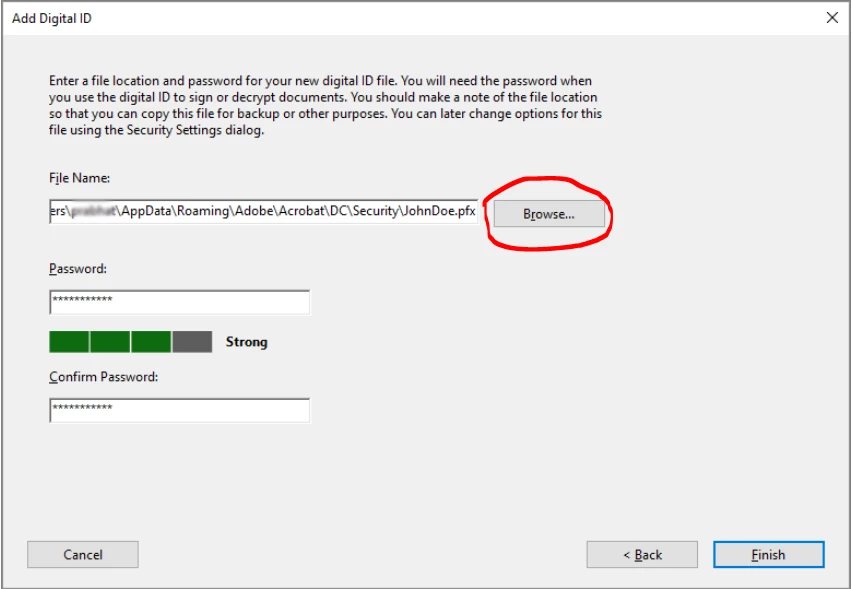
The digital ID file is stored at the default location as shown in the File Name field. If you want to save it somewhere else, click Browse and choose the location as shownin the screenshot below.

For more information , please check the pointer number 7 of the help page - https://helpx.adobe.com/acrobat/using/digital-ids.html


1 reply

Amal.
Community Manager
Amal.Community ManagerCorrect answer
Community Manager
August 11, 2021

Hi YossiD


Hope you are doing well and sorry for the toruble. As described you want to change the default path for signature files.


The digital ID file is stored at the default location as shown in the File Name field. If you want to save it somewhere else, click Browse and choose the location as shownin the screenshot below.

For more information , please check the pointer number 7 of the help page - https://helpx.adobe.com/acrobat/using/digital-ids.html