New Participant
April 21, 2020
Answered

change print margins

  • April 21, 2020
  • 1 reply
  • 9908 views

I have a PDF with more that one page.


The pages have tabs, so when printing duplex, I need to adjust left margin on all odd pages to ensure, that the pages are printed correct when the tabs are 'cut out'.

In Acrobat Pro it was possible to ajust margins on alle left or all right pages; where can I find this feature in Acrobat DC ?

(any alternatives will be welcome)


Adjusting when creating the PDF is unfortunatly not an option 😞


tia

Sebastian Bruun

Denmark
This topic has been closed for replies.
Correct answer Bernd Alheit

Thanks again, but I haven't found it - or it don't work?  (I use a Danish version of DC, so it is called somthing else.) 

And I dont want to resize the content, just move it 15 mm to the right 🙂 


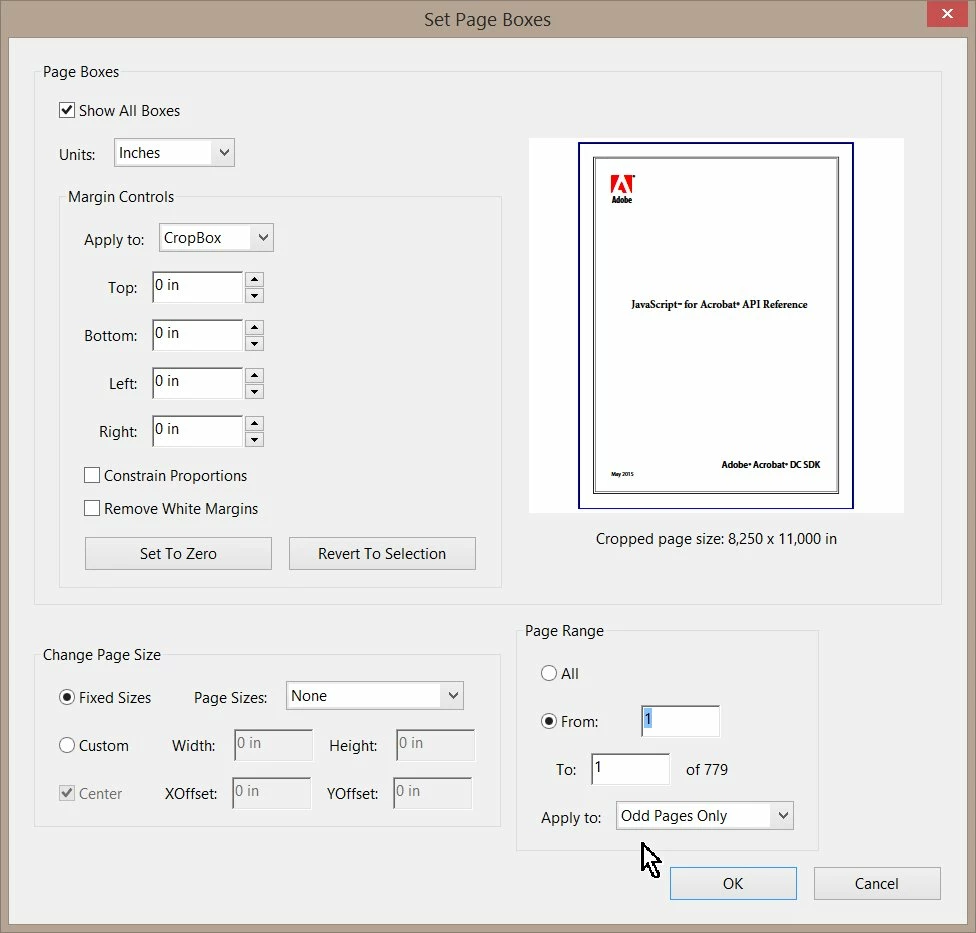
Look at Page Range:

1 reply

Bernd Alheit
Adobe Expert
April 21, 2020

You can use the crop tool at Tools > Edit PDF

New Participant
April 21, 2020

Thanks Bernd, - but well, not really.. 😞


The problem is, that I only want to adjust margins on left or right pages, not both.

Cropping - and other things I have tried - affects all pages, not just odd or even. And I need to move (extend left margin) on all left pages to ensure, that the duplex print will position the content right, when I cut out the tabs afterwords.


I have tried the tools in 'Set side boxes'? ( in Danish 'Indstil sidebokse'). But it simply not changes anything.


The actual PDF is combined of app. #140 files, each containing either a left og right page.

The feature were in the old Adobe Acrobat Pro, but I haven't found it in Acrobat DC - and have not saved a copy of Acrobat Pro.


Bernd Alheit
Adobe Expert
April 21, 2020

You can use the crop tool for odd pages only.