

Participating Frequently
March 11, 2018
Answered

Changing date format from American to English

  • March 11, 2018
  • 4 replies
  • 45410 views

Hi there. Could someone please tell me how I can change the date in a writable pdf in Adobe Acrobat from American to English format?

Correct answer Adorobat

Hi Alisonf,

Sorry for the delayed response.

You can change date format by opening the form in Acrobat > Tools > Prepare form

Right-click date field > Properties > Format tab > format category > date options

Below is the screenshot:
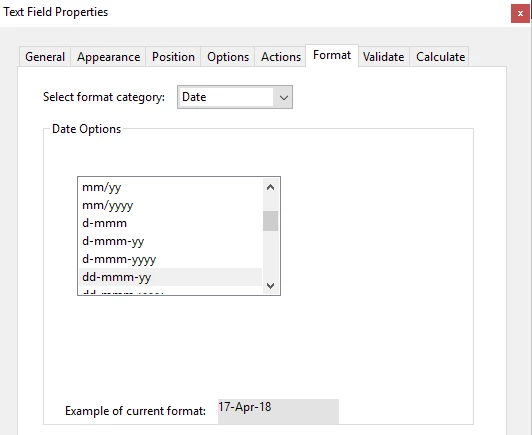
Feel free to update this discussion in case you need further help.

Shivam

4 replies

Participant
February 3, 2025

This is not working in acrobat pro.. I am not allowed to modify this whilst creating an agreement and there isnt a "tools"area for this?

S_S
Community Manager
Community Manager
March 6, 2025

Hi @Tennille37524370ujvw,


Hope you are doing well. Thanks for writing in!


Custom Date validation is available with Acrobat. 

You might want to try changing the settings as mentioned here: https://adobe.ly/43lV9jV


Hope this helps.


-Souvik

HCListon
Participant
September 5, 2023

I have been trying for weeks to change the default date to American style, and have not been successful. I HATE this problem. It happened when some update occurred a few weeks ago. Every contract I prepare now takes about 3 or 4 times longer than it used to. If there is really no way to correct the date format, can someone please suggest an alternative vendor for processing contracts that need to be signed? Thank you.


Participating Frequently
October 13, 2023

Same here! Just used Adobe to create/send an agreement for an electronic signature and didn't realize the date field wouldn't be set up right. I'm in USA and it was European format. This should be a general setting we can set and forget!

Participant
January 16, 2024

Same! Please get this fixed asamp Adobe! Thank you! 


After contacting Adobe support requesting assistance with the issue of changing the default for the date format to a US standard, I was informed, that unless you have Enterprise level licenses you cannot change date default formats.  The only way to change date format for each field you place the date requirement, is manually.  You can downgrade to Adobe Classic - file>adobe classic (I think those were the instructions) - which will revert you to an earlier version of Adobe.  I guess, until they send out another update which will override that setting!  I'm still trying to figure out how to set date format defaults in a document that is signed...manually doesn't cut it and may need to look at DocuSign

Participant
October 20, 2020

Is it posible to set a default date format (to the european standard, like YYY.MM.DD, or Norwegian standard DD.MM.YYYY). It realy should not be neede to have to change this for every dingle date field in every single document I am making, especially when I am making several documents a day that needs to be signed.

try67
Community Expert
Community Expert
October 20, 2020

No, unfortunately it's not possible. However, it is possible to change the Date format for multiple fields at the same time, using a script, like this (paid-for) tool I've created: http://try67.blogspot.com/2012/06/acrobat-apply-format-to-multiple-fields.html


Adorobat
Community Manager
AdorobatCommunity ManagerCorrect answer
Community Manager
April 17, 2018

Hi Alisonf,

Sorry for the delayed response.

You can change date format by opening the form in Acrobat > Tools > Prepare form

Right-click date field > Properties > Format tab > format category > date options

Below is the screenshot:

Feel free to update this discussion in case you need further help.

Shivam

Participant
October 28, 2025

Hi,


I am following these instructions but get as far as this: 

Acrobat > Tools > Prepare form

Right-click date field > Properties >


These are the only tabs I have on the date field, there is no format option. I've been going round in circles earching the rest of settings on Adobe and failing miserably. How do I get these settings when I am using Acrobat? 


Participant
October 28, 2025

I Googled it for you and got this:


The Actions, Format, Validate, and Calculate tabs are missing because the form was converted to a more limited Adobe Sign form or is a specialized field type. To fix this, revert the form to an Acrobat form by going to Tools > Prepare Form > More > Revert to Acrobat Form. For specific field types, like buttons, the properties may only be accessible through a custom script.