


Changing default highlight color for required field and background
So i fiddled with this settings:
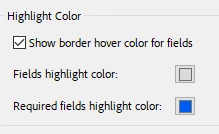 only to find out that this affects only my computer. When sending it to anyone else, they go back to the default light blue and red for required.
The colors I chose are the following:
- For the field highligh color: Red: 220; Green: 220; Blue:220
- For the required outline border color: Red: 0; Green: 90; Blue: 245
I chatGPT-ed how I would go about this based on this another solution: Solucionado: Fields highlight color - Adobe Community - 10821733 and came out with these two scripts:
This would go in document level script
// Saves user preferences for regular highlight color
var hiliUserPrefs = app.runtimeHighlight;
var colorUserPrefs = app.runtimeHighlightColor;

// Changes regular highlight color
app.runtimeHighlight = true;
app.runtimeHighlightColor = ["RGB", 0.86, 0.86, 0.86]; // Gris claro (Rojo: 220, Verde: 220, Azul: 220)

// Saves user preferences for required border color
var reqHiliUserPrefs = app.runtimeHighlightRequired;
var reqColorUserPrefs = app.runtimeHighlightRequiredColor;

// Changes border color
app.runtimeHighlightRequired = true;
app.runtimeHighlightRequiredColor = ["RGB", 0, 0.35, 0.96]; // Azul claro (Rojo: 0, Verde: 90, Azul: 245)
Then for the action when you close document:
// reset highlight
app.runtimeHighlight = hiliUserPrefs;
app.runtimeHighlightColor = colorUserPrefs;

// reset border
app.runtimeHighlightRequired = reqHiliUserPrefs;
app.runtimeHighlightRequiredColor = reqColorUserPrefs;
This worked 50% 😄 The regular highlight gray color is saved in my colleagues computer. But the required fields are still showing up as red. Do you know how would the correct code be?
Ty in advance =D
 AdChoices