


bowen192
Inspiring
January 8, 2020
Question

Checklist form creation - just a checkbox

  • January 8, 2020
  • 2 replies
  • 933 views

I have a form that I have created and exported to pdf. The layout is as follows:
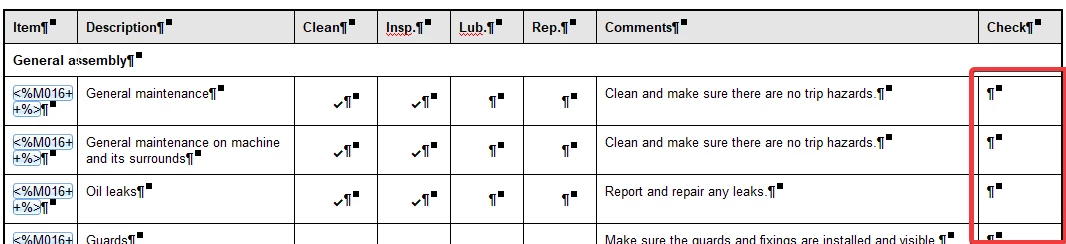
I want to populate only the Check column with a checkbox (and then add two signatures at the bottom).

Is there a way to tell Acrobat to do this (at least the checkbox bit)?

At the moment I can only see a manual way and there are hundreds of rows and the form is constantly updated, so that's not really an option.

Any suggestions welcome!

This topic has been closed for replies.

2 replies

try67
Community Expert
January 8, 2020

It's possible to use a script to create fields over certain characters. For example, I've developed a (paid-for) tool that picks up the Wingdings check-box and radio-button characters and places fields on top of them. So if you use that font when creating your form (in Word, for example) to mark the locations of where you want the fields to appear it will add them with 100% accuracy. You can find this tool here: http://try67.blogspot.com/2015/09/acrobatreader-convert-wingdings-to.html

ls_rbls
Community Expert
January 8, 2020

Hi,


Which  program did you use to export to PDF? With what program did you created the original source file ?


What operating system and Adobe Acrobat versions are you using?

bowen192
bowen192Author
Inspiring
January 8, 2020

The file was created and exported using Help+Manual

I'm using Windows 10 Pro 64

Acrobat is 2019.021.20061


At the moment the best solution I can find is to delete the non-checkbox fields and convert them to a checkbox using a paid for script, although this is still time consuming.


Thanks