biancam80961219
New Participant
May 2, 2023
Answered

Chrome extension stripping file name on save

  • May 2, 2023
  • 1 reply
  • 2961 views

After selecting a PDF file to download from a website, it opens in the adobe reader etension, but then saves without the original file name. Super frustrating. Any ideas? Screen recording at link.

https://drive.google.com/file/d/1iGghrbOGiTe-o4ATwhUeHkq5NlVqcHwI/view?usp=share_link


This topic has been closed for replies.
Correct answer gary_sc

Hi, @biancam80961219


Thank you for the video; it helped to answer a number of questions your description didn't mention. I can think of a couple of things to check.


One thing appears to happen is that around 22 seconds into your recording, you show a PDF file that has opened in Chrome. It is not open in Acrobat. If you look to the right of where your cursor is you can see the following:
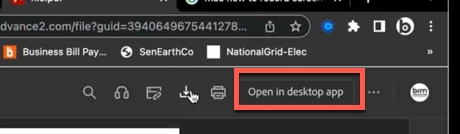
Yes, you are clicking on the Download icon, and that leads me to ask what your Mac's system is set to open PDFs with?


If you select ANY PDF on your computer and then to a Command-i on that file, a new window will pop up on the left side of your screen. When I do that, it shows that my PDFs open in Adobe Acrobat.
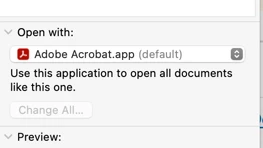
If it shows Adobe Reader, there's your issue. If it does, left-click on the double arrows on the right and select Adobe Acrobat
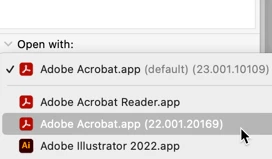
If I'm wrong, let me know. And, if I'm right, let me know as well.


Also, if you have Acrobat Pro on your system, there's not really much purpose for Acrobat Reader on your system. You can uninstall that at any time. 

 

1 reply

gary_sc
gary_scCorrect answer
Community Expert
May 2, 2023

Hi, @biancam80961219


Thank you for the video; it helped to answer a number of questions your description didn't mention. I can think of a couple of things to check.


One thing appears to happen is that around 22 seconds into your recording, you show a PDF file that has opened in Chrome. It is not open in Acrobat. If you look to the right of where your cursor is you can see the following:

Yes, you are clicking on the Download icon, and that leads me to ask what your Mac's system is set to open PDFs with?


If you select ANY PDF on your computer and then to a Command-i on that file, a new window will pop up on the left side of your screen. When I do that, it shows that my PDFs open in Adobe Acrobat.

If it shows Adobe Reader, there's your issue. If it does, left-click on the double arrows on the right and select Adobe Acrobat

If I'm wrong, let me know. And, if I'm right, let me know as well.


Also, if you have Acrobat Pro on your system, there's not really much purpose for Acrobat Reader on your system. You can uninstall that at any time. 

 

biancam80961219
New Participant
May 2, 2023

Thank you for this. I've deleted reader and the chrome extension and all seems to be well now. Thanks!

gary_sc
Community Expert
May 2, 2023

Excellent, glad to hear of the success. 


Can you please tap the "Correct Answer" under my answer above so that others that have the same issue can find that as an answer to their problem?


Thank you.
