


johnnyIES
Participant
December 4, 2017
Answered

Color scans are creating dark grey background on PDF's, and I need background to be white

  • December 4, 2017
  • 1 reply
  • 45993 views

Color scans are creating dark grey background on PDF's, and I need background to be white. I can scan in black and white, and this is a non issue, but I need the images to be the correct color. Is there a setting change that I can make. The user is using Adobe Acrobat 11 Standard.
Correct answer Adorobat

Hi JohnnyIES,

Sorry for the delay in response.

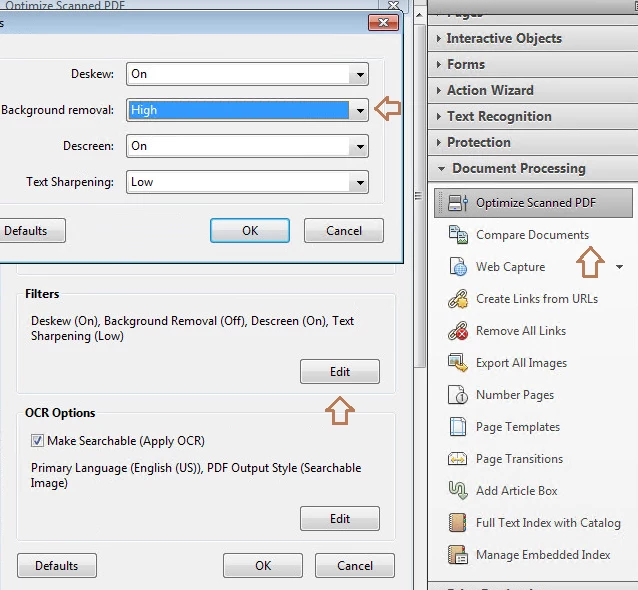
Try background removal tool in Acrobat and see if that helps. Under tools > document processing > optimize scanned pdf, click edit under filters > background removal > high.

Below is the screenshot:

Thanks,

Shivam

1 reply

Adorobat
Community Manager
AdorobatCommunity ManagerCorrect answer
Community Manager
January 25, 2018

Hi JohnnyIES,

Sorry for the delay in response.

Try background removal tool in Acrobat and see if that helps. Under tools > document processing > optimize scanned pdf, click edit under filters > background removal > high.

Below is the screenshot:

Thanks,

Shivam

Participant
February 12, 2022

I followed your instructions and it made no change, this was a scanned document that was opened in adobe , all the scanned/signed docs came into dropbox all with grey backgrounds,

we are waiting for anyone else who could suggest a fix, Ive been at this all day with no outcome.

Participant
December 28, 2022

The only quick fix solution is upload the document on https://www.scanwritr.com/ and click the contrast button. It will clear the background. It is a paid software, but you can download with the 'scanwritr' water mark at the bottom.The free version works on a per page basis. For mulitple pages, you need  to pay.