


New Participant
February 7, 2023
Question

Combine PDF's, Reopen and text is missing

  • February 7, 2023
  • 2 replies
  • 3751 views

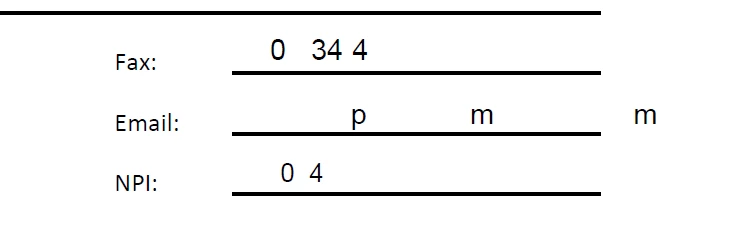
So this keeps happening to me and other members of my team. We work on an application (this always involved combining PDF's), email them for approval and then the text is all messed up like this when they are opened for review. If I click Edit PDF and select the text box and change the font sometimes it will show the entire word or number. 
 

This topic has been closed for replies.

2 replies

ls_rbls
Adobe Expert
February 14, 2023

Hi,


Would you be able to share an an example of the two files that you are trying to combine?


If this is not happening with every PDF documents that you try to combine, it could  be related to some sort of document or, as mentioned by @Karl Heinz Kremer , some sort of font type embedding restriction.


In any case, can also provide additional information on which type of program originally produced those two PDFs?

New Participant
February 15, 2023

So first I converted the Application Packet from Word doc to pdf. I filled out app, added Signature page. Saved. Corrupted,

ls_rbls
Adobe Expert
February 18, 2023

Hi,


So I followed your workflow with the Acrobat Mobile app and Office365 mobile app respectively.


And this is the combined files result:


https://acrobat.adobe.com/link/track?uri=urn:aaid:scds:US:8c8671d0-1b81-3230-a53f-7f3aed5cd1ee


I forgot to ask, if the signed page that you add to the packet is already filled and signed before the merge or is it signed after the documents are merged altogether?


In which case, you may want to use a blank merged PDF to distribute to your users isntead of combining filled and signed forms (just food for thought).


In any case, I will try and test with the full desktop version on a Microsoft Windows 10 (64-bit), and Adobe Acrobat Pro DC(32-bit) and will post back.


But  meanwhile, consider trying to do a pdf binder instead of combining files.. just to compare different results.


I am thinking that if you are using the Adobe PDFMaker COM Add-in from your version of Microsoft Office to export to a PDF that also could be playing a significant role.


What I normally do to work around these issues is to use the Accesibility Checker in Microsoft Word before my word document is fully finalized.


The Accessibility wizard will detect issues and allow you to apply recommended fixes.


Also, ensure that the MS Word file is saved to a .docx file (XML supported file) instead of the old .doc file.


Last,instead of exporting directly from MS Word using the Adobe PDFMaker COM Add-in, or Save As or Print to PDF methods, just see if you are able to open the file directly with Adobe Acrobat; it will do conversion to PDF automatically before opening the file.


OR,


If you go to the folder that this file is saved into, right-click on the file and select from the context menu to convert to PDF with Acrobat.

Karl Heinz  Kremer
Adobe Expert
February 7, 2023

This is usually a problem with subset embedded fonts. See here for some more information: http://khkonsulting.com/2015/02/missing-characters-merging-inserting-pdf-files-potential-workaround/

New Participant
February 14, 2023

I tried every step of this solution. The text still appered to be missing. Do you have any other recommendations? Thank you. 

New Participant
February 14, 2023

It does not work for me either.