


New Participant
May 18, 2022
Answered

Combining PDF portfolio documents

  • May 18, 2022
  • 2 replies
  • 3175 views

Using MS Outlook app, I've converted multiple emails into a single PDF portfolio document.  Works great.  Now I have several different PDF portfolio documents.  Is there a way to combine or merge the PDF portfolio documents into one?  Thanks
Correct answer Dave Creamer of IDEAS

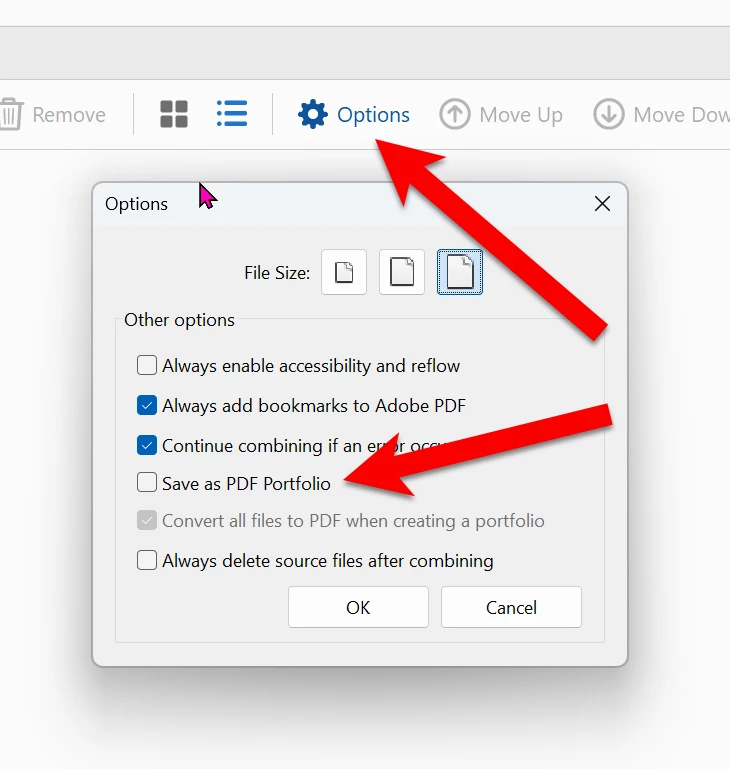
No, I don't think so; but I did figure out how to combine the portfolios into a single file.  It was the same as it always has been (under options, I unmakred the "Save as a PDF Portfolio".    Thanks for reaching out though!!


That is the solution for preventing a PDF portfolio when combining files, but it does nothing to convert a portfolio to separate PDFs, which was the original question. 

It's a good tip, however. In case anyone else is looking for the option, it is under the Combine Files tools, under Options (gear icon). 

2 replies

Dave Creamer of IDEAS
Braniac
April 17, 2025

In the portfolio, go to list view.

Select all the documents.

Right-click and extract them to a folder.

Then combine the PDFs into one.


David Creamer: Community Expert (ACI and ACE 1995-2023)
Harsh Vardhan Pareek
Community Manager
Community Manager
May 20, 2022

Hi @James245094670x37 


Yes, you can combine PDF portfolios into one. For that the process is the same i.e using the combine files tool and because porfolio is basically a cobination of different PDFs it will add those PDFs and create a new portfolio. 


Let us know if that helps.


Thanks,

Harsh

New Participant
April 17, 2025

That does not help.  I want a single document NOT a portfolio.  How do you do that.  It use to be easy and not it is totally messed up.

Dave Creamer of IDEAS
Braniac
April 17, 2025

@Karla Alsberge are you connected to James at all? The response was to his question.


David Creamer: Community Expert (ACI and ACE 1995-2023)