Known Participant
October 9, 2019
Answered

Comment format changing when copying from Word document

  • October 9, 2019
  • 2 replies
  • 10159 views

Hi, I am using Adobe Acrobat Pro DC version 2019.012.20040


The comments I wanna add are in a different format in a MS word document and when I copy paste them, the bold and italicized words in the original word document are originally there in the word document style and remain so when I click post, but when I close the comment pop up, the format resets.

I have shown this issue in a video here: https://www.youtube.com/watch?v=oGS1s4u2ojI 


Why is this happening and is there a way I can preserve the font style when transferring content from a MS word document to the comments box in Adobe Acrobat Pro DC? It is very time consuming italicizing and making words bold again. 

I am really in need of help and will appreciate a permanent resolution to this. Thank You! It has been months. 
This topic has been closed for replies.
Correct answer ls_rbls

the minute I paste it is all left sided with no indent or spacing.  Look below

D. Procedure
1. Inspection Requirements
a. Inspect each PPR and PS area on a quarterly basis, i.e., approximately every three months. Exceptions to this schedule must be authorized and approved by the EPL contract Principal Investigator (PI) and EPL Management and documentation to this effect included in the inspection records.
b. The inspection will take place near the end or immediately following the quarter being inspected.


There is no indention of the 1 or a. or b.


Ok , so this is what I found and is not related to Acrobat.


I think we finally got the correct answer to this old thread.


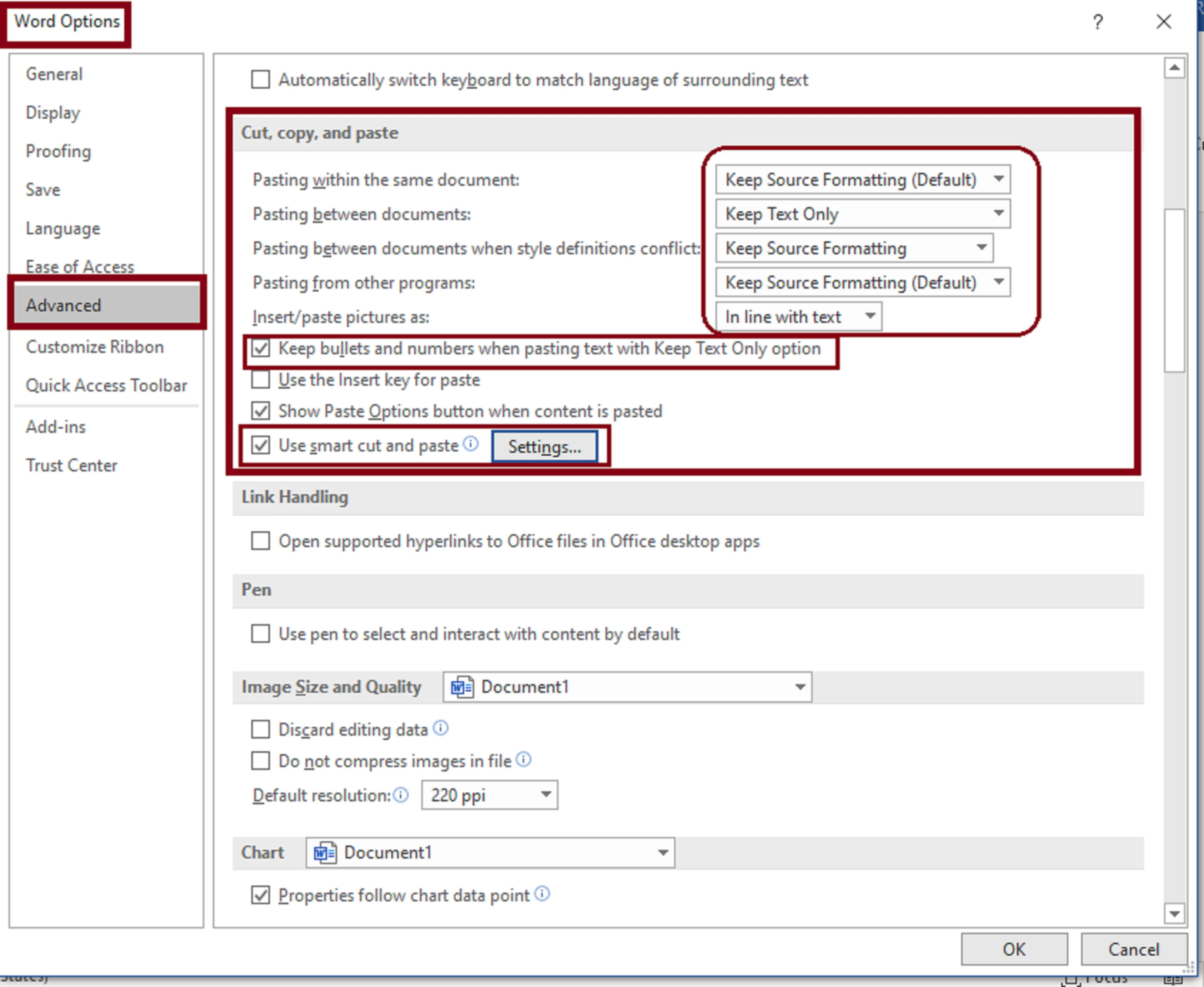
You can set a textfield in Acrobat as multi-line and with Rich Text Formatting. Then you need to modify the cut, copy, paste preferences in MS Word advanced options.


To do so go to "File" --->>> "Options" --->>> "Advanced" --->>> "Cut, copy, and, paste.


See image below to modify settings:


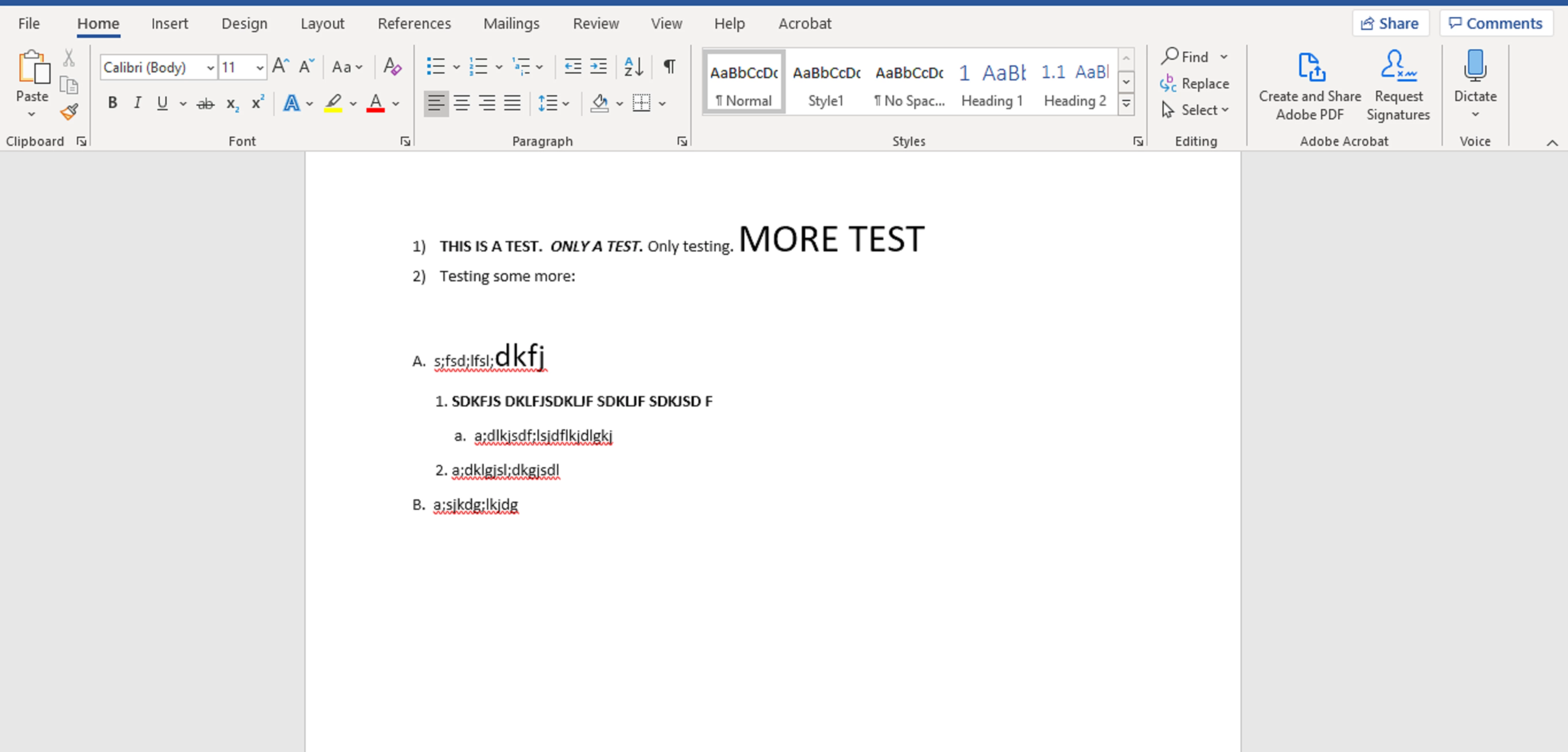
And below is my original document in MS Word with some text formatted:


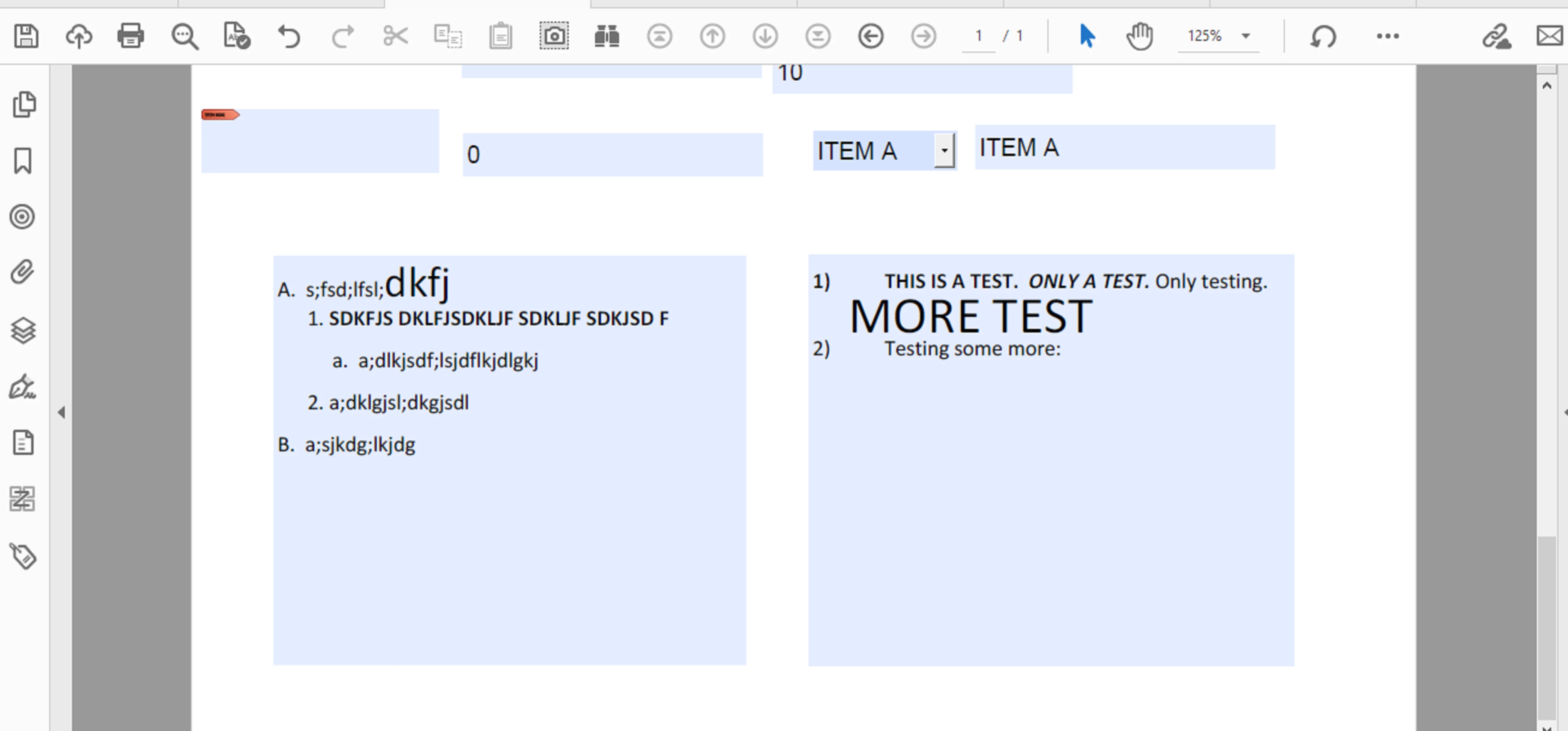
And the result in Acrobat using textFields with multi-line and Rich Text Formatting enabled:


2 replies

ls_rbls
Braniac
October 15, 2019

So I went ahead and did a little more homework.


These are the additional steps I would try while we wait for additional tech support guidance:


1) Save a copy of this document back to MS Word (or back to its original source file, then convert back to PDF)


This doesn't work try next step


2) review the following link https://helpx.adobe.com/acrobat/using/importing-exporting-comments.html


And explore if the problem you are experiencing can be resolved with a step in importing comments from MS Word and how to tagg them properly in the MS Word document before they are imported to the PDF document.


3) Creating and modifying presets, useful quick video here: https://m.youtube.com/watch?v=-dQArR2b02w


4) since the problem you brought up seems to be related to the comment boxes per se, and taking into account that you are able to copy and paste formatted text into a comment box, but the comment box resets itself to plain text, would it make sense if you open thumbnail view for all the pages in the document, select them all, right-click to open "Page Properties" and tick use Document Structure.


These are ny best suggestions at this time.


Known Participant
October 15, 2020

What if I am copying text from WORD like below and trying to paste in a PDF.  I can not get the formatting to stay and I am in a TEXT FIELD with rich text.

A.  s;fsd;lfsl;dkfj

      1. a;dslkfjs;ldkgjsdlf

           a.  a;dlkjsdf;lsjdflkjdlgkj

      2. a;dklgjsl;dkgjsdl

B.  a;sjkdg;lkjdg

ls_rbls
Braniac
October 15, 2020

Can you be more specific .


When exactly are losing the formatting of the copied text, after you cloe Acrobat and reopen the document?

ls_rbls
Braniac
October 9, 2019

Please refer to the following slides:


jaleedagAuthor
Known Participant
October 9, 2019
Hey, thank you for posting these photos! If you don't mind, can you demonstrate the process in a video by recording it via screengrab software, uploading it on Youtube and share the link? I can't understand how to allow Rich text formatting which is step 1 of the process. Thank you and bless you mate!
ls_rbls
Braniac
October 9, 2019

I don't have a screen recorder at this time, but here is an additional slide to cover the step 1 that I did not illustrated: