


Answered
Comment text size small in pane vs large in edit mode
I am trying to make the comment text larger in the comment pane in Acrobat since I find the default size too small. I found this in both an existing document and a new document I made to test this.
Samplesteps:
- create a new PDF from Word (or open an existing PDF file)
- open in Acrobat pro (I'm on Macbook pro -- Sonoma 14.6.1)
- Acrobat > preferences > Commenting: set font size 18, font Arial, OK (note: the option says "restart required" so ...)
- restart Acrobat, reopen file
- open comment pane
- select some text in the file > click the comment icon on the pop-up menu
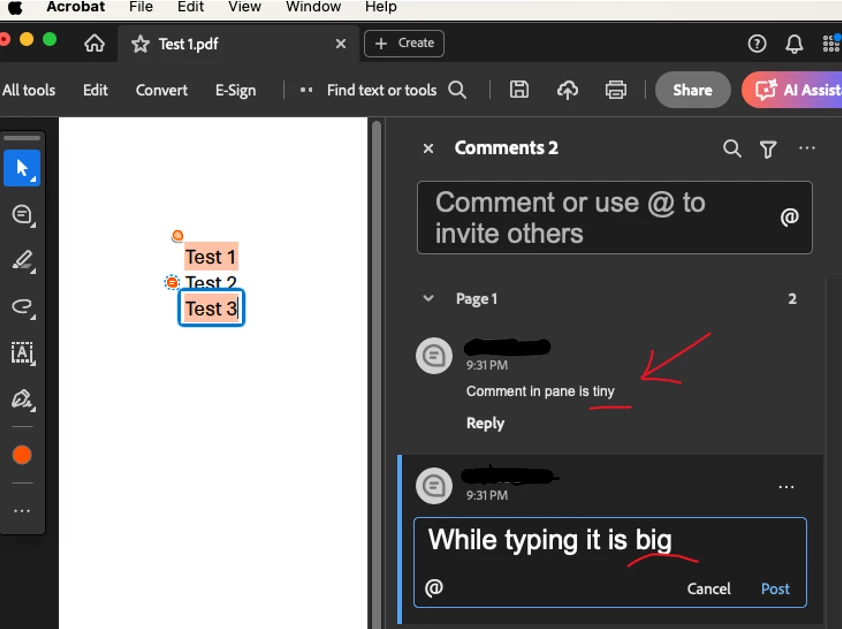
- start typing the text in the comment pane --> RESULT: text looks nice and big!
- Post the comment
RESULT: the text is back to the automatic tiny text
***Is there some setting I'm not adjusting to set the "committed/posted" comment default text size?

 AdChoices