New Participant
March 26, 2025
Answered

Completed Web form automatically sent to signers

  • March 26, 2025
  • 1 reply
  • 465 views

I am using adobe acrobat pro.
Whenever my document is signed, an email is automatically sent to the signer with the document to be downloaded.


How do I disable that ? I read that i need to contact support, but they do not get it.
 

Correct answer Meenakshi Negi

Hi Ourspot Outdoors, 


Thank you for reaching out.


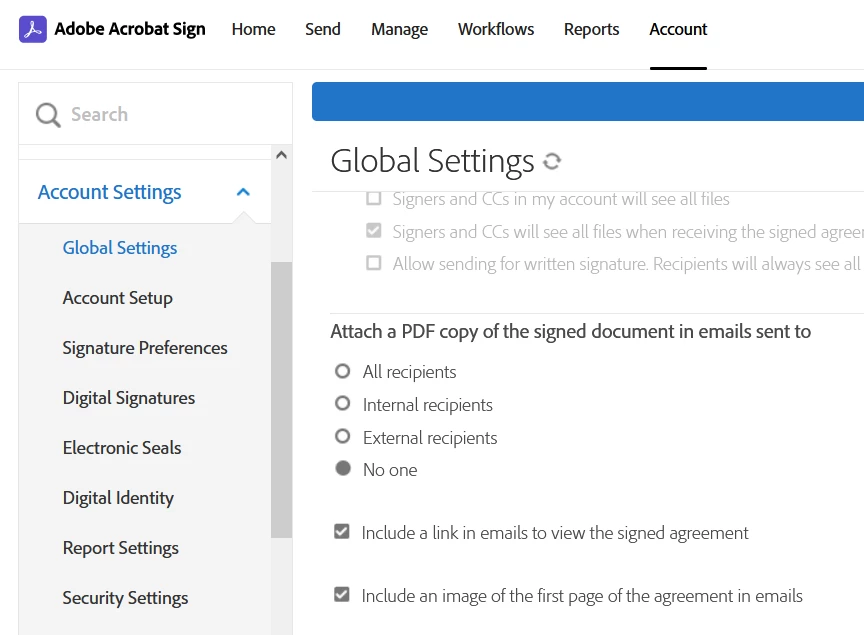
We checked your account and see that you have an Acrobat Sign individual plan. The option that you are looking for is available in the Acrobat Sign Enterprise plan. For more information, refer to the following help document: https://adobe.ly/4l7HzY4

Check the screenshot below for reference:


It is not possible to make any changes via JavaScript in Acrobat Sign. 


Let us know if you have any questions.


Thanks,

Meenakshi


1 reply

creative explorer
Community Expert
March 26, 2025

@Ourspot Outdoors isn't that a good thing? Your client would get a copy of the signed form or contract?! 

I don't see the disable function in Acrobat Pro, and you need Adobe Sign to manage that. Maybe JavaScript could work for that?

I did look in the Preferences—nothing stood out


m
Meenakshi Negi
Community Manager
Meenakshi NegiCommunity ManagerCorrect answer
Community Manager
March 26, 2025

Hi Ourspot Outdoors, 


Thank you for reaching out.


We checked your account and see that you have an Acrobat Sign individual plan. The option that you are looking for is available in the Acrobat Sign Enterprise plan. For more information, refer to the following help document: https://adobe.ly/4l7HzY4

Check the screenshot below for reference:


It is not possible to make any changes via JavaScript in Acrobat Sign. 


Let us know if you have any questions.


Thanks,

Meenakshi