


PFritz
Participating Frequently
January 31, 2017
Answered

Configuration error 213:11 with Adobe Acrobat DC

  • January 31, 2017
  • 3 replies
  • 39715 views

I have an end user with a 32-bit Windows 7 system that is getting the following error when opening Adobe Acrobat DC on his computer.:
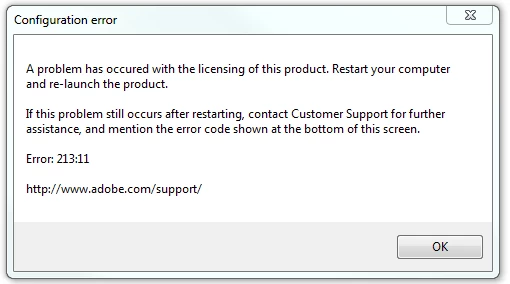
The user has no other Adobe products installed beyond the standard Reader/Flash/Shockwave/AIR applications.  It's a Classic install, not Continuous.  Repairing the install and uninstalling/reinstalling Acrobat DC did not resolve the issue.  The user does have admin rights to his machine.  I tried removing read-only from C:\ProgramData\Adobe\SLStore.

Based on searches on Google and the Adobe forums here, this is a common error message, but I could not find anyone running into the problem with Adobe Acrobat DC.  Thank you all for any assistance you can provide here.

This topic has been closed for replies.
Correct answer Superhero_Jeff

I had the same problem.  It was not the permissions issue stated at article linked above.  However, it was a good lead.  Here's how I fixed it:

  • Close Acrobat
  • Open the Run dialog box (Windows key+R)
  • Type in %appdata% and click OK
  • Open the Adobe folder
  • Delete the Adobe PCD folder
  • Delete the SLData folder
  • Open Acrobat

Issue fixed.

3 replies

Superhero_Jeff
Superhero_JeffCorrect answer
New Participant
July 7, 2017

I had the same problem.  It was not the permissions issue stated at article linked above.  However, it was a good lead.  Here's how I fixed it:

  • Close Acrobat
  • Open the Run dialog box (Windows key+R)
  • Type in %appdata% and click OK
  • Open the Adobe folder
  • Delete the Adobe PCD folder
  • Delete the SLData folder
  • Open Acrobat

Issue fixed.

michaelb86676351
New Participant
May 28, 2018

Thanks. Issue fixed

PFritz
PFritzAuthor
Participating Frequently
February 6, 2017

Settings the SLStore and Adobe PCD folders to no one be read-only did not resolve the issue.  Do you have any other suggestions, kglad?  Thanks.

kglad
Community Expert
February 6, 2017

permissions should be read/write.

if you followed the suggestions and they failed, using a browser that allows popups and cookies, contact adobe support during pst business hours by clicking here and, when available, click 'still need help', https://helpx.adobe.com/contact.html

kglad
Community Expert
January 31, 2017

restore permissions on both adobe pcd and slstore folders

https://helpx.adobe.com/creative-cloud/kb/configuration-error-cs5.html

PFritz
PFritzAuthor
Participating Frequently
January 31, 2017

C:\Program Files\Common Files\Adobe\Adobe PCD, correct?  The link did not specify that folders location in Windows, but I was able to find it doing a search for it in Explorer.

kglad
Community Expert
January 31, 2017

the (corrected) link in message 1 shows the the location of the two folders.