


Cécile_
Participant
August 5, 2022
Question

Convert excel document to PDF

  • August 5, 2022
  • 1 reply
  • 569 views

Hi,

I have an excel document that I cannot convert to a PDF form. I have the following error :
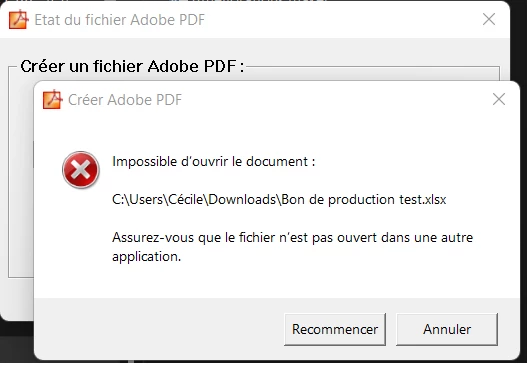
My document contains lists. With an other document without list it works.

I hope you can help me,

Thanks !

Cécile

This topic has been closed for replies.

1 reply

AkanchhaS8194121
Legend
August 5, 2022

Hi Cécile_,

Hope you are doing well.

Thanks for sharing the sample file. 

We did check the conversion at our end, and here is how it looks. (please check the attachment)

The steps to be performed are:

Open Excel file

File>Save As Adobe PDF>  on the Acrobat PDF maker dialog box, make sure you have the appropriate options selected. 

Like, either entire Workbook or both the Sheets. (see image below)


If it still doesn't work, then:

Would you mind sharing the Adobe Acrobat version you are using? To check the version, go to Help > about Acrobat and ensure you have the recent version 22.001.20169  installed. Go to Help > Check for updates and reboot the computer once (you must save all the work before restarting) https://www.adobe.com/devnet-docs/acrobatetk/tools/ReleaseNotesDC/index.html 


Thanks,

Akanchha 

Cécile_
Cécile_Author
Participant
August 12, 2022

Hi Akanchha,


Thanks you for you answer.

This is working when I did as you said. (If I try : right clic on the file, convert to PDF, I have the error.)

The problem is that the PDF I get is not a form, it's just a PDF, it can't be changed...


Have a nice day,

Cécile