Known Participant
March 24, 2018
Answered

Converting every color to black in a pdf file

  • March 24, 2018
  • 3 replies
  • 77887 views

Hello

Is it possible to convert every color (except white) to black so the printed document would be easier to read. I searched a lot but every solution was converting color to grayscale. I know how to convert or print to grayscale but I don't want grey color.  They grey color (or any shade) is difficult to read ( in my opinion ).

I would be happy if you could provide me with a solution or a workaround.  

Correct answer AnandSri

Hello Peterschneider,

Sorry for the delayed response and inconvenience caused. As per the description above, you want to print a color PDF into true black, Is that correct?

On Windows, you can print all of the non-white colors in your PDF file as black, resulting in a simple monochrome printout. Printing as black is useful for printing PDFs that contain text only, or for printing engineering drawings that have lightly colored lines.

  1. Click File>Print.
  2. Select Print Color as Black, this prints colors as solid black, not in shades of gray.
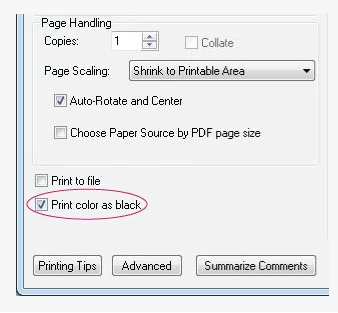
Note: If the checkbox is dimmed, click the Advanced button. Make sure that Acrobat Default is selected in the Settings menu of the Advanced Print Setup dialog box.

     3. Click Ok to Print.

You can also make custom settings/changes in Advanced Printer Setup, for detailed information, please refer to the following Adobe articles Color conversion and ink management (Adobe Acrobat Pro)

Advanced PDF print settings, Adobe Acrobat

You can navigate to File>Print>Click on Advanced>Under Color Management>You can select Black and White in Color Profile
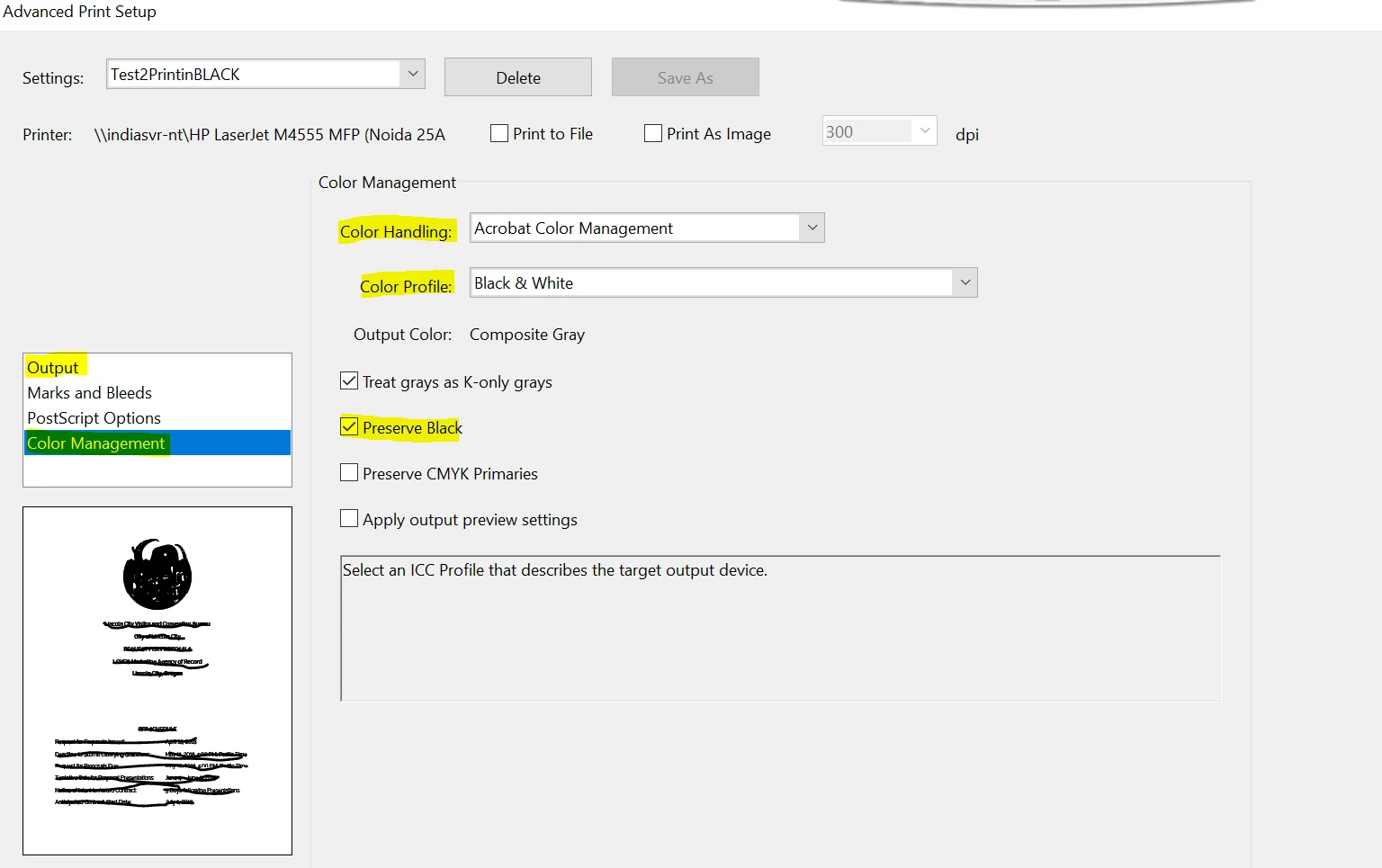
By making the changes, you can print the color PDF in black.

You can also refer and try the suggestions from the following Adobe articles Cannot print to PDF in black and white

https://acrobatusers.com/forum/printing-prepress/bw-print-colour-pdf/

Let us know how it goes and share your findings.

Regards,

Anand Sri.

3 replies

Participant
August 23, 2024

ALL TERMS AGREED. I AM HUMANE. I LOVE ALL, NO GEOGRAPHICAL BOUNDARIES NOR CONTINENTAL FRONTIERS. D. RAVI SANJAY, ADVOCATE, HYDERABAD, TELANGANA, INDIA

AnandSri
Community Manager
AnandSriCommunity ManagerCorrect answer
Community Manager
May 3, 2018

Hello Peterschneider,

Sorry for the delayed response and inconvenience caused. As per the description above, you want to print a color PDF into true black, Is that correct?

On Windows, you can print all of the non-white colors in your PDF file as black, resulting in a simple monochrome printout. Printing as black is useful for printing PDFs that contain text only, or for printing engineering drawings that have lightly colored lines.

  1. Click File>Print.
  2. Select Print Color as Black, this prints colors as solid black, not in shades of gray.

Note: If the checkbox is dimmed, click the Advanced button. Make sure that Acrobat Default is selected in the Settings menu of the Advanced Print Setup dialog box.

     3. Click Ok to Print.

You can also make custom settings/changes in Advanced Printer Setup, for detailed information, please refer to the following Adobe articles Color conversion and ink management (Adobe Acrobat Pro)

Advanced PDF print settings, Adobe Acrobat

You can navigate to File>Print>Click on Advanced>Under Color Management>You can select Black and White in Color Profile

By making the changes, you can print the color PDF in black.

You can also refer and try the suggestions from the following Adobe articles Cannot print to PDF in black and white

https://acrobatusers.com/forum/printing-prepress/bw-print-colour-pdf/

Let us know how it goes and share your findings.

Regards,

Anand Sri.

Participant
April 14, 2023

I believe that's an older version of Acrobat you are using.  The new versions do not allow for this "color as black" option.  

Participant
October 2, 2023

That is true, and absolutely ridiculous that a 10 year old version has useful functionality that no longer exists.

Inspiring
March 24, 2018

Hello Peter,

Yes it is possible to convert colored PDF file to Black and white. You can use Adobe PDF printer to convert the colors. Please follow the steps below:

1. Open the colored PDF file and go to File>>Print

2. Select Adobe PDF as the printer.

3. Check the option to Print in Grayscale and print the file. It will ask you to save the file.

4. If Print to grayscale option is  not available, that means the file is being printed as an image. Go to Advanced and uncheck the option to print as an image.

Regards,

Known Participant
March 25, 2018

Thank you for your answer, but this is not the result I was hoping for.

Your solution keeps the "gray" color.  Green ---> light gray,   Red --> darker gray .....

I want that every color becomes true black.

I have a black/white laser printer and printing a colored document in grayscale makes the document very hard to read.

In a docx. file I can simply press ctrl+A and transform every color to black.   In a .pdf file this is not that easy.

Participant
September 17, 2021

I has a similar problem with a scanned pdf document. I managed to solve it by clicking on Manual Greyscale icon in Printing Quality settings and then adjusting in Greyscale setting Brightness (lowering) and Contrast (increasing). It is much more visible now for reading when printed.
