


Participant
July 14, 2021
Answered

Correspond Number to a Radio Button

  • July 14, 2021
  • 1 reply
  • 1389 views

I am creating a form to calculate performance scores. 


I would like a radio button to be automatically selected based off a calculated score.
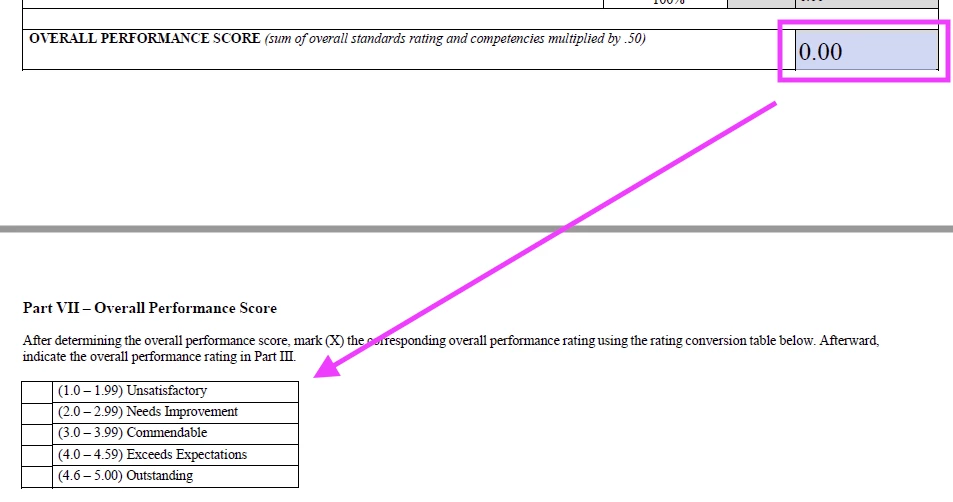
Throughout my document, I have populated buttons to execute this javascript based off of the "Mouse Up" action (Group19 are my radio buttons):


var totalScore = this.getField("Total").value;

if (totalScore >= 1.00 && totalScore <= 1.99) {
this.getField("Group19").value = "Choice1";
} else if (totalScore >= 2.00 && totalScore <= 2.99) {
this.getField("Group19").value = "Choice2";
} else if (totalScore >= 3.00 && totalScore <= 3.99) {
this.getField("Group19").value = "Choice3";
} else if (totalScore >= 4.00 && totalScore <= 4.59) {
this.getField("Group19").value = "Choice4";
} else if (totalScore >= 4.60 && totalScore <= 5.00) {
this.getField("Group19").value = "Choice5";
}


The javascript executes perfectly, but here is the problem - the form user needs to click on a button to activate the javascript, which is inelegant. I have noticed that users will fill out the form and fail to click on the buttons needed to activate the javascript. I have seen a form where a radio button is automatically selected based off of the number in the "Overall Performance Score" without the need to click on a button to execute the javascript.


Is there another way to correlate the "Overall Performance Score" to a radio button without to use of a button to activate the javascript?


Thank you SO much for any expertise you may have 🙂


This topic has been closed for replies.
Correct answer Nesa Nurani

Use custom calculation script to calculate score and after that add your code for radio buttons all in same script.

EDIT:

Try something like this:

var rb = this.getField("Group19");
var s1 = this.getField("Sum1").value;
var s2 = this.getField("Sum2").value;
event.value = (s1*.5)+(s2*.5);
if (event.value >= 1.00 && event.value <= 1.99) {
rb.value = "Choice1";
} else if (event.value >= 2.00 && event.value <= 2.99) {
rb.value = "Choice2";
} else if (event.value >= 3.00 && event.value <= 3.99) {
rb.value = "Choice3";
} else if (event.value >= 4.00 && event.value <= 4.59) {
rb.value = "Choice4";
} else if (event.value >= 4.60 && event.value <= 5.00) {
rb.value = "Choice5";
} else rb.value = "Off";


1 reply

Bernd Alheit
Community Expert
Community Expert
July 14, 2021

When you calculate the score you can also activate the radio button. 

Participant
July 14, 2021

Danke schoen! Thank you so much for responding!!! 🙂 I deeply appreciate you!! 


"Total" is automatically calculated based off of other fields in the form. Because the score is automatically populated, there is no need for the user to actually click on that field to activate my javascript. This is the calculation:


Is there another way for the calculated score to activate the radio button that I am missing? I appreciate any insight you may have 🙂

Nesa Nurani
Community Expert
Nesa NuraniCommunity ExpertCorrect answer
Community Expert
July 14, 2021

Use custom calculation script to calculate score and after that add your code for radio buttons all in same script.

EDIT:

Try something like this:

var rb = this.getField("Group19");
var s1 = this.getField("Sum1").value;
var s2 = this.getField("Sum2").value;
event.value = (s1*.5)+(s2*.5);
if (event.value >= 1.00 && event.value <= 1.99) {
rb.value = "Choice1";
} else if (event.value >= 2.00 && event.value <= 2.99) {
rb.value = "Choice2";
} else if (event.value >= 3.00 && event.value <= 3.99) {
rb.value = "Choice3";
} else if (event.value >= 4.00 && event.value <= 4.59) {
rb.value = "Choice4";
} else if (event.value >= 4.60 && event.value <= 5.00) {
rb.value = "Choice5";
} else rb.value = "Off";