


Participating Frequently
May 27, 2021
Question

Cos document table full error

  • May 27, 2021
  • 3 replies
  • 7169 views

Hi Support,

I am facing an issue with random documents:
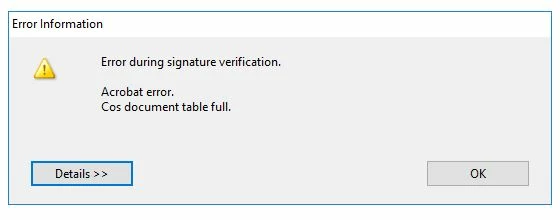
PDF document contains multiple annotations which includes signature annotations also. This PDF document was signed multiple times by the signers on different signature fields. Document is signed by our signing application. When we opened the final signed PDF document which contains multiple signed signature fields, Adobe Reader DC marks some signatures invalid as well as when the document is opened in Adobe Acrobat it prompts the above error.

Regards,
Muddassir Awan

3 replies

New Participant
July 31, 2022

I am getting same error (bit more elaborate) if I try to combine more than 250 images (JPEG or TIFF) in Acrobad document. This is happening with Acrobat Pro 2020 not a reader... (see attached snapshot).

The claim is that the disc is full (not a case) or memory low (Not a case, 64GB - 58 available).

I dont recall seing this error in earlier versions of Acrobat. Huge limitation. 

However, I was able to save compiled document with 250 pages, repeat the process, and then combine these 250-pagers in a full document. However, pain... 

Dubravko


New Participant
December 15, 2022

This kind of error crops up when I am building PDFs from page images.  Sometimes it has to do with the number of pages but other times it is the size of the files.  It seems to me that there is poor resource management that leads to this kind of error.  With today's computers (6+ cores, 16G+ RAM, copious storage, etc.) these should not occur.  OR, the application should watch for it and manage the resources to prevent what is all but a crash for the process.  I usually find that restarting the application clears this enigmatic Cos table and it will work for a while until it fills up again.


To Adobe, we spen a very large sum individually and collectively on Adobe CC subscriptions.  We deserver programs that work reliably and use the available hardware resources.  There's no excuse in 2023 not to have Acrobat Pro be a multithreaded application that scales according to the available resources.

Brainiac
May 27, 2021

How many signers? More than 10 signatures is not viable. 

Participating Frequently
May 28, 2021

Hi @Test Screen Name

There are only 7 signatures in the document.

Regards

Participating Frequently
September 1, 2021

Hi @Test Screen Name 

Have you any update on this scenario please?

Regards,
Muddassir Awan

AkanchhaS8194121
Brainiac
May 27, 2021

Hi Muddassir,


Thanks for the screenshot. 

As shared, the document has been signed by the multiple signers on different filed. Were those fields assigned to each individual signer? 

It could be a possibility one of or more than one signature wasn't validated. Or the signature filed wasn't assigned. 

Below is the help article for how you can validate digital signature of a PDF document. https://helpx.adobe.com/acrobat/using/validating-digital-signatures.html#validate_a_digital_signature 


Thanks,

Akanchha 

Participating Frequently
May 28, 2021

Hi Akanchha,

These fields are signed individually and the signatures are valid as I have validated the signatures using Foxit and iText. but facing the issue with Adobe.

Regards,
Muddassir Awan