


New Participant
June 1, 2018
Answered

Creating a Custom Calculation Script in Adobe Acrobat

  • June 1, 2018
  • 4 replies
  • 68209 views

Hi! I don't have any experience with script, but I think that I need to create a custom calculation script in my Adobe Acrobat form.

I have created a budget form and simply want to be able to enter expenses and have them automatically add up the running total. I'm trying to figure out a way to code this in the calculation area easily, without needing to write new code for each box.

So, for example, the form looks like this:

Date     Description     Category     Amount     Balance

4/23     Chipotle             Food            $25          $25

4/25     Starbucks          Food            $10          $35

4/27     Target                Supplies      $100        $135

I want the form to be able to automatically calculate that the balance is 35 when I add in the 10 for Starbucks, then 135 when I enter 100 for Target, etc. From looking it up in the past, I used the following for some similar calculations:

// Obtain the value from the first field

var v1 = getField("balance1").value;

// Obtain the value from the second field

var v2 = getField("amount2").value;

// Set this field value equal to the sum

event.value = v1 + v2;

When balance1 is the $25 and amount2 is the $10.

Is there a way I can change this formula to be able to use it for every balance field without needing to edit the formula in each one separately?

Thank you for your assistance!!

kristy
This topic has been closed for replies.
Correct answer try67

Thank you so much for your help!!

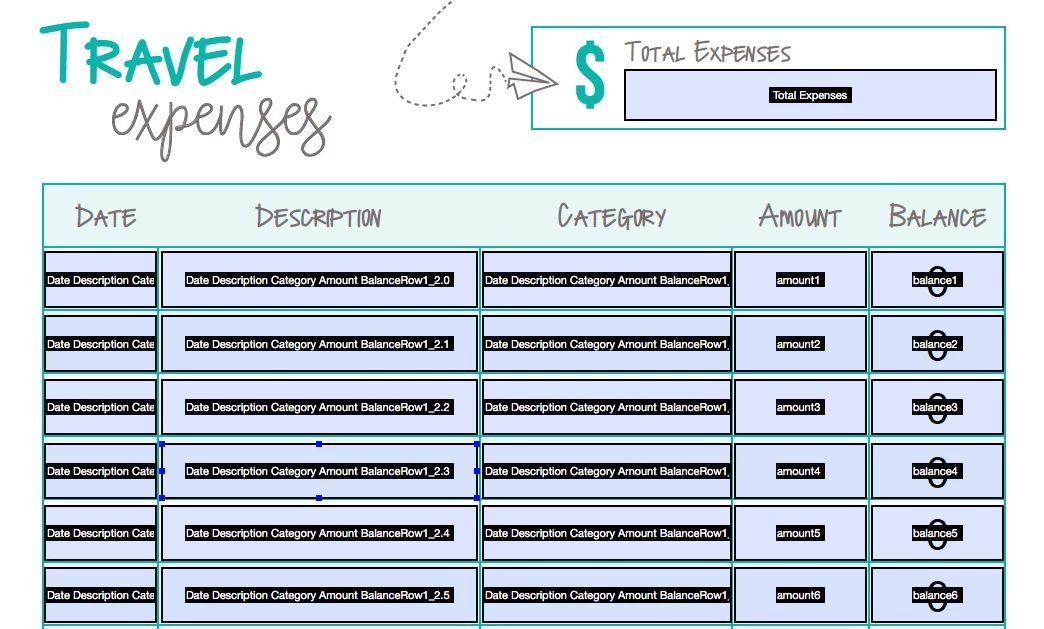
I have attached a shot of the file below. So the amount and balance columns are sequential (amount1, amount2, amount3, etc, and balance1, balance2, balance3, etc). I hope this is what you need?


OK, then this is the doc-level script you can use (insert it under Tools - JavaScripts - Document JavaScripts):

function calcBalance() {

    var rowNumber = Number(event.target.name.replace("balance", ""));

    var amount = Number(this.getField("amount"+rowNumber).valueAsString);

    if (amount==0) event.value = "";

    else {

        var prevBalance = 0;

        if (rowNumber!=1) prevBalance = Number(this.getField("balance"+(rowNumber-1)).valueAsString);

        event.value = amount+prevBalance;

    }

}

And then the custom calculation script of each "balance" field is simply:

calcBalance();

4 replies

New Participant
February 28, 2023

Hello, I'm looking for assitance.  I need to calculate a percentage which would be the (Actual Lodging + Actual M&IE) divided by the (Per Diem Lodging + M&IE) but I don't know how to write the custom calculation script.


try67
Community Expert
February 28, 2023

You can do it using this code:


var v1 = Number(this.getField("Actual Lodging").valueAsString);
var v2 = Number(this.getField("Actual M&IE").valueAsString);
var v3 = Number(this.getField("Per Diem Lodging").valueAsString);
var v4 = Number(this.getField("M&IE").valueAsString);

var v1_2 = v1+v2;
var v3_4 = v3+v4;
if (v3_4==0) event.value = "";
else event.value = v1_2 / v3_4;
New Participant
March 8, 2024

I need help. I need to know the code to calculate the Freight=Labels &Tags + Valves & Components (0.07)


New Participant
September 21, 2020

Hi there,

I was wondering if you could help me with the below problem:

I have to apply 15% promotional discount if the customer purchases 2 or more items from the given choice, would you know how can I acheive the same.

Thanks in advance,

G


try67
Community Expert
September 21, 2020

In order to help we need to either see the file or at least know the names of the fields.

However, if you name them something like Price1, Price2, etc. and place the number (without "EUR" or the commas) as their export values you could use this script as the custom calculation script of your text field:


var total = 0;

for (var i=1; i<=18; i++) {

var v = this.getField("Price"+i).valueAsString;

if (v!="Off") total+=Number(v);

}

event.value = total*0.85;

Participating Frequently
September 27, 2021

Your amazing, thank you so much for helping me at 11 pmPST. I love it!!! I entered the script but nothing happens in the next field? I deleted my original scrip and only entered what you sent. Now that I think about it, I probably should leave my old script and just add your script below. Is that correct? 


Here is the script I entered in the 1st field, no scripts entered in the subsequent 41 field. 

var v1=+this.getField("Text1.60.0.0").value;
var v2=+this.getField("Text1.60.0.1").value;
event.value=0;
if(v2!=0){
//compute difference between v1 and v2 as a percentage of v1:
event.value=(v2-v1)/v1}

for( var i=0; i<=41; i++){
if(Number(this.getField("Text1.60."+i+".1").value)!=0)
this.getField("1."+i).value = (Number(this.getField("Text1.60."+i+".1").value)-Number(this.getField("Text1.60."+i+".0").value))/Number(this.getField("Text1.60."+i+".0").value);
else
this.getField("1."+i).value = 0;}

Participating Frequently
May 30, 2019

I am working on a PDF that needs to calculate positive and negative numbers to get a subtotal. One item might have a credit of -$1,000 and the next line might show a -$250 credit and then a line might show a $300 charge. How can I get an accurate subtotal mixing positive and negative numbers?

Thanks in advance.

try67
Community Expert
May 30, 2019

Just use the built-in Sum command. It doesn't care if the value is negative or positive...

Participating Frequently
May 30, 2019

I did do that, but it does not calculate correctly (see below)

try67
Community Expert
June 1, 2018

Depends on how you named the fields. If you did it in a consistent way then you could write a doc-level function that does the calculation and then simply call it from each one of the Balance fields.

New Participant
June 2, 2018

Thank you for your response! Do you know if there is a tutorial somewhere that explains how to do that? Thank you!

try67
Community Expert
June 2, 2018

If you provide the field names I can help you with the code.