Participating Frequently
October 24, 2018
Question

Cross-highlighting PMI in 3D pdf doesn't work

  • October 24, 2018
  • 2 replies
  • 3025 views

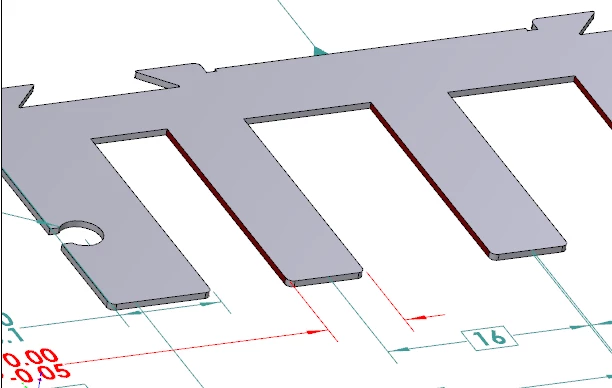
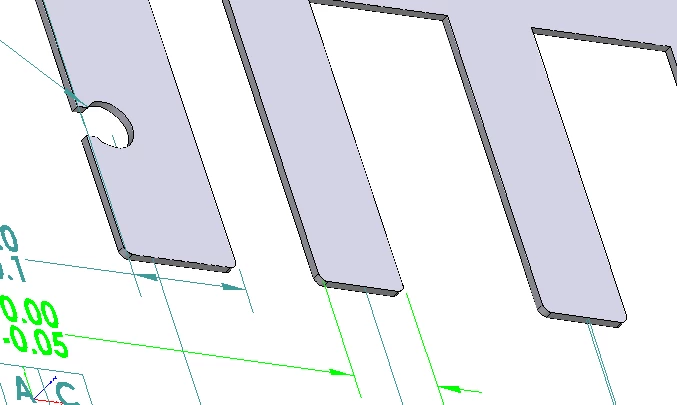
In the 3D functionality whenever a dimension or tolerance is selected the associated surfaces of the 3D model should light up. This happens on my PC, but my colleague who is running the same version of Acrobat DC doesn't have the problem. We are both running version 2019.008.20074. The only difference I can think of is that his PC is running win7 Dutch, mine is on win10 US English. The screenshots below show the difference with exactly the same file from the same network location. Note in the 2nd image the dimension and the sides of the part are highlighted in red where in the first only the dimension highlights.
my PC

colleague's PC

Is there a setting somewhere I am missing to enable the cross-highlighting?

This topic has been closed for replies.

2 replies

Participating Frequently
June 7, 2019

Just in case anybody else ever runs into this problem, I've found out what the cause and solution are.

Apparently the PDF wasn't being rendered with hardware acceleration, something that wasn't apparent because the option hardware rendering for legacy video cards was on. Hence the non-highlighting and (found upon closer inspection) also poor rendering quality of the model as compared to on other devices.

In another post I found out that the NVIDIA drivers are apparently not supported (why though, Adobe?) and you must make sure that Acrobat uses the integrated graphics. For some reason this wasn't the case on my PC.

New Participant
February 7, 2022

Hello marct24022675,


I know this is a very old ticked, but I've encountered the exact same problem. 

Activating hardware rendering for legacy video cards and selecting DirctX 9 works for me. But I also have to disable "activate protected mode at startup" (under security (extended). 


This of course is not very good if you send a 3D pdf to a customer and have to tell them to deaktivate some of their security features. Does someone have a solution to this?

Participating Frequently
October 25, 2018

Acrobat doesn't automatically highlight PMI, it is generally done using JavaScript attached to the document, page or 3D annotation. Make sure that JavaScript processing is enabled.

Participating Frequently
October 26, 2018

Thanks for the tip phils, I hadn't thought of that. Unfortunately that isn't it, though. Javascript was and is enabled.

Any other ideas?

Participating Frequently
October 26, 2018

JavaScript errors can sometimes cause strange behaviors as well. But there isn't much that you can do about those.

What software generated the PDF? Can you share the PDF?