



iNeedArrays
Participating Frequently
July 18, 2022
Answered

Custom formatting for text field which is populated by a drop down menu selection

  • July 18, 2022
  • 1 reply
  • 5585 views

Hi guys,


I'm preparing an form for my job and having trouble finding this answer. The form is for a list of training courses. The user should be able to select a training course from a Dropdown List, then have a corresponding Text Field populate with the description of their selected training course.


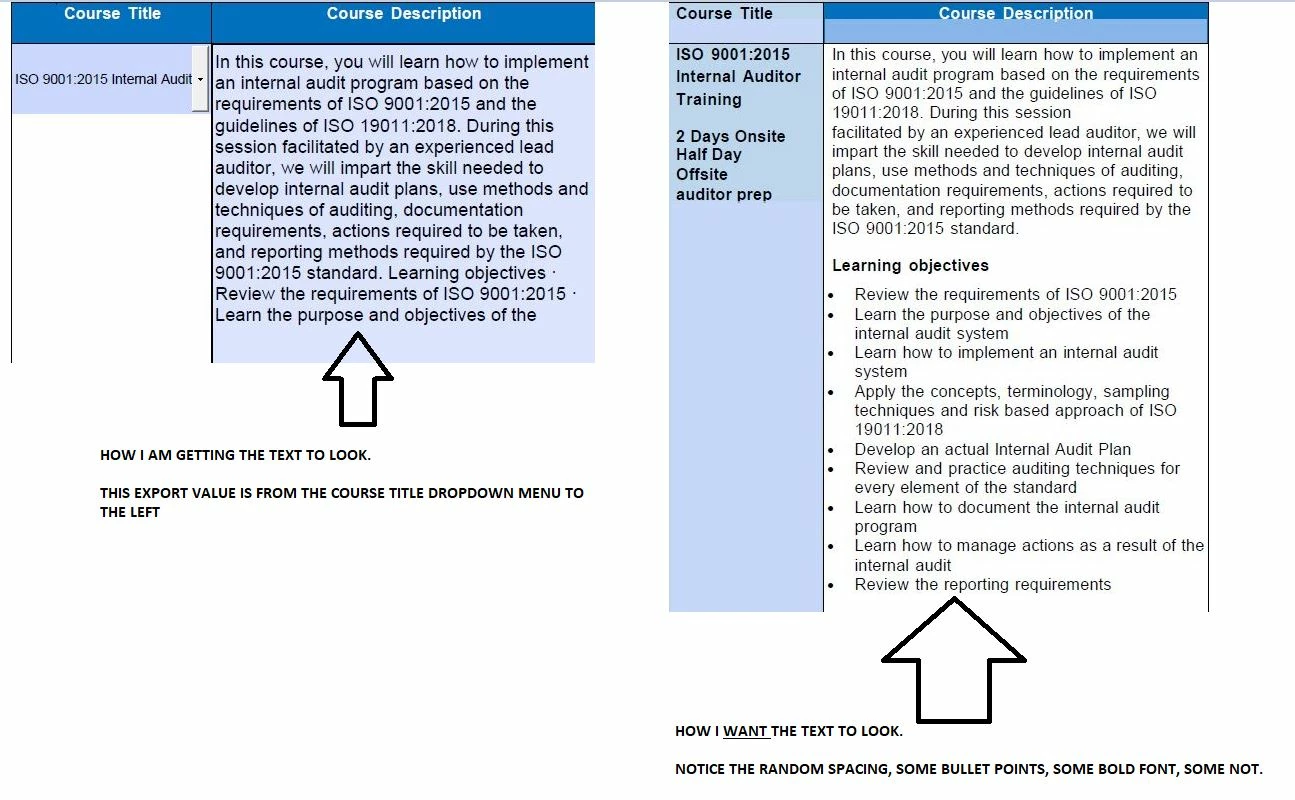
I understand how to do that part. What I am stuck on is how to force the Text Field(for the Course Description) to hold my custom formatting (as in random line spacings, some bolded sub-headers, bullet points, indents, etc.). The course descriptions are several paragraphs long so they can't just be a solid wall of text.


I have Multi-line and Allow Rich Text Formatting selected under the Text Field properties. I also then exited Prepare Form mode, selected the text and pressed Ctrl+E to enter the Form Field Text Properties. I do see these options but it does not appear to allow for random custom spacing, at least in my case where the text is being populated by the Export Value of a Dropdown list item. That Export Value is simply a solid box...you can write as much as you like in there, but cannot (as far as I can tell) skip lines or anything.


What do you guys think? Can this be done by using one text field? Or perhaps I have to export the course description across several text fields which are pre-spaced and formatted to my liking? This sounds very time consuming and difficult if so. Especially if I am trying to perform the same task for several items in the drop down menu, all with descriptions of differing length and formatting.


Pic below of what I'm trying to accomplish


Any guidance is very welcome. Thank you!


This topic has been closed for replies.
Correct answer Nesa Nurani

lol im so lost..i've been troubleshooting this literally all day but its not working how i need. 


The Variable drop does seem to be working as intended. What is not working properly is the additional text. So Lets say my Dropdown menu is populated with these selections: 'Apples', 'Oranges', 'Grapes'


The Drop variable is indeed working properly, populating the text field with 'apples', 'Oranges', 'Grapes', respectively. But this following code remains in the text field regardless of the selection. I need to assign different objects/texts to each individual dropdown selection. So for example..if I select 'Oranges' from the dropdown box, the text box would populated with 'Oranges' + 'Big round fruit' for example. Then if I select 'Apples', the text box would populate with 'Apples' + 'red delicious' for example. And the text needs to be formatted as rich text with random spacing as we discussed before. 


Is there something additional I would need to do to accomplish this?

Thanks for your patience with me


You can do it like this:

var drop = this.getField("Course").valueAsString;

event.target.richText = true;
event.target.multiline = true;

switch(drop){
case "Oranges":
var spans = new Array();
spans[0] = new Object();
spans[0].text = drop;

spans[1] = new Object();
spans[1].text = "Big round fruit";
spans[1].textColor = color.blue;
spans[1].textSize = 18;

event.richValue = spans;
break;

case "Apples":
var spans2 = new Array();
spans2[0] = new Object();
spans2[0].text = drop;

spans2[1] = new Object();
spans2[1].text = "red delicious";
spans2[1].textColor = color.red;
spans2[1].textSize = 18;

event.richValue = spans2;
break;

default:
event.value = "";}

1 reply

Nesa Nurani
Community Expert
Community Expert
July 18, 2022

Instead of export value, you can write text in script the way you want it to look.

try67
Community Expert
Community Expert
July 18, 2022

Agreed, but just want to clarify that in order for it to look like that you will have to set the text field as having Rich Text Formatting and use a script to apply an array of Span objects, each one containing a single string with its own format. Then apply that array to the field's richValue property to have it displayed.

iNeedArrays
Participating Frequently
July 18, 2022

Thank you both. I am assuming the script should be applied under the Dropdown properties under Format--> Custom Format Script?