Exit
  • Global community
    • Language:
      • Deutsch
      • English
      • Español
      • Français
      • Português
  • 日本語コミュニティ
  • 한국 커뮤니티
0

Darstellungsgehler beim Öffnen von PDF-Dokumenten

New Here ,
Aug 18, 2025 Aug 18, 2025

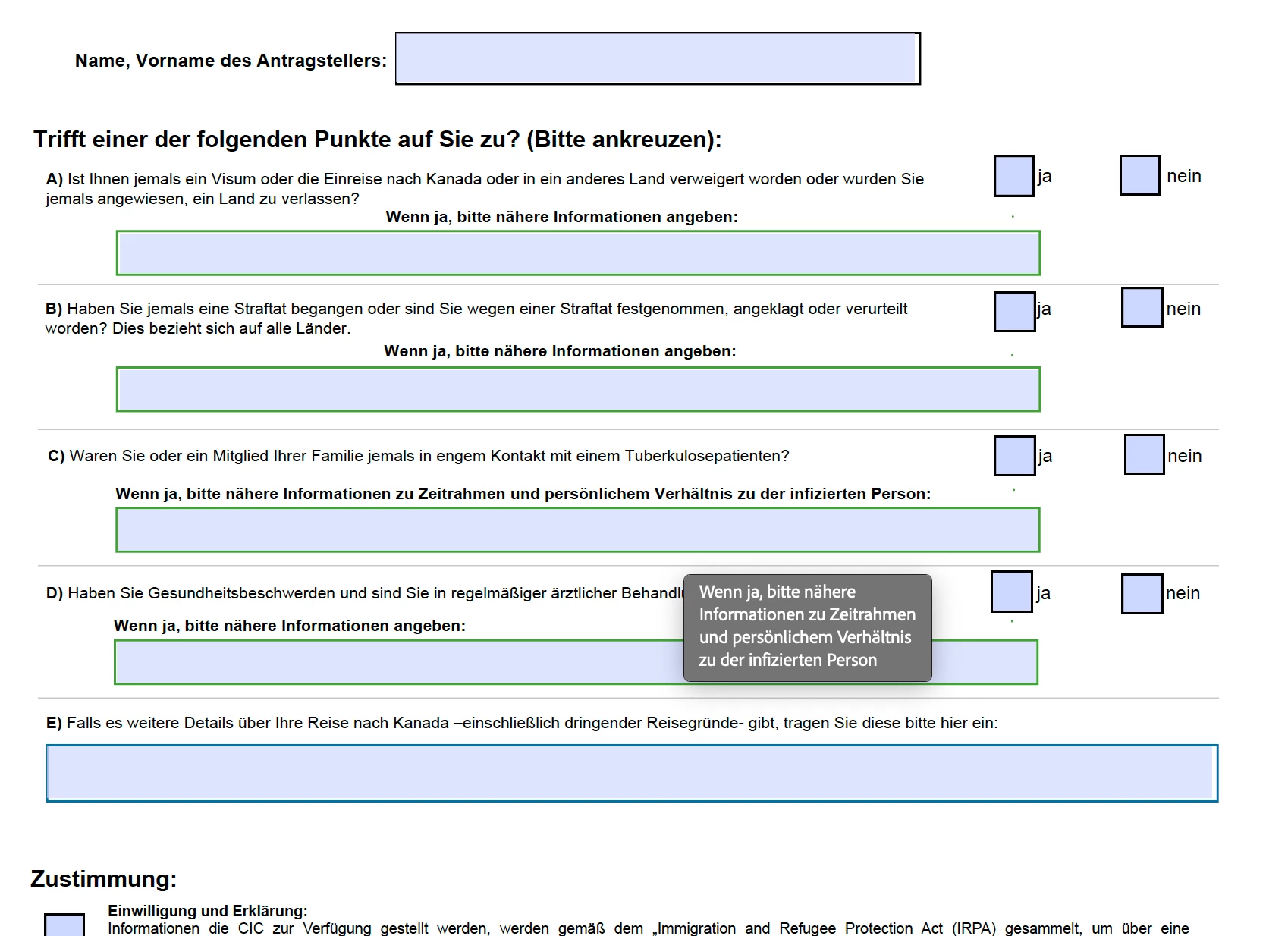
Seit ungefähr einer Woche erhalte ich beim Öffnen von verschiedenen PDF-Dokumenten Darstellungsfehler. Bei ausfüllbaren PDFs werden nur die Textfelder und Kästchen angezeigt, aber nicht die Beschriftungen. Bei anderen Dokumenten werden statt dem Text nur Punkte angezeigt.


Bei manchen Dokumenten wird eine Fehlermeldung angezeigt, dass eine Schrift nicht gefunden wurde. Aber nicht bei allen, bei denen der Fehler auftritt. 


Eine Kurzrecherche hat ergeben, dass bei dieser Fehlermeldung Schriftarten manuell hinzugefügt werden müssen. Das war bisher aber noch nie notwendig, dieselben PDFs, die jetzt den Fehler enthalten, ließen sich vorher problemlos öffnen.


In anderen PDF-Readern tritt das Problem ebenfalls nicht auf.


Eine Neuinstallation von Adobe hat nicht geholfen, zumal das Problem nicht nur bei mir auftritt, sondern auch bei meinen Kollegen.


Gibt es für das Problem eine einfache Lösung? Für jedes geöffnete Dokument manuell eine Schriftart zu installieren ist nicht praktikabel...

TOPICS
PDF
2.5K
Translate
Report
Community guidelines
Be kind and respectful, give credit to the original source of content, and search for duplicates before posting. Learn more
community guidelines
1 ACCEPTED SOLUTION
Adobe Employee ,
Aug 22, 2025 Aug 22, 2025
LATEST

Hi @raphael_2525


Thanks for sharing the file. 


TariqAhmadDar_0-1755881203274.png

Screenshot 2025-08-22 at 10.17.01 PM.png


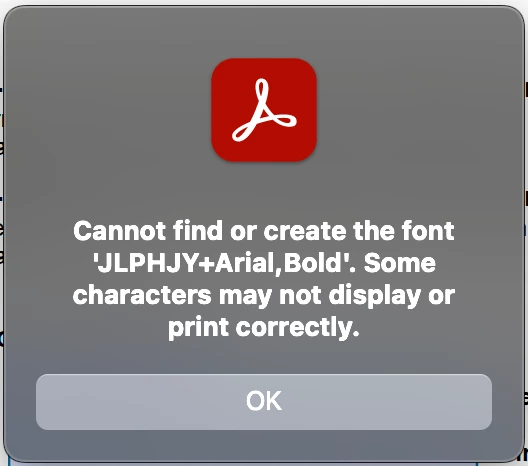
When I open the file, the error message for the font "ULPHJY +Arial, Bold" appears. Since this file was created with a third-party app, it likely used a custom font. While Acrobat attempts to render the file, the font does not seem to be properly embedded, hence the error. 

After I used the Preflight font fix-up, the file opened, and those dotted lines turned into text. I know it may not fulfil your requirement that a font face be used, but now it is clear the issue is with the file, not with the app.  


Please check the file attached that I fixed. 


FYI... Why does Acrobat show font issues while browsers/other apps render fine

1. Acrobat is stricter about fonts

  • Acrobat and Reader strictly follow the PDF specification.

  • If a PDF doesn’t embed fonts properly, Acrobat tries to use the exact system font (or substitute one) → If a font is missing, you’ll see errors like “Cannot find or create the font.”

  • Browsers (Chrome, Edge, Firefox) or other viewers are more forgiving, and silently substitute with any available font without warning.


2. Font embedding differences

  • If the PDF creator only partially embedded fonts or didn’t embed them at all, Acrobat notices this and highlights the issue.

  • Browsers just render with a fallback font that “looks close enough.”


3. Transparency and text rendering

  • Acrobat uses a full PostScript and PDF engine to render content.

  • Many other viewers use lightweight rendering libraries (like PDFium in Chrome) that rasterize text differently, masking font issues.


4. Security / Licensing compliance

  • Acrobat respects font licensing more strictly. Some fonts cannot legally be embedded. Acrobat warns you.


Best regards,
Tariq | Adobe Community Team | Meet Acrobat Studio

View solution in original post

Translate
Report
Community guidelines
Be kind and respectful, give credit to the original source of content, and search for duplicates before posting. Learn more
community guidelines
Community Expert ,
Aug 18, 2025 Aug 18, 2025

@raphael_2525 first of all, 2 weeks ago you were fine, until last week.... since reinstalling Adobe didn't resolve the issue, and other PDF readers work fine, it's pretty clear that the issue isn't with Adobe itself. Instead, it seems like something outside of the program is causing the trouble, a sort of external dependency that Adobe needs to function correctly.

1. Did you do a recent update to Acrobat? Or your OS? 
2. PC or MAC?
3. What version of Acrobat?
4. Is your colleagues and co-workers on the same OS? PC or MAC?
5. A permission issue?


Translate
Report
Community guidelines
Be kind and respectful, give credit to the original source of content, and search for duplicates before posting. Learn more
community guidelines
New Here ,
Aug 18, 2025 Aug 18, 2025

Thank you for the fast answer.


Here are the answers to your questions:

1. I have activated automatic updates for Adobe, so I don't know, when the last update was installed. The last update for my OS was installed on 15.08.2025, but the problem occured before that. Before that, the last update was 6 weeks ago, long before the problem occured.

2. PC (Windows 11, Version 24H2)

3. Version 2025.001.20577

4. Yes, all my colleagues work on the same OS on PC.

5. This shouldn't be the case, as I have admin access to our systems.

Translate
Report
Community guidelines
Be kind and respectful, give credit to the original source of content, and search for duplicates before posting. Learn more
community guidelines
Adobe Employee ,
Aug 18, 2025 Aug 18, 2025

Hi @raphael_2525


Thanks for reaching out, and sorry for the troubled experience. 
If you open the file, which is rendering blank in Acrobat, in Google Chrome, doesn't it open fine? Is it possible you can share a video recording of the issue, or at least a screenshot of the file rendering in Acrobat and the same file rendering in Google Chrome?


Will be waiting for your response.

Best regards,
Tariq | Adobe Community Team

Translate
Report
Community guidelines
Be kind and respectful, give credit to the original source of content, and search for duplicates before posting. Learn more
community guidelines
New Here ,
Aug 18, 2025 Aug 18, 2025

I have added screenshots of the file in Adobe and in Chrome (where it opens fine). It also opens fine in Microsoft Edge and Firefox.


This time, I got a different error message in Adobe (screenshot also added) which translates to "Error on this page. The page may not display correctly in Acrobat. Contact the creator of the PDF document to fix the problem." But as it opens fine in other PDF readers and has opened fine in Adobe until two weeks ago, I don't think, there is a problem with the PDF file itself.

Translate
Report
Community guidelines
Be kind and respectful, give credit to the original source of content, and search for duplicates before posting. Learn more
community guidelines
New Here ,
Aug 18, 2025 Aug 18, 2025

I forgot the screenshot of the error message. So here it is.

Translate
Report
Community guidelines
Be kind and respectful, give credit to the original source of content, and search for duplicates before posting. Learn more
community guidelines
Adobe Employee ,
Aug 19, 2025 Aug 19, 2025

Thanks for the screenshot and error message, @raphael_2525.
Could you please share the file with us? It seems there is a problem with the file. 


If you can't share the file with us publicly, you can send it via PM. To send a private message, click on the envelope icon in the top right corner.  


Also, judging from the error message. 

This usually means the PDF contains content that is corrupted, non-standard, or created with tools that didn’t fully comply with the PDF specification.


Please try analyzing the PDF with Acrobat’s Preflight tool to identify possible file issues.

  • Open Preflight (under Tools > Print Production > Preflight).
  • Run a validation profile, such as PDF/A compliance, or analyze for problems.
  • If errors are found, try the available Fixups (e.g., flatten transparency, embed fonts, or convert to PDF/A).
  • Finally, save the file again as an Optimized PDF


Let us know how it works.


Best regards,
Tariq | Adobe Community Team

Translate
Report
Community guidelines
Be kind and respectful, give credit to the original source of content, and search for duplicates before posting. Learn more
community guidelines
New Here ,
Aug 20, 2025 Aug 20, 2025

I can not share the full PDF, as some pages contain customer data. I removed these pages (they only contain text and don't show any errors) and attached the document.


After removing the pages, the remaining pages now show most of the text. But especially on the second page, some of the text is replaced by black dots (screenshot attached). This also happens in several other PDF files, which have not been created by us (but by authorities of several countries).


I tried to use preflight, but when I click on it, Adobe shows a message that Preflight needs to be installed manually and directs me to the Adobe website. But the link leads to an error page (Error 404: Page not found).

Translate
Report
Community guidelines
Be kind and respectful, give credit to the original source of content, and search for duplicates before posting. Learn more
community guidelines
Adobe Employee ,
Aug 22, 2025 Aug 22, 2025
LATEST

Hi @raphael_2525


Thanks for sharing the file. 


TariqAhmadDar_0-1755881203274.png

Screenshot 2025-08-22 at 10.17.01 PM.png


When I open the file, the error message for the font "ULPHJY +Arial, Bold" appears. Since this file was created with a third-party app, it likely used a custom font. While Acrobat attempts to render the file, the font does not seem to be properly embedded, hence the error. 

After I used the Preflight font fix-up, the file opened, and those dotted lines turned into text. I know it may not fulfil your requirement that a font face be used, but now it is clear the issue is with the file, not with the app.  


Please check the file attached that I fixed. 


FYI... Why does Acrobat show font issues while browsers/other apps render fine

1. Acrobat is stricter about fonts

  • Acrobat and Reader strictly follow the PDF specification.

  • If a PDF doesn’t embed fonts properly, Acrobat tries to use the exact system font (or substitute one) → If a font is missing, you’ll see errors like “Cannot find or create the font.”

  • Browsers (Chrome, Edge, Firefox) or other viewers are more forgiving, and silently substitute with any available font without warning.


2. Font embedding differences

  • If the PDF creator only partially embedded fonts or didn’t embed them at all, Acrobat notices this and highlights the issue.

  • Browsers just render with a fallback font that “looks close enough.”


3. Transparency and text rendering

  • Acrobat uses a full PostScript and PDF engine to render content.

  • Many other viewers use lightweight rendering libraries (like PDFium in Chrome) that rasterize text differently, masking font issues.


4. Security / Licensing compliance

  • Acrobat respects font licensing more strictly. Some fonts cannot legally be embedded. Acrobat warns you.


Best regards,
Tariq | Adobe Community Team | Meet Acrobat Studio

Translate
Report
Community guidelines
Be kind and respectful, give credit to the original source of content, and search for duplicates before posting. Learn more
community guidelines