


Participating Frequently
September 21, 2021
Answered

Dates and Days Autofill

  • September 21, 2021
  • 3 replies
  • 1957 views

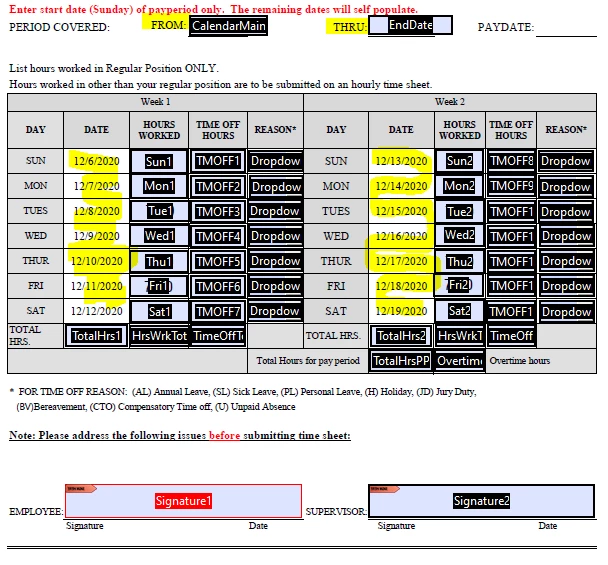
I have an excel that lets me enter a date, and it autofills the highlighted areas with the date end rage of 2 weeks from the initial date entered. It autofills the dates next to the days. I am new to Acrobat, but need to redo our timesheet as a fillable PDF instead of using Excel. Please help!


This topic has been closed for replies.
Correct answer Nesa Nurani

Lets say your field names are "Date1-Date14", use this as validation script of "CalendarMain" field (field where you select start date):

var date = util.scand("mm/dd/yyyy", event.value);
for( var i=2; i<=14; i++){
if(event.value == ""){
this.getField("Date1").value = "";
this.getField("Date"+i).value = "";}
else {
date.setDate(date.getDate() +1);
this.getField("Date1").value = event.value;
this.getField("Date"+i).value = util.printd("mm/dd/yyyy", date);}}

3 replies

Nesa Nurani
Nesa NuraniCorrect answer
Community Expert
September 21, 2021

Lets say your field names are "Date1-Date14", use this as validation script of "CalendarMain" field (field where you select start date):

var date = util.scand("mm/dd/yyyy", event.value);
for( var i=2; i<=14; i++){
if(event.value == ""){
this.getField("Date1").value = "";
this.getField("Date"+i).value = "";}
else {
date.setDate(date.getDate() +1);
this.getField("Date1").value = event.value;
this.getField("Date"+i).value = util.printd("mm/dd/yyyy", date);}}

Participating Frequently
September 22, 2021

This worked! This has been extremely helpful! I have seen you post on other pages and i appreciate you taking the time, yet again, to assist a novice. 

Inspiring
September 21, 2021

You don't have fields where dates should go?

Do you want first date to be same as input date or it starts with +1 day?

Participating Frequently
September 21, 2021

Yes, the first day would be the date entered. Below is our current sheet. When you enter a date in the "FROM" cell, it will autofill the rest of the dates shown. 


Amal.
Community Manager
Community Manager
September 21, 2021

Hi there


Hope you are doing well and sorry for the trouble.


The workflow you are trying to do is might be possible using the custom JavaScript. For more information about using the Javascript please check the help page - https://acrobatusers.com/tutorials/javascript_console/


Regards

Amal