


Participant
March 17, 2023
Answered

Deactivation of signature verification does not work

  • March 17, 2023
  • 3 replies
  • 1531 views

HELP:
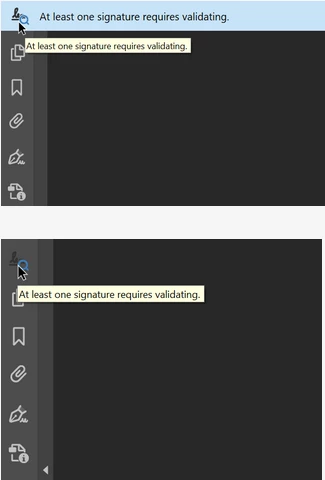
The blue bar "at least one signature needs verification" takes up working screen and draws away my attention from working. 


I deactivated the automatic verification of signatures ("Bearbeiten" -> "einstellungen" -> "Unterschriften" -> "Überprüfung") but still every time I open this file the blue bar reappears.

HOW CAN I DEACTIVATE IT?
This topic has been closed for replies.
Correct answer Amal.

Hi @Falk289243569vjh 


Hope you are doing well and sorry to hear that.


Please click on the icon on the far left of the blue bar (the signature w/ either a magnifying glass or yellow warning symbol), and it'll hide the bar, storing it in the left... pull-out toolbar


Let us know how it goes.


Regards

Amal


3 replies

Participant
February 12, 2024

how can i sig validet

Amal.
Community Manager
Community Manager
February 12, 2024

Hi there


Please go through the help page https://helpx.adobe.com/acrobat/using/validating-digital-signatures.html and see if that works.


~Amal

Participant
February 12, 2024

sig not valied

Amal.
Community Manager
Amal.Community ManagerCorrect answer
Community Manager
March 17, 2023

Hi @Falk289243569vjh 


Hope you are doing well and sorry to hear that.


Please click on the icon on the far left of the blue bar (the signature w/ either a magnifying glass or yellow warning symbol), and it'll hide the bar, storing it in the left... pull-out toolbar


Let us know how it goes.


Regards

Amal


Participant
March 17, 2023

Dear Amal,

thank you. Exactly the solution I need.


Have a wonderful weekend.


(Sidenote: the symbol get's removed from the side-toolbar and integrated into the notification bar, so it just moves a few mm. Therefore I did not intuitively try to hide the notification by clicking on the symbol)

Amal.
Community Manager
Community Manager
March 17, 2023

Hi @Falk289243569vjh 


We are glad to hear that. Marking a reply or response “Correct” will help future users with the same issue quickly identify the correct answer.


Regards

Amal