


Participant
March 16, 2018
Answered

Default Font Changing To Unreadable Characters in Adobe 2015.006.30417

  • March 16, 2018
  • 3 replies
  • 14154 views

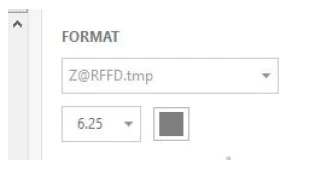
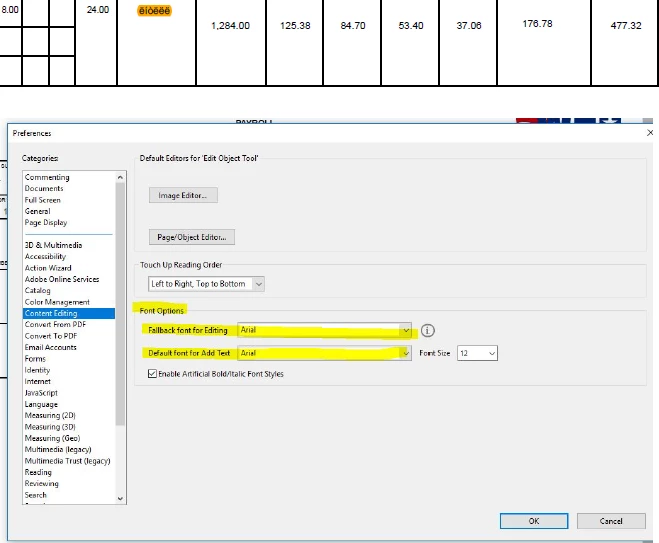
As the title suggests we are using Adobe Acrobat Pro DC 2015.006.30417. On many of our machines when we open a pdf and goto to fill in parts of the pdf it writes in an unreadable machine language (Highlighted in orange below) even though we have went into preferences and set the content editing font to arial (highlighted in yellow below). The font its trying to use is pictured directly below. We are able to change the font in the format window and continue but everytime a user opens up a form and tries to edit content it continues to default to this problem. Any known fixes would be greatly appreciated, thanks.
This topic has been closed for replies.
Correct answer Document Geek

This looks like a font embedding issue. Try this: Embedding Fonts with Acrobat Pro's Preflight Tool - KHKonsulting LLC

3 replies

Participating Frequently
April 5, 2023
Hi there, I would greatly appreicate any advice.
 
I create an Indesign job and it creates a perfect PDF, then if I go to another job in another program like Illustrator that has other fonts then go back to indesign and make some changes for the client the job looks fine in Indesign but when I create the PDF the PDF has substituted some letters or symbols with a box with an X in it as per the attached.
 
The word below in the screen grab should be efficient. The ff has been substitued with a box. It happens with hyphens as well.
 
Thank you.
Bevi Chagnon - PubCom.com
Legend
April 5, 2023

Hi @Graydesigns, this white block means that a particular glyph is missing on the font that is being used. In your sample, the missing glyph is the ffi ligature (Unicode codepoint FB03, see the ligatures Unicode characters chart at Unicode.org). Your sample appears to use a version of Garamond (or Sabon, a close cousin of Garamond). 


Not all fonts contain ligatures, so somewhere during the process, the original font was swapped with a different font (or different version of the font) that doesn't have the ffi ligature.


There are a bazillion variations of Garamond available from the font foundries. Searching Adobe Type https://fonts.adobe.com/search?query=garamond shows that their library has 7 different versions:

  • Adobe Garamond (by Adobe)
  • Garamond Premiere (by Adobe)
  • EB Garamond (by Google)
  • Cormorant Garamond (by Google)
  • ATF Garamond Micro (by ATF)
  • ATF Garamond Text (by ATF)
  • ATF Garamond Subhead (by ATF)


Linotype/Monotype has several more variations https://www.linotype.com. And then there are the Garamonds that come with our operating systems and software.


They are not the same: Each variation is unique. Although the basic alpha-numeric glyphs are usually available on all, only some will have ligatures and an even smaller group will have the specific ffi glyph.


Suggestions:

  • Make sure that the original variation of Garamond you used is still installed on your computer. You can see if InDesign is missing a font by going to Type/Find Replace Font. Is your preferred version of Garamond listed as missing? If so, use the lower section to swap in the correct version.
    • Note that switching between programs or opening/closing/opening projects can trigger Adobe's cloud fonts and trigger missing font or glyph errors. This is one problem we're seeing here in the Forums with cloud fonts.
  • If possible use a traditional version of the font rather than a cloud version. That is, download the font and install it permanently on your computer. This should bypass the cloud flakiness.
  • And you can also turn off automatic ligatures in your project. This will change the ffi ligatures to the real individual f f i characters. Done in 2 places:
    • In a Paragraph Style definition dialogue, UNcheck ligatures in both the Basic Character Formats and OpenType Features sections.
  • Lastly, make sure that when you export to PDF (either print or interactive) that all font glyphs are embedded into the PDF. It should say:
    • Subset fonts when percent of characters used is less than: 100%.


Hope this helps.


|    Bevi Chagnon   |  Designer, Trainer, & Technologist for Accessible Documents ||    PubCom |    Classes & Books for Accessible InDesign, PDFs & MS Office |
Participating Frequently
April 5, 2023

Thank you, the problem is now solved, I updated Suitcase, reinstalled a new version of the fint and updated Indesign.

Participant
March 26, 2018

Absolutely worked. Thank you so much.

Document Geek
Community Expert
Community Expert
March 26, 2018

Glad to hear it.

Document Geek
Community Expert
Document GeekCommunity ExpertCorrect answer
Community Expert
March 23, 2018

This looks like a font embedding issue. Try this: Embedding Fonts with Acrobat Pro's Preflight Tool - KHKonsulting LLC

Participant
March 23, 2018

Does this mean that if I'm the party editing this PDF after it has been created that I would need to purchase these fonts to not have this issue? Just trying to understand why I have a default font set for editing and a "Fallback font" that I would assume should fill that role if I don't have a font installed?

Document Geek
Community Expert
Community Expert
March 23, 2018

No, you shouldn't have to. It just means the PDF wasn't created with all the fonts embedded. Just try running the preflight fix mentioned above and see what happens. Then report back.