


Participant
December 5, 2018
Answered

Delete prompt

  • December 5, 2018
  • 2 replies
  • 3943 views

Simple question. Should be a simple answer. How do I disable delete prompt: " Are you sure you want to delete the page form the document"

I have a lot of pages to delete in a document and do not have time to answer yes for every single page. Someone on here has to have an answer. I have been searching for over 30 minutes now. Please Adobe people someone respond.

Thank you!!!!!!!!!!!!!!!!!!!!!!!!!!!!!!!!
This topic has been closed for replies.
Correct answer passerbyA28

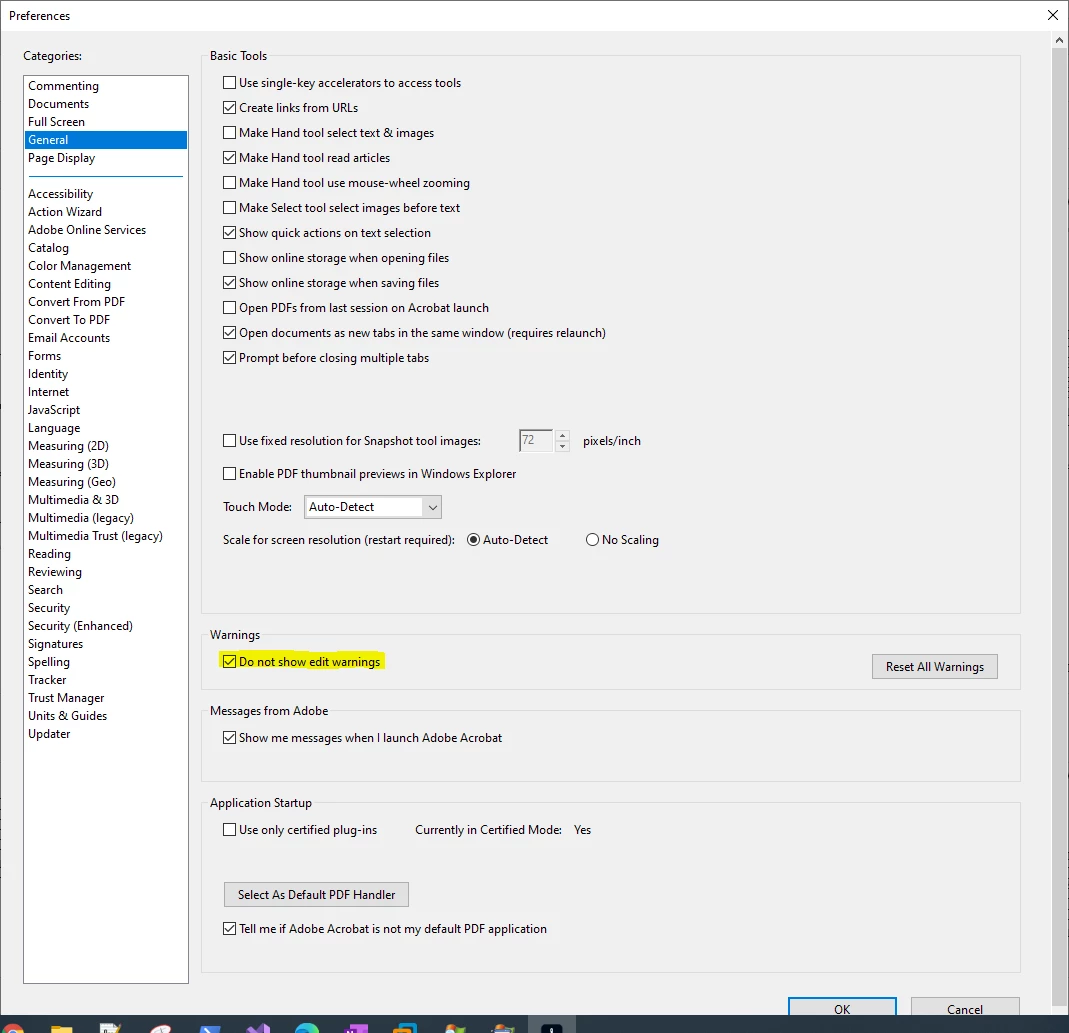
For anyone still having this issue, in Acrobat 2020 I was able to turn off warnings with:

Edit->Preferences->General->Warnings (heading)

Select "Do not show edit warnings"


2 replies

passerbyA28Correct answer
Participant
December 24, 2021

For anyone still having this issue, in Acrobat 2020 I was able to turn off warnings with:

Edit->Preferences->General->Warnings (heading)

Select "Do not show edit warnings"


bobtem
Inspiring
April 26, 2024

Update for 2024, it is in Prefs>General>Warnings

try67
Community Expert
Community Expert
December 5, 2018

Only possible by using a script.