1BigTimeBookie
Inspiring
May 6, 2024
Answered

Detecting different / odd page sizes in Adobe PDF

  • May 6, 2024
  • 1 reply
  • 2328 views

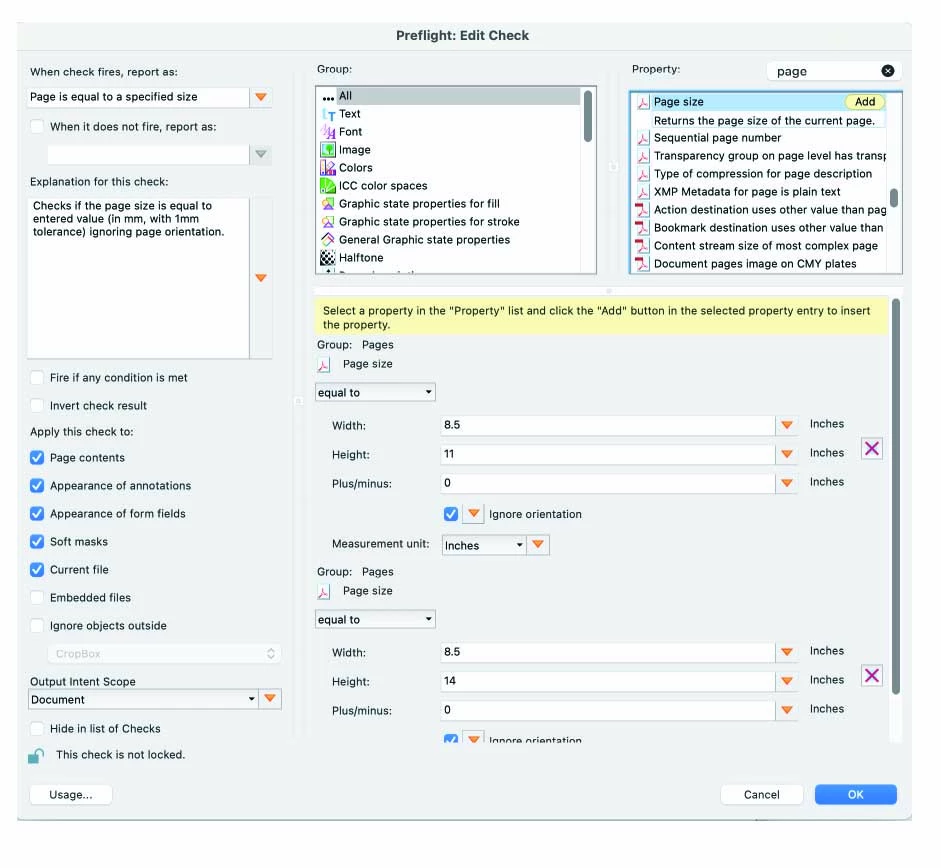
In the past I have successfully been able to check PDFs to see if all of the page sizes are what I need them to be.  However I have set the correct parameters but when I search a test document, it checks it but doesn't return the correct answer.  Three pages should produce an error.  Any suggestions or corrections are appreciated. 


See the picture below that show my selections.  thanks in advance for your assistance. 


Architecture: x86_64

Processor: Intel

Build: 24.2.20687.0

AGM: 7.1.4

CoolType: 9.1.0

JP2K: 4.0.2.54248


This topic has been closed for replies.
Correct answer try67

Thank you.   I went just back into the document and eliminated the rounding issue.  For example, If a page size was 11.379823766134 I changed it to 11.38.  I corrected all of the pages in question, ran it through pre flight and still no pages were flagged.  I have attached the updated pdf. 


In the picture I provided, do you see any place, where my parameters are incorrect? 

Thanks for your assistance. 


This is not something you can fix so easily. It comes from the issues JS has with floating points, especially when dividing numbers (as it needs to do when converting PostScript points to inches).

Here are the results I get for the second file you sent:

1: 8.5 x 11
2: 8.5 x 14
3: 8.5 x 11
4: 8.5 x 11
5: 8.370000203450521 x 11.68999989827474
6: 11.47999996609158 x 8.879999796549479
7: 8.66000027126736 x 15
8: 8.91999986436632 x 11.470000372992622


The real solution would be to define a range, instead of checking if the page size is exactly 8.5 x 11 you should check if it's between 8.49 and 8.51 and 10.99 and 11.01, for example.


1 reply

try67
Community Expert
May 7, 2024

Can you share the PDF file in question, and the Preflight profile you created?

1BigTimeBookie
Inspiring
May 20, 2024

Sorry for the delay.  I created this doc in Illustrator and saved it as a PDF.  Opened it in Adobe and reduced the file size. 


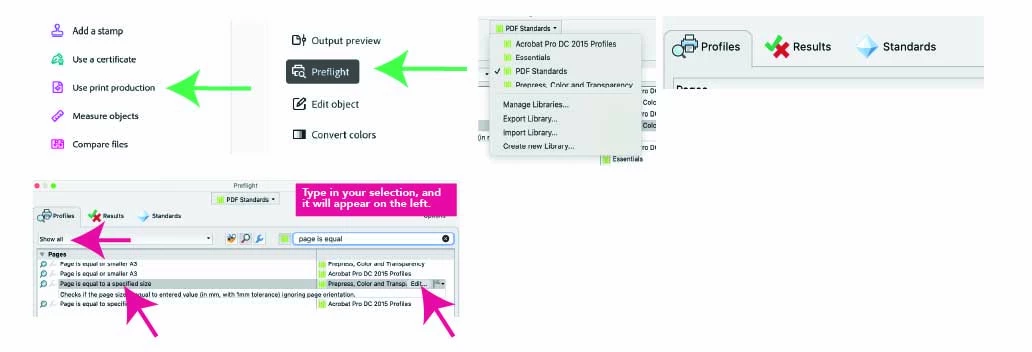
When you say PreFlight 'profile', I don'g know what you mean.   Please see the pics I have shared above for how I set up the - Page is equal to a specified size - function.  


If there is more to do, I have not done that.  Looking forward to getting this to work.  Thanks

1BigTimeBookie
Inspiring
May 20, 2024

This is not something you can fix so easily. It comes from the issues JS has with floating points, especially when dividing numbers (as it needs to do when converting PostScript points to inches).

Here are the results I get for the second file you sent:

1: 8.5 x 11
2: 8.5 x 14
3: 8.5 x 11
4: 8.5 x 11
5: 8.370000203450521 x 11.68999989827474
6: 11.47999996609158 x 8.879999796549479
7: 8.66000027126736 x 15
8: 8.91999986436632 x 11.470000372992622


The real solution would be to define a range, instead of checking if the page size is exactly 8.5 x 11 you should check if it's between 8.49 and 8.51 and 10.99 and 11.01, for example.


Yes this is the answer!  I made the changes. I tested several other page size options - using points not inches, higher and wider, lower, odd page, etc.  Using - unequal to - is the setting that achieved your solution of creating the range.  Pre flight identified all pages outside and inside this range.  Thanks so much for your patience. I hope this works for others or at least gives them an idea where to troubleshoot.   May your charge cord always reach the outlet 👍