... Why change something that works...? This is a good example why one should not do that.
Please explain how one should now sign a field in a document like this:
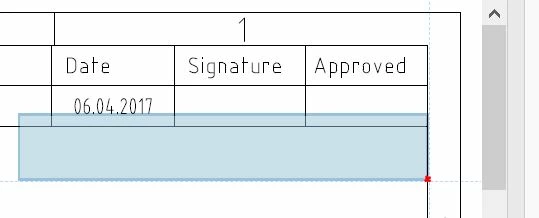
I am in the top right corner of a document. I want to place the signature within the "Approved" box. The new default signature size is too big. Fantastic. Now how do I resize it? Well, I need to put the top-left corner of the signature box in the top-left corner of the "Approved" box, click and resize. Cumbersome, but so far so good. But how do I do that if the box is being moved by the mouse cursor which is in the bottom-right corner of the box (red dot), which cannot go outside of the margins of the document itself....? 
I honestly thought this is a bug in my PC.... What kind of a UI requires you to position a top-left corner of a box, while dragging the box for its bottom-right corner!?
What was wrong with defining the size of a signature by creating a custom size box with the mouse cursor? Click-drag-release - done. This is a nightmare. Absolutely shocked.
Are there no settings to get rid of this new, revolutionary method... with all due respect...?
Dear violina123,
Thank you for reporting the issue.
Please try reducing the zoom level. And placing the signature rectangle at the bottom right corner where you want to.Setting the zoom level of the pdf to a higher value shows a bigger box size.But if you reduce it to a lower zoom level the box does not appear too big and secondly you can place it at any position. This would solve the problem of the box not going outside boundary as well.
To revert this change, you have to set the registry key as follows:
HKEY_CURRENT_USER-->Software-->Adobe-->[Product Name]-->[Track Name like DC/2015 etc]-->Security-->cDigSig-->bModernTool
bModernTool should be of type REG_DWORD and value should be set to 0.
This will take you back to old setting for signature box.
Please let me know if you are facing any issue
Regards,
Chandrima



 AdChoices