

Participating Frequently
November 8, 2021
Answered

Digital Signature Not readeable

  • November 8, 2021
  • 2 replies
  • 11381 views

Hello,

When i try to digitaly signe a PDF document i have a signature not readable.
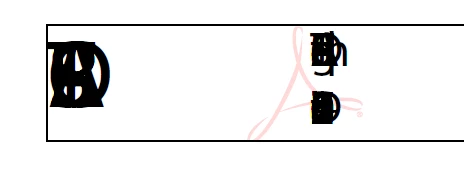
I have install a new version and suppress the preference folder.

Did someone Know how to repair this.


regards

Correct answer Amal.

Hi Sebastien,


Hope you are doing well and sorry to keep you waiting.  We have got some updates from the engineering team as below:

By default MyriadPro-Regular font is used for signing. The issue might arise if the font which is used for signing is present under C:\Windows\Fonts but is a shortcut linking to other software's cache.

So, let's try out a few steps and check the behavior:

  1. Please check if the same font is present under C:\Windows\Fonts
  2. If present,  Is it a font shortcut?
  3. Uninstall the MyriadPro-Regular font from the Windows Fonts directory (C:\Windows\Fonts ) and see the behavior.
  4. Install the Adobe provided MyriadPro-Regular font into the Windows Fonts directory and check the behavior.

    If it still doesn't work: please try cleaning Local app data cache here  %LOCALAPPDATA%\Adobe\Acrobat\<track> and reboot the computer once and check.


Let us know how it goes.


Regards

Amal

2 replies

Amal.
Community Manager
Amal.Community ManagerCorrect answer
Community Manager
March 31, 2022

Hi Sebastien,


Hope you are doing well and sorry to keep you waiting.  We have got some updates from the engineering team as below:

By default MyriadPro-Regular font is used for signing. The issue might arise if the font which is used for signing is present under C:\Windows\Fonts but is a shortcut linking to other software's cache.

So, let's try out a few steps and check the behavior:

  1. Please check if the same font is present under C:\Windows\Fonts
  2. If present,  Is it a font shortcut?
  3. Uninstall the MyriadPro-Regular font from the Windows Fonts directory (C:\Windows\Fonts ) and see the behavior.
  4. Install the Adobe provided MyriadPro-Regular font into the Windows Fonts directory and check the behavior.

    If it still doesn't work: please try cleaning Local app data cache here  %LOCALAPPDATA%\Adobe\Acrobat\<track> and reboot the computer once and check.


Let us know how it goes.


Regards

Amal

Amal.
Community Manager
Community Manager
November 9, 2021

Hi Sebastian,


Hope you are doing well and sorry to hear that. As descibed, the digital signatures are not readable.


Please check out the similar discussion with the correct answer marked here https://community.adobe.com/t5/acrobat-discussions/digital-signature-text-is-overlapping/m-p/12381126#M328425 and see if that works for you.


Regards

Amal

Participating Frequently
November 9, 2021

Hi,

I have read the discussion and i already try to install the last version (after a clean uninstall of the last Adobe version) and it doesn't work. i have delete the preference and do a ccleaner regedit clenaning before.

Regards,

Participating Frequently
January 13, 2022

Hi Sebastien,


We are sorry to hear that. The issue mainly arrises when the required font is not priperly embedded in the PDF file or its not present on your system or you may not have the required permission to use the font.

FOr more information about font embedding, please go through the help page https://helpx.adobe.com/acrobat/using/pdf-fonts.html


Regards

Amal


Hello,

I have read your link bute i haven't found a solution. What can i do for the font.

I am not sure that it's comming from this. A user can sign document for few weeks and one day it's not working. The documents are the same or made with the same way (from word document).

regards,