anshulg84986250
New Participant
October 16, 2018
Answered

Disable Comment Pop Up

  • October 16, 2018
  • 8 replies
  • 27902 views

After latest update of Adobe Reader (Desktop) :

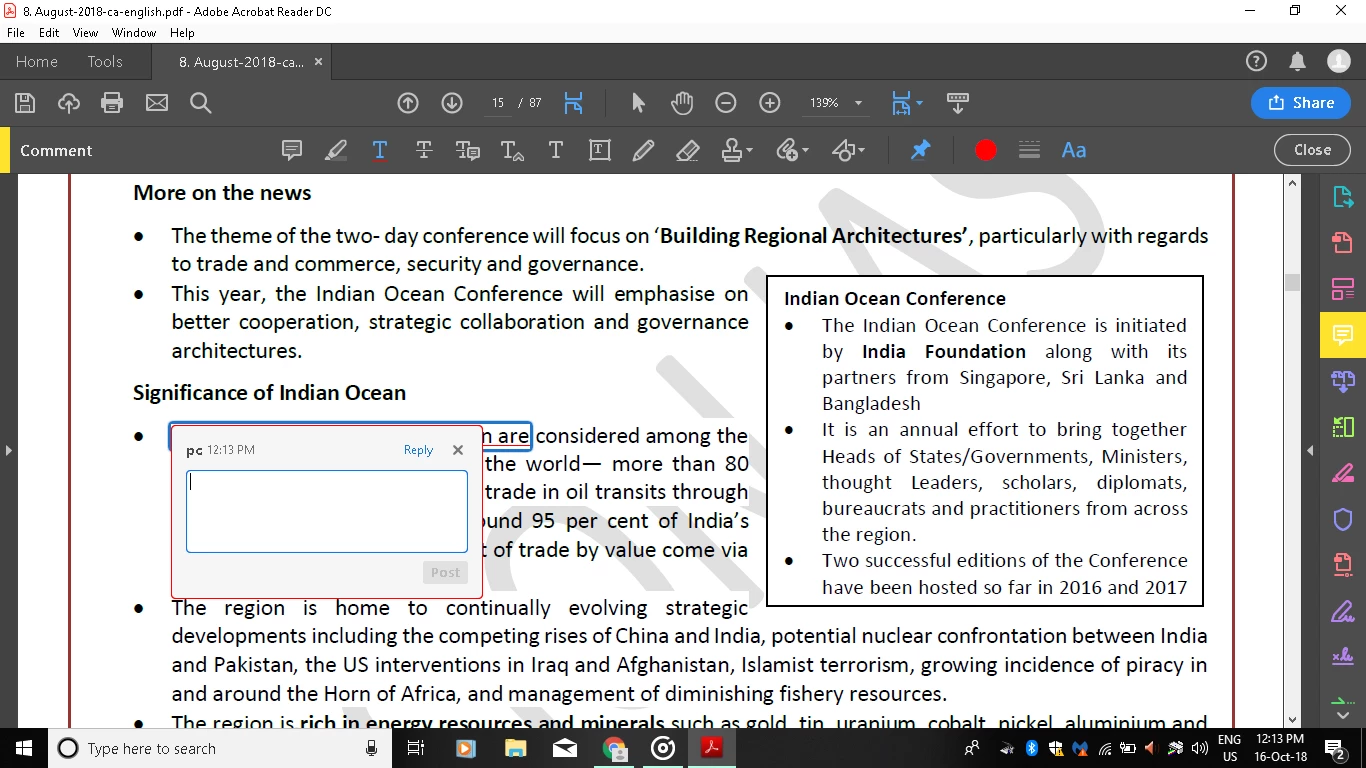
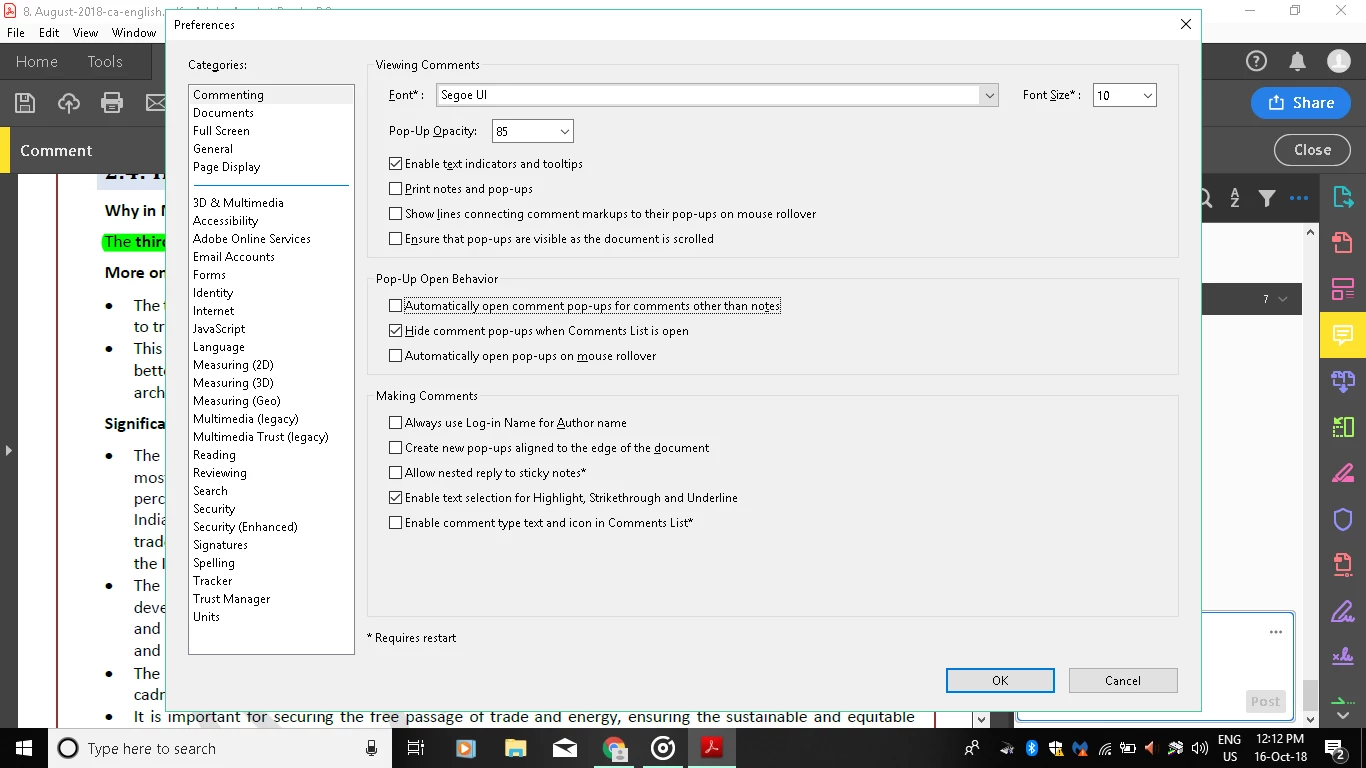
Comment pop up opens up whenever I underline a text.This is happening even when I have not selected "Automatically open comment pop ups for comment other than notes" in Commenting Preferences. This is very irritating when one wants to have a continuous reading. { Though pop up not opens when Comment App(pan) remains opened, but that is not reader friendly.} Also, after underlining, I cannot scroll down the page using keyboard; all time I have to select hand cursor--> click somewhere on the document--> then I can scroll down.

Is there any solution?
Correct answer Meenakshi Negi

Hi All,

We have released a fix patch of Acrobat/Reader 19.010.20069 that resolves this issue.

Please try to update the application. Launch the application and go to Help > Check for updates.

You may also refer this link 19.010.20069 Out of cycle update, January 03, 2019 — Release Notes for Acrobat DC Products for more details on the recent update.

Let us know if how it goes.

Regards,

Meenakshi

8 replies

CielMika
New Participant
December 23, 2018

I tried the above settings but it still opens this annoying window when I highlight or underline. I have the newest update 20064.

Meenakshi Negi
Community Manager
Meenakshi NegiCommunity ManagerCorrect answer
Community Manager
January 3, 2019

Hi All,

We have released a fix patch of Acrobat/Reader 19.010.20069 that resolves this issue.

Please try to update the application. Launch the application and go to Help > Check for updates.

You may also refer this link 19.010.20069 Out of cycle update, January 03, 2019 — Release Notes for Acrobat DC Products for more details on the recent update.

Let us know if how it goes.

Regards,

Meenakshi

Known Participant
January 4, 2019

This does not appear to resolve the stamps creating a comment pop up.

Here are my settings:

Meenakshi Negi
Community Manager
Community Manager
December 18, 2018

Hi All,

We have recently released an update that resolves the issue with comment pop-up.

Please update the application to version 19.010.20064.

You may refer to this link Release Notes | Adobe Acrobat, Reader for more information on the recent update.

Hope that helps.

Let us know if you experience any issue.

Regards,

Meenakshi

New Participant
December 19, 2018

Hi!

I have the same problem  and it persists after the new update. Does the update work for others? It does not for me. How else can we fix the problem? It is extremelly irritating and slow to read and highlight documents having to close down comments pop ups all the time.

Meenakshi Negi
Community Manager
Community Manager
December 19, 2018

Hi Pilarg,

Please make sure that that the option "Automatically open pop-ups on mouse rollover" is not selected under the Comment preferences.

In application, go to Edit  > Preferences > Commenting.

Could you please confirm if the pop-up appears when you are reading the document or adding the annotations in the PDF?

Did you check if the behavior is replicable on all PDFs?

Share the current version of the application and OS installed on the machine.

Regards,

Meenakshi

New Participant
November 30, 2018

I am having the same problem!  It directly relates to my stamp.  I just spent an hour with Adobe Support and in the end they told me to Google the problem.  Ugh!

I have noticed that it doesn't happen all the time.  But one thing that is consistent is that it is showing up on every version of Adobe Acrobat and Adobe Reader.  I am worried that this will begin to frustrate my customers since it is already frustrating my co-workers.  Please help Adobe!!

Known Participant
November 28, 2018

I believe this is also related to using stamps. Now when I apply a stamp a comment window opens as well, and I have to delete the extra comment after each stamp is applied. Very tedious to have to do double work.

try67
Braniac
November 28, 2018

Can you post a file with this "extra" pop-up? I might be able to create a tool that will remove them automatically...

Known Participant
November 28, 2018

You can't, not directly. You can upload it to Dropbox, Google Drive, Adobe Cloud, etc., and then post the link to it here, or you can email it to me privately (try6767 at gmail.com), if you prefer.


Test Doc for Acrobat Comment Pop.pdf - Google Drive

There are 3 stamps in the file but 6 comments were created.

richardp58552387
New Participant
November 27, 2018

I have the same issue with Pro DC.   This is my third time going back to Adobe customer support.   There is no way to shut the comments

off you have to manually nix each one.....doubling the time spent doing a markup

Adobe - own up that you have a problem and fix it

New Participant
November 22, 2018

I'm experiencing the exact same issue here, it's so frustrating.

Any help would be much appreciated!

vrdmg
New Participant
October 22, 2018

I'm having the exact same issue with my Adobe Acrobat Pro DC and it's extremely frustrating. I have the same settings you've marked, and whenever I highlight text a comment popup opens. Extremely annoying, especially since I use this for work and people are starting to complain about the popups, but I've explained I've tried to fix it and so has my IT guy.

AkanchhaS8194121
Braniac
October 16, 2018

Hi Anshulg,

Sorry to hear about the frustrating experience with the changes to the latest version of Acrobat. Could you please share the exact version of Adobe Reader DC.

Open Reader>Help>About Adobe Reader

Also, check for the latest patch released Adobe Acrobat official update (19.008.20074). Open Acrobat>Help>Check for update.

Regards,

Akanchha

velekag19
New Participant
October 25, 2018

I'm having the exact same issue as well. I checked the version of my Reader and it is 2019.008.20074. I hope this helps and I really hope you manage to fix it soon because it's really annoying.