


ianc46124884
New Participant
October 4, 2018
Question

Disable or remove Share button new to Acrobat DC

  • October 4, 2018
  • 16 replies
  • 34781 views

After the last update 2018-09, this bright blue Share button appeared. 

And then a pop-up comes telling me what it can do for my life.

How can we hide the button or at least disable the pop-up

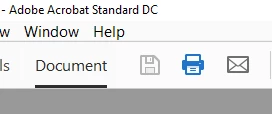
If I want to share, I will press the e-mail button that was already there, beside print:
16 replies

ls_rbls
Community Expert
August 8, 2019

Hello,

Just wanted to add that if you wish to remove the blue "Share" button see the images below:

Be advised that some registry keys are not lockable and you may want to do a more extensive  research on which registry keys will allow a permanent change if messing with the registry is fine with you.

OR

As to answer how can you remove/customize/personalize the "HOME VIEW"  and the "TOOLS CENTER" tabs from the main Adobe Acrobat workspace or interface (to include the other items)?

No,  there is no way to do that at this time... You may, however, petition here in this forum that the development teams consider your request so that they can implement it in a future release. So your feedback is gold.

I found the following links to be highly useful and educational to me and I wish to share them here for the benefit of other members in this community that may have a similar inquiry:

Is it possible to hide the "Menu" & "Tools" bar permanently in Acrobat?

Adobe Acrobat Workspace basics in Acrobat DC

Participating Frequently
July 29, 2023

You know… I did eventually come back to Acrobat. I simply have no better solution for processing cropping needs in large files. 
The fact that somewhere along the way the popups died makes it tolerable. 
There’s still something to be said here. Acrobat has one feature it can do better than most other PDF programs. Cropping. 
The OCR is woefully behind the industry whole. 
Page layout and arrangement was never a priority for PDF. Conversion/output options are limited. Input options are non-existent for todays market. 
Aechiving operations like web and html to pdf is a joke. 
Batch processing spends more time “checking security” than actually processing. 
Inputting anything complicated failed. 

If I didn’t know better I’d think Adobe was trying to kill off Acrobat. And found out enough lazy businesses would stick with it as long as it still worked on the oldest LTS version of windows and keep paying no matter what. 

jane-e
Community Expert
August 7, 2019

Hi

This was fixed by the engineers in December 2018 after feedback from users. Right-click the toolbar and choose "Hide Share Button Label". The first screen shot shows the Share button. In the second, it is gone.

If you don't see it, then update Acrobat DC from the Help menu.

~ Jane

Participating Frequently
August 7, 2019

You are mistaken.

Doing this does not remove teh "sharte button" it simply changes it from a big blue button to a grey one.

Even if it did - the toolbar is still polluted with the "feedback", Learn Adobe", Notifications" and "profile /settings" buttons.

All of these should be customisable - that is removable from the toolbar (they can still be in the menus for anyone who uses them).

It wastes space (for all the tools that are far more frequently used) as well as confused any client of mine who is completing a (fillable) form (In Reader).

This is basic programming - interface shoudl be for the user - not the self-important twat who assumes that everone only does what he does.

Adobe Employee
August 8, 2019

Hi,

Can you please explain the issue you have with : Feedback, Help, Notification and Profile icons in top bar? Since they are in top bar, they do not take up any space from your toolbars neither are obstructing any workflows. For Share button, switching off the label makes it occupy a small space in toolbar. Hope that works. Thanks.

RogerEllisJr
New Participant
April 17, 2019

Has anyone found this hidden setting to remove the share button?

New Participant
February 8, 2021

After a couple days of brute forcing my registry by adding all the seemingly plausible modifications that could remove the share button based on Adobe's provided index, I was able to remove the share, feedback, and other buttons on the most recent update, as of today (2020.013.20074):

I will attach my .reg file along with this post (in .txt format). I am certain that there are some excess modifications within the .reg file that doesn't really do anything, but, I don't want to spend any more time fixing an annoying problem that Adobe could have easily fixed years ago, if they had actually listened to their customers. Maybe they should try reading the book I'ved attached in my example to better understand the frustration we've been feeling. Reading it could maybe help them realize that if they continue to ruin the customer experience, they're not going to keep getting more customers, regardless of how much cloud advertisements they try to shove down everyone's throat.


I don't know...this is just my hunch, of course.


Lastly, if someone could filter-out the ineffective .reg-modifications on my file, and post a more concise .reg file, you would be a wonderful person.


Warm regards,

Brenna

Adobe Employee
December 21, 2018

With our latest release on 11th Dec, 2018, the issue reported by you has been addressed.

If your product has not already been updated, to get the latest product update, click on the menu Help --> Check for updates in the product.

Now you can right click on the Toolbar and customize the Share button by selecting the appropriate option.

For more information about the release, please refer to the Release Notes and the New Feature Summary web links.

Hope this helps in addressing the reported issue. We look forward to the continued feedback.

Participating Frequently
August 6, 2019

No.

This does not solve the problem.  It avoids the issue and pretends the problem is not there.

The problem is that the "share", "Feedback", "Learn Adobe", "Notifications" and "Profile and settings" buttons cannot be removed or hidden.

This is not hard to understand:

(Cambridge Dictionary)

(Collins dictionary)

Participating Frequently
August 7, 2019

I SHARE your frustration. Unfortunately there is one feature in Acrobat my new replacement app can not match. Though after talking with them they assured me they are working on the issue. So for now I was forced back to paying $15 a month for an app I use once or twice every 30 days.

I now see that this is a lost cause. The design member or team who came up with this (aside from being foolish and self righteous) obviously dug in to maintain the bug. Er, feature. Despite hundreds of lengthy posts on Reddit, discuss, talk-back, etc. All undeniably against this.

When microsoft did this with the ribbon they boosted an I independent  company, extend office, to one of the largest publishers of office extensions with their toolbar addin.

be interesting to see if the same idea comes to acrobat.

Participating Frequently
November 23, 2018

Well; here I am now. I found another program that is almost as good as Acrobat. I’ve given up a few benefits in automated cropping, but editing and redaction are actually better.

I would have waited, and eventually come back to Acrobat once this glaring bug was addressed. However adobe chose to charge me on the way out the door.

I’m livid!

i have two registered accounts. One dates back to 2006. The other pre-dates the internet and was created by POSTAL MAIL card.

I’ve Been loyal and outspoken in my support.

This is how you treat me?  Charge me $40? Too bad. One more customer who won’t come back.

keep this up you’ll quickly go out of business!

New Participant
November 20, 2018

I stopped using Acrobat Reader DC, because this useles button is taking way too much space from my toolbar.

Other competing programs allow me to set my own tools and not force down useless Adobe features that I don't use down my throat.

Participating Frequently
October 16, 2018

I echo the frustration of others. This is a really sad "enhancement" that simply gets in the way. It's unnecessary, inconvenient, ill-considered, annoying, and ultimately frustrating that it can't be removed. This kind of arrogant we-know-better-than-you-what-you-need from Adobe isn't winning any friends.

PLEASE REMOVE IT OR ALLOW US TO.

johng78495102
New Participant
October 16, 2018

Hello Mr. Gupta,

But is there a way to hide the "share", "provide feedback", and "learn adobe DC) buttons from the toolbar? They take up far too much real estate and make it so I cannot have the tools that I want to quickly access in the toolbar when I shrink the window down to the width of the page I am viewing.  This is a big economical problem for when I want to review and annotate multiple documents at a time.

See below: the ability to only have 8 tools visible in the tool bar (the page numbers should not even count as tools) when reviewing an 8.5 x 11 document in page view on a 27" monitor is a problem.

Please give us the ability to show/hide whatever we want in the tool bar. Productivity is everything and the inability to remove unwanted items has a significant negative effect on mine. It sounds like this is negatively affecting most everyone else who uses the product also.

Thank you.

hansm38969220
New Participant
October 14, 2018

One more vote to stop disrupting the user interface.

This button is ugly, annoying, way too big and always blocking something useful. To prevent users from disabling this little bugger, some marketing guys disabled the disabling. So that is how customers are treated?

New Participant
October 12, 2018

Agree that the blue messages like this "Share" popup (or whatever these promotional messages are called these days) shown in the attached image, is one of the annoying features of the most recent update to Adobe Acrobat Pro DC.

As if the other changes to layout and interface were not disruptive enough, this kind of nonsense has no place in a product marketed as "Pro" (as in professional). Or has that word too been abused into utter meaninglessness by marketers?