


Hoover5896
New Participant
August 24, 2017
Answered

Disable popup

  • August 24, 2017
  • 2 replies
  • 11740 views

Hello,

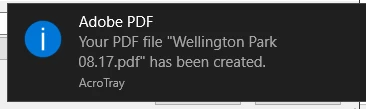
Below is the popup I get every time I save a PDF and I want to disable this? The popup appears in the bottom right corner of my screen every time. Reason being is because sometimes I need to batch print a huge list of PDFs and then save them all into different folders and this popup always gets in the way of the save button so I have to either wait for it to go away or exit out of it every time. Just want to disable the popup altogether! Any help or guidance is appreciated!
This topic has been closed for replies.
Correct answer Dave__M

OK - let's sleuth a bit deeper.  Can you tell me how you are creating the multiple PDFs?  Printing from Word?  Another application?  That might help us track down a solution.

A great weekend to you as well,

Dave

2 replies

New Participant
October 23, 2019

Follow Dave_M's instructions to get to the Settings > Notifications & Actions.  You may see Print Notification.  Turn that off and it may take care of the problem.

New Participant
October 25, 2019

After reviewing my own solution, I checked and it doesn't work either.  I can't seem to get rid of that annoying notification.

Dave__M
Participating Frequently
August 24, 2017

If running on Windows (10 for my screenshot), you should be able to enable/disable notifications from your Windows Notifications & actions System settings dialog.

I hope this is helpful.

My best,

Dave

Hoover5896
New Participant
August 25, 2017

Hi Dave,

Thank you for the help. Odd thing is though, I do not even have Adobe Reader as an option to turn notifications off. So I have to click "Get notifications from apps and other senders" off which results in me not getting any popups for any apps, and I do not want that. I at least want popups for Outlook 2016. Any idea why I would not have Adobe Reader as a notification to turn off in this section?

Again, I appreciate the help! Have a great weekend!

Dave__M
Dave__MCorrect answer
Participating Frequently
August 25, 2017

OK - let's sleuth a bit deeper.  Can you tell me how you are creating the multiple PDFs?  Printing from Word?  Another application?  That might help us track down a solution.

A great weekend to you as well,

Dave