


Drop-down calendar shows in preview, but not once download the PDF.
Original Document Creation:
Made in Google Sheets and saved as a PDF.
Steps I took with Adobe:
Creative Cloud > Acrobat > See All tools > Prepare a Form > Open > Select a File > Create Form > Text Field:
(General Tab) renamed to "DOCDATE" > Form Field "Visible"
(Appearance Tab) Changed both Border Color and Fill Color to "transparent"; Font to"12"
(Position Tab) Width = 1.1288 in x 0.2556 in
(Options Tab) Alignment "Left"
(Format Tab) Select Format Category "Date" and Date Options to "MM/DD/YYYY"
No other changes made in tabs.
Selected "Preview" > Calendar works (see snapshot):
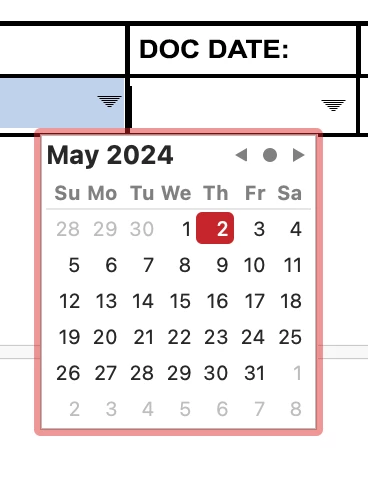
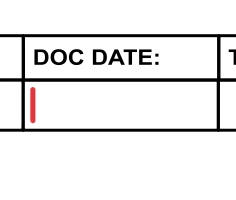
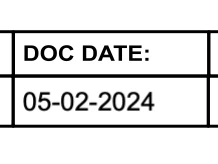
Select Exit Preview > File > Save > Adobe Cloud Storage > Home > Your Files > Check box to select file > Download > Location = "Desktop" (Running MacOS Sonoma 14.4.1) > Double-click to open the PDF > Click in the "DOC DATE:" field > box turns blue and cursor appears > no drop-down arrow and no calendar (see snapshot) > Can type in date only (see snapshot):
This client wants the drop-down calendar to match other forms built by other people in the past with Acrobat.
Thank you for any assistance.
 AdChoices