



Dumb Frustrating folder finder when extracting pdf pages to individual files
Turns out that if you want to extract multiple pages as individual files from PDF file in Acrobat Pro, when it's time to decide where you want to store those files, you get this...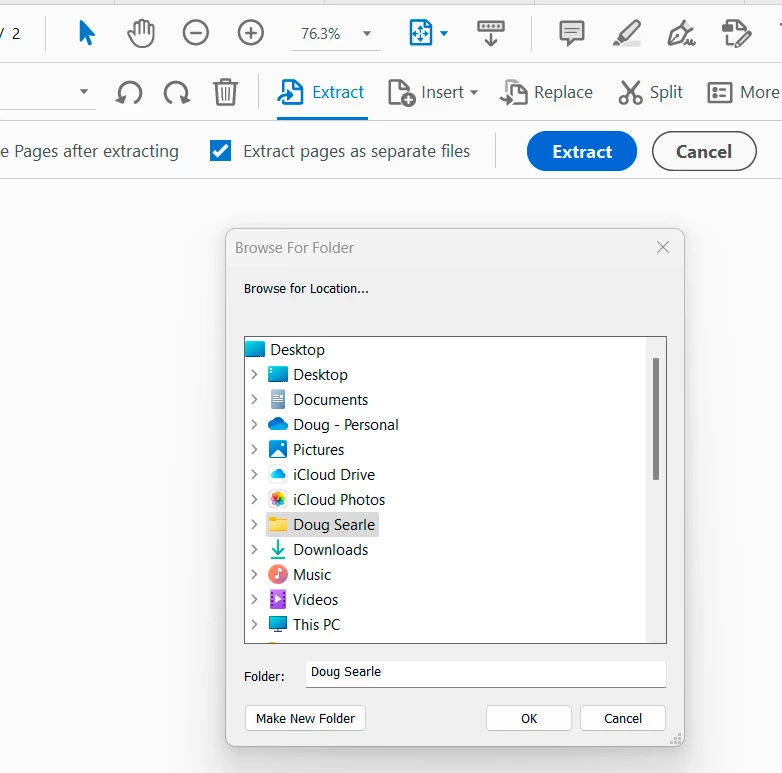
Really? This is extremely cumbersome. You really want me to look through my whole system directory? You really want to default to a file folder I almost never use for anything? Don't you want to provide me with a standard Windows File Explorer interface? Don't you want to default to the location of the source file? or maybe the same location I used last time? or maybe let me designate a default location?
As far as I can tell, this is the ONLY function in all of Adobe-land that presents me with this nonsense. Is there a good reason for this? If I insert a page from a file, you don't make me use this to find it. What the heck?
This Browse for Folder thing (or is it Browse for location...) is one of the dumbest things I've seen in a while.
 AdChoices