


Participant
November 29, 2016
Question

Editing Text in a Scanned Document

  • November 29, 2016
  • 3 replies
  • 5024 views

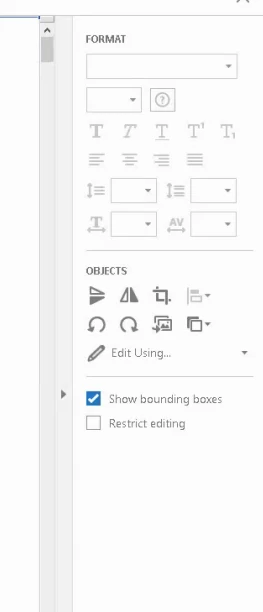
   I am trying to edit scanned text in Adobe Acrobat Standard DC. I am not able to do so unless I convert to a Word file format. The purpose is to copy and paste text out of the PDF.  I am able to do this on a Adobe Acrobat Pro DC program but not Standard. Is this limited to just Pro? According to the Adobe Acrobat Tutorials it should work for both. There is nothing that specifies whether it is Acrobat Standard or Pro, just as long as it is not Reader.  Below is a screenshot showing the "Edit PDF" Menu on the right from Standard not showing the text option. Below that is the screenshot from PRO where it appears.

Acrobat Standard
Acrobat PRO
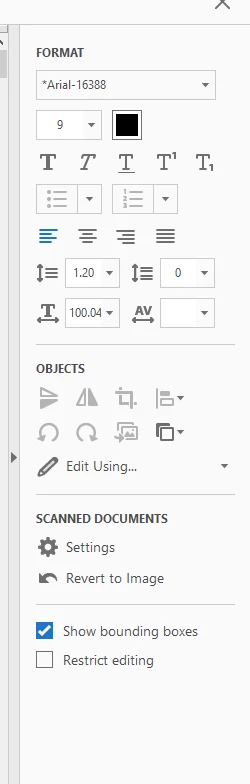
Is this a setting that is set up in PRO automatically that I am missing in Standard? I looked all over to find the differences between the 2 and can't seem to find it so that I can add this to my Edit Menu. I need to be able to edit scanned documents without converting them to Word in order to save time. Having to convert back and forth is a time drain.

This topic has been closed for replies.

3 replies

Karl Heinz  Kremer
Community Expert
Community Expert
March 10, 2017

There are a number of differences when it comes to recognizing text between Acrobat DC Standard and Pro. Some of these differences also depend on the version of Standard or Pro you are running (perpetual license - or "classic" - versus the subscription - or continuous - version).

Acrobat Pro in it's continuous version will automatically OCR a document when you try to edit it, and will create a version that allows you to actually edit text. Acrobat Standard will not do this, and even if you run OCR manually (via the "enhance scans" function) will never create a document that can be edited - all it does is store the recognized text "behind" the original image.

You mention in your question that you only need this to copy and paste text from the PDF document into a different document - if that different document is not a PDF file, you can do this with Standard: Just run OCR via the "Enhance Scans" tools, and then select text, copy and paste e.g. into a MS Word document. For anything else, you will need Acrobat Pro.

HifiHelge
Participating Frequently
March 10, 2017

Karl Heinz Kremer​ You said, that there are differences between the versions of DC Pro, do you know, that all versions allowing to edit the text direct in pdf or is there any version, which is not able to do this?! I am going to buy a DC Pro Version, but want to be sure, that this essential function is includet..

Karl Heinz  Kremer
Community Expert
Community Expert
March 10, 2017

The difference is between the classic and the continuous version of Acrobat DC Pro: With the classic version, you get only those features that were implemented at the time the application was originally released, all you get in the updates are security updates and bug fixes, The continuous (or subscription) version gets updates to it's functionality (in addition to bug fixes and security updates) every three months. You can find out what was added since Acrobat DC was originally released here: https://helpx.adobe.com/acrobat/using/whats-new.html - there are links to the previous updates at the bottom of the page.

When it comes to OCR, the only differences I am aware of are an update to the OCR engine, updates to OCR'ing camera images, and the automatic OCR when you try to edit a scanned document. You can of course still invoke OCR manually. In all versions of Acrobat DC Pro, you can create documents in the "Editable Text&Images" format:

Bernd Alheit
Community Expert
Community Expert
December 15, 2016

In Acrobat Standard you must first use Tools > Enhance Scans

HifiHelge
Participating Frequently
March 10, 2017

>In Acrobat Standard you must first use Tools > Enhance Scans

Bernd Alheit, sure that works? It doesnt work with my DC standard. Look like only Pro can do this! No?

Bernd Alheit
Community Expert
Community Expert
March 10, 2017
Adobe Employee
December 15, 2016

Hi kathyn7691112​,

Editing of scanned documents is a PRO only feature. This feature is not available in Adobe Acrobat Standard and Reader.

Regards,

Priyanka