


New Participant
April 17, 2023
Answered

Email an attachment not a link

  • April 17, 2023
  • 15 replies
  • 80621 views

I literally create hundreds of AutoCAD documents weekly that must be sent as a PDF attachment.

Adobe's decision to make sending a link in an Outlook email as opposed to an attachment, the default action, is an absolutely horrible idea.

The extra clicks wreak havoc with my workflow. So much so that if I can't change the default back to an attachment, I will ditch Acrobat completely, all 7 licenses & switch to Nitro.

I need to find a way to change the default, please help.
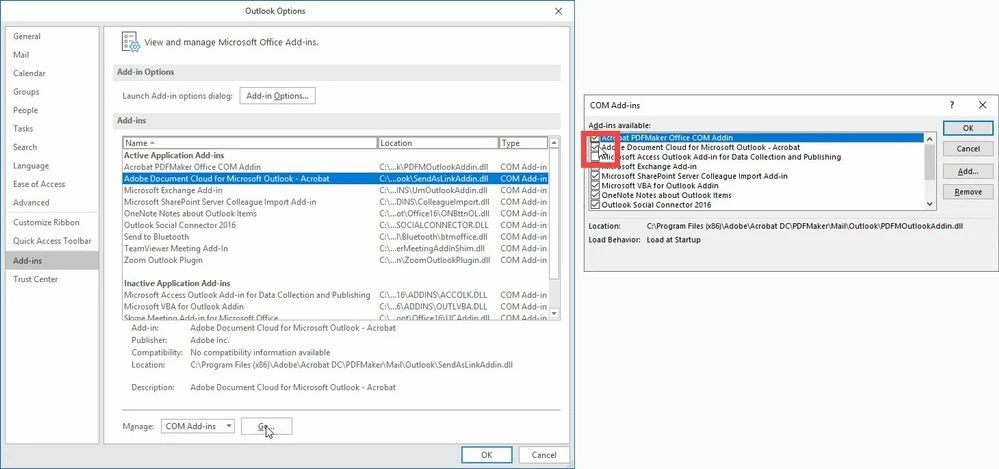
Correct answer Caleb3081357318ux

I was having the same issue! I resolved it by removing the add in in Outlook. 


File>Options>Add Ins> Manage COM Add-ins> Go
Uncheck the Adobe Cloud Connector > Click OK


15 replies

Participating Frequently
December 15, 2023

This is a feaking mess. I can no longer send PDF files as attachment, just the totally useless Adobe link to the file. This means that the email recipient cannot download the file. WTF??

New Participant
December 15, 2023
I feel your pain. I gave up & cancelled my Adobe subscription.

Sent from my iPhone
New Participant
June 27, 2023

Tottaly agree.  Is shutting down much of my work


New Participant
June 21, 2023

I AGREE SAME THING AT MY OFFICE!

New Participant
April 18, 2023

Thank you!


Steve Martineau
[Personal information removed by the moderator]

Meenakshi Negi
Community Manager
Community Manager
April 17, 2023

Hi SMartineau,


Thank you for reaching out.


To send the PDF as an email attachment by default, disable the "Send link in attach to email (Sign-in required)" option in Acrobat Preferences.

Go to Edit > Preferences >  Email accounts in Acrobat or Acrobat Reader on a Windows machine. For Mac, Application Preferences > Email accounts.

Refer to the screenshot attached below:


Thanks,

Meenakshi


Marking a reply or response “Correct” will help future users with the same issue quickly identify the correct answer.

Participating Frequently
April 18, 2023

This 'email accounts' opion is not available in Adobe Acrobat Reader x64. How do I disable it permanently in this version?

New Participant
April 20, 2023

Hi Paul2020,

Thanks for reporting the issue and apologies for the inconvenience caused!

Please note that "Email Accounts" preference option is available for all the users, no subscription is required to have this option.

On some machines we noticed that if we set registry “bDisableWebmail” to 1 then "Email Accounts" is not available.

Can you please check if this registry is set to 1 on your affected machines as well, by any chance?

Path of the registry for Acrobat or Reader 64 bit version:

[HKEY_LOCAL_MACHINE\SOFTWARE\Policies\Adobe\Adobe Acrobat\DC\FeatureLockDown\cWebmailProfiles]
"bDisableWebmail"=dword:00000001


Kindly delete the above registry from your system(if exists) and  then restart Acrobat/Reader app. Now, check if you see the “Email Accounts” Preference.


Regards,

Arvind


Thank you! This was the issue.

Any idea how that option got there? I used Acrobat Customization Wizard to create this install, but I did not disable any webmail or cloud features.