


New Participant
April 17, 2023
Answered

Email an attachment not a link

  • April 17, 2023
  • 15 replies
  • 80627 views

I literally create hundreds of AutoCAD documents weekly that must be sent as a PDF attachment.

Adobe's decision to make sending a link in an Outlook email as opposed to an attachment, the default action, is an absolutely horrible idea.

The extra clicks wreak havoc with my workflow. So much so that if I can't change the default back to an attachment, I will ditch Acrobat completely, all 7 licenses & switch to Nitro.

I need to find a way to change the default, please help.
Correct answer Caleb3081357318ux

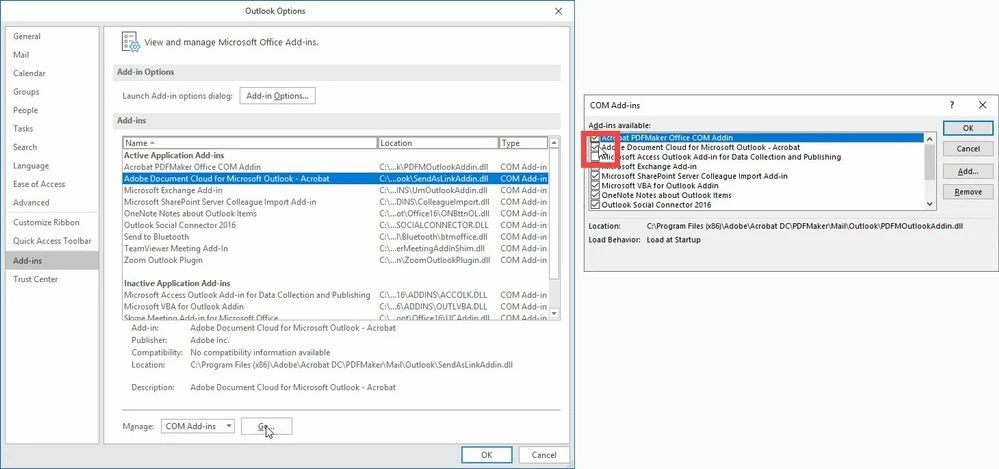
I was having the same issue! I resolved it by removing the add in in Outlook. 


File>Options>Add Ins> Manage COM Add-ins> Go
Uncheck the Adobe Cloud Connector > Click OK


15 replies

New Participant
October 10, 2024

Re-posting this so it is the most recent message.

In summary:

  1. Adobe > Edit > Preferences > Email Accounts > Select your default mail application and make sure the checkbox for Always send files as links is DISABLED.
  2. Outlook > File > Options > Add-ins > Go > Uncheck Adobe Document Cloud... Click Ok. Close out of Outlook, re-open it, confirm it is disabled.
  3. In Adobe, click Share > generic icon on the right, NOT the Outlook icon on the left.
New Participant
June 10, 2025

just remember to restart both the outlook and the adobe

and


New Participant
September 21, 2024

I get how frustrating that is! Sending links instead of attachments can really mess up your workflow, especially when dealing with hundreds of PDFs like I do in **consulting**. You can change the default in Acrobat by going into the settings under “Send as attachment” to switch it back. If that doesn’t work, Nitro’s a solid alternative—I've seen clients make the switch when Adobe became too much of a hassle!

New Participant
September 21, 2024
quote

I get how frustrating that is! Sending links instead of attachments can really mess up your workflow, especially when dealing with hundreds of PDFs like I do in consulting. You can change the default in Acrobat by going into the settings under “Send as attachment” to switch it back. If that doesn’t work, Nitro’s a solid alternative—I've seen clients make the switch when Adobe became too much of a hassle!


By @jack_8442

I hope this helps you.

New Participant
September 21, 2024
quote

I literally create hundreds of AutoCAD documents weekly that must be sent as a PDF attachment.

Adobe's decision to make sending a link in an Outlook email as opposed to an attachment, the default action, is an absolutely horrible idea.

The extra clicks wreak havoc with my workflow. So much so that if I can't change the default back to an attachment, I will ditch Acrobat completely, all 7 licenses & switch to Nitro.

I need to find a way to change the default, please help.


By @SMartineau

I totally get your frustration! Sending a link instead of a PDF attachment adds unnecessary steps. In my **cold email agency**, I deal with similar issues when automating outreach. You can switch the default by going into Adobe's preferences and changing the email settings to send as attachments instead of links. If that doesn’t work, switching to Nitro could be a good alternative!

New Participant
August 16, 2024

In summary:

  1. Adobe > Edit > Preferences > Email Accounts > Select your default mail application and make sure the checkbox for Always send files as links is DISABLED.
  2. Outlook > File > Options > Add-ins > Go > Uncheck Adobe Document Cloud... Click Ok. Close out of Outlook, re-open it, confirm it is disabled.
  3. In Adobe, click Share > generic icon on the right, NOT the Outlook icon on the left.
Participating Frequently
August 28, 2024
Hello,
I am running Windows 11, and Adobe pro. I can no longer get adobe to send files by email as attachments. Its always gives me a link. I've done everything suggested in preferences for both adobe and outlook, and I cannot get any version where I'm even given an option of it not being a link. I must be able to send these files as email attachments from with Adobe Acrobat. Help!
New Participant
September 19, 2024

You're unlikely to get assistance here. Try contacting Adobe directly.

New Participant
July 28, 2024

Thank you for the solutions!!!! I changed Outlook Add-on first and it worked!! I also went ahead and unchecked "Always send files as a link" in the Adobe Preferences/Email Accounts window.


Soooo grateful!!!

Participating Frequently
May 1, 2024

phone adobe. There is a fix in Outlook Settings. I do not remember where. It does work perfectly.

New Participant
April 22, 2024

None of these solutions is working. Changing the settings in Adobe have no effect. When I try to uncheck the Document Cloud option in Outlook it just causes the program to hang. This problem is effecting my entire office and is seriously slowing us down. Adobe and/or Microsoft need to fix this mess.

New Participant
May 1, 2024

With outlook the only way I've been able to get around the link only issue is to NOT send or share from Adobe, but open an email and then click "attach file" and the recent files you've made will appear.  Click the one you want and at that time you can select link or file and bingo your file is attached.

New Participant
April 10, 2024

There is no "preferences." Not under Edit, not under anywhere. 

New Participant
January 19, 2024

I agree that this link instead of attachment is a mess.  I work for companies getting FDA clearance/approval.  FDA requires use of Adobe Pro to work with their latest submission templates BUT when I need to send a document directly to an FDA reviewer through email FDA will not accept a link.  Adobe Pro, you waste of my precious time. I have already fixed this once and somehow it reverted and I have to go in and get away from links again. PITA!

Participating Frequently
January 9, 2024

In the body of the email,  after you click on attch document, a very small drop box appears in the top right corner of the email text. Click on no to send as attachment. A nasty issue Adobe should fix.